
Payments, Cancellations & Refunds
Enterprise Private Group Training
Training Credits
On-Demand Subscriptions
Learning Modalities
Getting Started
To get started, create an account by simply following the Sign Up link and fill in the form with your details.
- Check out our Quick Guide for step-by-step details on how to sign up and use NW SABA.
- NW BU employees, please follow these steps to access SABA.
Important Note: On the Product Account field leave "NetWitness", this ensures that your account gets created in our NetWitness domain.
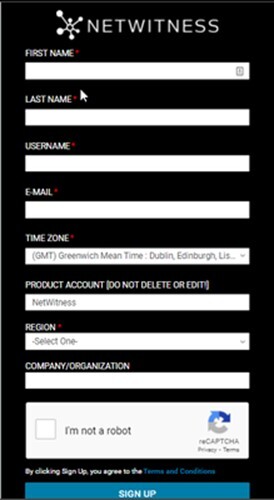
You can browse our Guest Catalog here but will need an account to register and sign up for training.
If you have any questions, please contact us at education.support@netwitness.com
Payments, Cancellations & Refunds
Payments
Credit Card
- We currently accept a variety of Payment Options (VISA, MasterCard, American Express, etc.).
- A confirmation will be generated once your credit card has been processed. This can take up to two business days.
Training Credits
- If you are registering for training with Training Credits, select the Training Credit payment option to proceed with your registration. If Training Credits is not listed as a payment option, please Contact Us providing your Purchase/Sales Order Number (if available), along with the class (date & location) you would like to attend.
- If you are looking to purchase Training Credits, you will need to work with your account manager to obtain a quote for a Purchase Order.
- If you are not sure who your account manager is, please Contact Us for assistance.
On-Demand Subscriptions
- Access a variety of On-Demand training at a discounted price with an On-Demand Subscription.
- Subscription is valid for 1 year after activation (subscription expires 1 year from initial purchase date).
Cancellations
Cancellation by Customer
- Changes to a course order will only be accepted in writing.
- If you wish to reschedule a training course, your request must be received at least ten (10) business days prior to the start date.
- Full tuition will be charged for rescheduling requests received less than ten (10) business days prior to the start date.
- The same rules apply to virtually delivered training courses.
- Once activated, any On-Demand training courses may not be substituted for another course, as it will be viewed as delivered and consumed.
Please reach out to the Education Team to request our full cancellation policy.
Cancellation by NetWitness
- NetWitness reserves the right to reschedule or cancel a course due to low enrollment or other circumstances.
- NetWitness will notify you via email at least 10 business days prior to the course start date if a class is cancelled.
- Once notified, you may reschedule or receive a full credit.
- NetWitness shall not be liable for non-refundable travel arrangements if a course is rescheduled or cancelled.
Refunds
Self-Paced Classes
- No refund / Late charge of 100% will be applied if dropped after purchase (applicable on all payment methods used to purchase Self-paced).
Instructor Led and Virtual Classes
Payment Made By Credit Card:
- 15+ days prior to start date: Full refund and option to drop if registered using credit card.
Payment Made By Training Credit:
- 15+ days prior to start date: Full refund, no option to drop for self.
- Please contact us and our teams will be glad to support.
Subscriptions
- A full refund (self-service) within 1 day of purchase. Subscription cannot be cancelled after 1 day.
- A subscription transfer can only be done by reaching out to the Education Team for more information. Contact Us
Enterprise Private Group Training
In addition to Public Instructor Led training, and our On-Demand courses and labs, NetWitness Education Services is also happy to offer Private Group Training; dedicated private training for your group and/or organization.
Session Details
- Private dedicated sessions, for up to 10 students, which helps keep the focus on your organization needs.
- Live Instructor Led sessions.
- Dedicated labs.
- Flexible scheduling.
- Better value than booking individual public ILT seats.
Current Offerings
Below is the list of current classes offered:
- RSA NetWitness Platform Foundations 11.6
- RSA NetWitness Platform Analysis 11.6
- RSA NetWitness Platform Admin I 11.6
- RSA NetWitness Platform Admin II 11.6
- RSA NetWitness Endpoint Foundations 11.6
- RSA NetWitness Platform Content Creation 11.6
- RSA NetWitness Platform Introduction to Hunting 11.6
- RSA NetWitness Platform Reporting 11.6
Contact your account rep or send us an email directly at education.support@netwitness.com for additional information.
Training Credits
Use of NetWitness Education Training Credits (TCs) provides you with a fast and easy way to enroll in any NetWitness-provided training course when it is needed.
Benefits
- Training Credits (TCs) are NetWitness Education's currency.
- Training Credits are deposited into a company’s training account and are available for general consumption by your employees. Valid for one year from date of purchase, pre-paid Training Credits provide maximum flexibility to ensure your team’s readiness to manage your Digital Risk.
- With flexible Training Credits you can satisfy your training requirements as they evolve throughout the year. You reduce the paperwork and approvals associated with multiple enrollments by taking care of all your training needs with a single purchase.
Details
- One Training Credit (TC) has a value of $1.00.
- Valid for customers and partners in all regions of the globe.
- Can be used to register one or more individuals.
- Can be redeemed for any NetWitness Education course and any delivery mode (ILT, OnDemand class, OnDemand labs).
- Valid for 364 days from time of issuance. Any unused days are null and void after the expiration date.
- Payment can be made with purchase order or credit card.
- TC's are not valid for EC-Council courses.
For more information about purchasing or utilizing Training Credits, please contact your account manager, or reach out to us directly at education.support@netwitness.com .
On-Demand Subscriptions
Start your NetWitness learning journey with our new On-Demand Subscription. This offering provides learners a flexible way to access the training they need when they need it. The subscription also provides self-paced enablement at a significant discount versus Live Classroom training.
The following subscription is value-priced to allow a single student to select any On-Demand courses of interest during a one (1) year period. Courses designated in the catalog as “Coming Soon” as well as any new training which becomes available as an On-Demand delivery option are included in these On-Demand Subscription(s).
1-Year Individual Subscription Option
| Subscription Description | Subscription SKU | Pricing* |
|---|---|---|
| NetWitness Platform Subscription | ED-NW-ODSUB-PLAT | $8,489.25 USD |
| Subscription Content | ||
| Includes ALL OD Classroom, OD Labs and OD Learning for Administrators and Analysts using NetWitness Platform and NetWitness Endpoint. See below for the list of courses: | ||
Included Courses
- NetWitness Platform ESA Fundamentals
- NetWitness Platform ESA EPL Rules
- NetWitness Platform Foundations
- NetWitness Endpoint Foundations
- NetWitness Platform Administration I
- NetWitness Platform Administration II
- NetWitness Platform Analysis
- NetWitness Platform Introduction to Hunting
Certification Exams
- NetWitness Associate Certification Exam
- NetWitness Specialist Administrator Certification Exam
- NetWitness Specialist Analyst Certification Exam
Benefits
- One easy transaction.
- Over 2x the value versus buying individual courses.
- Convenient, self-paced curriculum.
- Content equivalent to Live Classroom, including same hands-on labs.
- Great way to get the training needed for certification.
- Self-paced training allows you to re-take modules as needed.
- On-call support team available to provide assistance and support.



FAQs
What is included in a subscription?
All classes that are offered as On-Demand Learning, On-Demand Classroom or On-Demand Labs are included in your package. To see a list of classes, visit this page and search "On Demand."
What is OnDemand?
Click here to see a description of our On-Demand Learning Modalities.
How do I purchase and activate my subscription?
Click here to Purchase and Activate Subscription.
What if the end user assigned to the subscription purchased by an organization left?
Click here to know more about NetWitness subscription transfer policy.
NetWitness Platform ESA Fundamentals 11.3
Access Training for Customers/Partners
Access Training for NetWitness Employees
$225 USD | 200 Training Credits
Summary
Are you an RSA NetWitness customer looking for guidance on ESA? This On-Demand learning will provide you with the right information to get started.
Overview
This On-Demand learning course presents an overview of Event Stream Analysis including a description of correlation approaches and ESA’s role in correlation, ESA components and features, when to use ESA and how configuration settings affect ESA rules.
It focuses on the basics of ESA including architecture, creating basic rules, deploying rules, creating enrichments and notifications, and forwarding alerts to the RESPOND module.
Audience
Anyone who is interested in Event Stream Analysis (ESA) with relation to the RSA NetWitness Platform.
Delivery Type
On-Demand Learning (self-paced eLearning)
Duration
60 Minutes
Prerequisite Knowledge / Skills
It is recommended that students complete the following eLearning courses prior to taking this training:
Course Objectives
Upon successful completion of this course, participants should be able to:
- Describe a correlation approach.
- Describe ESA’s role in correlation.
- Describe the features and components of ESA.
- Identify when and how to use an ESA rule.
- Describe the features of the basic rule builder.
- Create a basic rule.
- Create enrichments.
- Describe how configuration settings affect ESA rules.
- Explain best practices for writing ESA rules.
Course Outline
- Module 1: A Correlation Approach
- Module 2: ESA Overview
- Module 3: Basic ESA Rules
- Module 4: Configuring ESA
- Module 5: ESA Best Practices
NetWitness Platform ESA EPL Rules 11.3
Access Training for Customers/Partners
Access Training for NetWitness Employees
$225 USD | 200 Training Credits
Summary
This On-Demand learning provides in-depth instruction on creating and managing EPL rules within Event Stream Analysis (ESA).
Overview
The course focuses on the development and management of advanced ESA EPL rules, including syntax, logic structure, pattern matching, and optimization techniques. Participants will learn how to write effective EPL statements and manage correlation logic within the NetWitness Platform.
Audience
Security analysts and administrators responsible for creating and managing ESA rules.
Delivery Type
On-Demand Learning (self-paced eLearning)
Duration
90 Minutes
Course Objectives
- Understand EPL syntax and structure.
- Create advanced correlation rules using EPL.
- Implement pattern matching and filtering logic.
- Optimize ESA rule performance.
- Apply best practices for rule management.
Course Outline
- Module 1: EPL Syntax and Structure
- Module 2: Advanced Rule Creation
- Module 3: Pattern Matching and Logic
- Module 4: Performance Optimization
NetWitness Platform Foundations

This course covers basic NetWitness Platform functionality, introducing the student to foundational aspects of the solution.
Audience
Anyone interested and new to NetWitness Platform.
Duration
3 days
Prerequisite Knowledge / Skills
Introduction to NetWitness Platform on demand learning.
Students should be familiar with basic computer architecture, networking fundamentals and general information security concepts. Basic knowledge of the TCP/IP protocol stack is beneficial.
$3,638.25 USD | 3,000 Training Credits
Delivery Types
This course is delivered in 2 Modalities:
- Virtual – Instructor Led Training (VILT) v12.5
- On-Demand Classroom (ODC) v12.5 (Select related version to access training)
Course Overview
This course covers NetWitness Platform architecture, data flow, core and enhanced components, metadata concepts, rules, investigation techniques including queries, filtering and pivoting, along with reporting, alerting and incident management.
Overviews of Endpoint Insights, Advanced Endpoint, UEBA and NetWitness Orchestrator are also provided.
Students will gain insights into using the major features of the platform through a combination of lecture and demonstration, as well as practical hands-on exercises that reinforce the concepts.
NetWitness Platform Foundations version 12.5
Access Training for Customers/Partners
Access Training for NetWitness Employees
Course Objectives
Upon successful completion of this course, participants should be able to:
- Recognize how NetWitness Platform provides visibility across your infrastructure and utilizes data collected from different sources.
- Utilize the NetWitness Platform investigation capabilities to reconstruct events effectively.
- Refine investigation outcomes by applying filtering techniques manageable through Centralized Content Management (CCM) to create a focused dataset.
- Describe and utilize the Reporting Engine and the NetWitness Event Stream Analysis (ESA).
- Identify and utilize various methods to create and manage incidents and alerts.
- Configure and analyze Endpoint agents and Endpoint meta.
- Describe the roles of NetWitness User and Entity Behavior Analytics (UEBA) and Orchestrator.
Version Highlights
- Introducing the Home Page feature, exploring different Views for Admin, Analyst, and Manager and how to configure and customize any View.
- Explaining the newly updated Web Event Reconstruction Version 1 and Version 2 supported by NetWitness Platform version 12.5.
- Introducing Insight Asset Exported Services Change Alerts feature.
- Introducing Insight Asset Type Change Alerts feature.
Course Outline
- Module 1: NetWitness Platform Overview
- Module 2: Investigation Basics
- Module 3: Refining the Dataset
- Module 4: Reporting Engine Basics
- Module 5: Event Stream Analysis (ESA)
- Module 6: Incident Management and Respond
- Module 7: NetWitness Endpoint Insights Agent
- Module 8: NetWitness UEBA and NetWitness Insight Overview
- Module 9: NetWitness Orchestrator
NetWitness Endpoint Foundations 11.6 ILT
Access Training for Customers/Partners
Access Training for NetWitness Employees
$2,425.50 USD | 2,000 Training Credits
Summary
This training introduces security analysts and administrators to the architecture and toolkit for detecting and investigating risk on endpoint hosts.
This is an update to version 11.6.
Overview
This 2-day course consists of lecture/discussion and lab exercises intended to lay the foundations of your understanding of NetWitness Endpoint.
Intended audience is anyone performing security monitoring, hunting, and analysis with NetWitness Endpoint; anyone serving as admin or content creator for NetWitness Endpoint will also benefit. It supplements the NetWitness Platform Foundations and NetWitness Admin I courses.
Audience
Anyone new to NetWitness Endpoint interested in increasing their familiarity with the tool’s features and functions within the context of endpoint investigation and analysis.
Duration
2 days
Prerequisite Knowledge / Skills
- Basic familiarity with NetWitness Platform 11.x (recommended).
- Familiarity with typical incident response processes (recommended).
- Basic knowledge of malware, networking fundamentals and general security analysis concepts is recommended.
Course Objectives
Upon completion of this training, the student should be able to:
- Enable/Disable a data retention policy.
- Define new Endpoint policy group.
- Configure the NetWitness Endpoint Log Hybrid.
- Create packager and deploy Endpoint agent.
- Scan endpoint host and evaluate results.
- Interpret host and file risk scores.
- Customize Endpoint data display.
- Analyze a process, including parent and child processes.
- Identify potentially malicious activity.
- Identify Autoruns on a Windows endpoint.
- Create an incident manually.
- Assign an incident in Respond.
- Interpret incident views.
- View deployed ESA rules for Endpoint.
- Extract a Master File Table.
- Identify timestamp discrepancies in MFT.
- Download files for external analysis.
Course Outline
- Module 1: Introduction
- Module 2: Architecture & Configuration
- Module 3: Endpoint Agents, Hosts, & Scans
- Module 4: Risk Scores and Metadata
- Module 5: Files and Libraries
- Module 6: Processes, Autoruns and Anomalies
- Module 7: Alerts and Incidents
- Module 8: Malicious Behavior & App Rules
- Module 9: Forensic Tools
- Module 10: Configuration
NetWitness Platform Administration I

Summary
This course covers essential administrative and configuration tasks to get NetWitness Platform up and running.
Audience
Anyone interested in the administration and operations of the NetWitness Platform.
Duration
2 days
Prerequisite Knowledge / Skills
NetWitness Platform Foundations
$2,425.50 USD | 2,000 Training Credits
Delivery Types
This course is delivered in 2 Modalities:
- Virtual – Instructor Led Training (VILT) v12.5
- On-Demand Classroom (ODC) v12.5 (Select related version to access training)
NetWitness Platform Administration I version 12.5
Access Training for Customers/Partners
Access Training for NetWitness Employees
Course Overview
This classroom-based course provides an overview of essential administrative tasks that are performed to get NetWitness Platform up and running.
Students gain insight into configuring hosts and services and managing users within NetWitness Platform and gain practical experience by performing a series of hands-on labs.
Course Objectives
Upon completion of this training, the learner should be able to:
- Enable data collection, parsing, and aggregation by configuring the core and additional hosts of the NetWitness Platform.
- Enable Centralized Content Management (CCM), data analysis, and retention by configuring CCM, ESA, and the Archiver in the NetWitness Platform.
- Optimize the operational effectiveness and communication efficiency of the NetWitness Platform by configuring the email server and global notifications.
- Validate licensing and entitlements to support organizational operations.
- Identify the basic administrative logs and network configurations and tools in NetWitness, such as Live service and CLI service management, to provide end-users with content that enhances end-to-end visibility.
- Apply the basic Endpoint configurations to gain deeper insights into their activities and events.
- Enable access control and personalization and enhance security of the NetWitness Platform by creating and managing users.
- Identify and apply external authentication techniques in the NetWitness Platform to enable centralized management and streamline the login process.
- Protect sensitive information, ensure compliance with regulations, and mitigate the risk of data breaches by configuring data privacy.
Version Highlights
- Customize the Home page for optimal visibility on your environment.
- Explore CCM enhancements and navigation.
- Learn how to deploy STIX feeds via multiple methods in your environment.
- Learn about new Endpoint management features.
Course Outline
- Module 1: Configuring NetWitness Logs and Network Core Hosts
- Module 2: Configuring Content, ESA, and Archiver
- Module 3: Configuring System Settings
- Module 4: Configuring Logs and Network Services
- Module 5: Configuring NetWitness Endpoint
- Module 6: User Management
- Module 7: External Authentication
- Module 8: Data Privacy
NetWitness Platform Administration II

Summary
This course covers tasks performed by an administrator to monitor and maintain the NetWitness Platform.
Audience
Anyone interested in the administration and operations of the NetWitness Platform.
Duration
2 days
Prerequisite Knowledge / Skills
$2,425.50 USD | 2,000 Training Credits
Delivery Types
This course is delivered in 2 Modalities:
- Virtual – Instructor Led Training (VILT) v12.5
- On-Demand Classroom (ODC) v12.5
Course Overview
This course provides students with knowledge and skills related to the administration and operation of the NetWitness Platform.
Topics covered include NetWitness Platform Services, Health and Wellness, Event Source Monitoring, backup and recovery, and administration tools for monitoring and troubleshooting the NetWitness Platform.
Students will gain practical experience by performing a series of hands-on labs.
NetWitness Platform Administration II version 12.5
Access Training for Customers/Partners
Access Training for NetWitness Employees
Course Objective
Upon completion of this training, the student should be able to:
- Describe the difference between Core services and Platform services.
- Create custom Health and Wellness policies.
- Take investigative steps to locate the cause of and remediate an alarm.
- Gather data for Customer Service using soseport.
- Modify, export and import event source attributes.
- Monitor and debug event sources.
- Perform Backup and Restore procedures.
- Use NetWitness administrative/management tools to monitor the platform.
- Build REST queries.
- Use the NwConsole and REST commands to perform NetWitness administrative tasks.
Version Highlights
- Introducing the Logstash JDBC pipelines support feature and how to configure and collect audit logs.
- Explaining the new feature File Copy Over with non-root User in NetWitness Recovery Tool (NRT).
- Introducing a new feature: Password-less Remote Copy for the NetWitness Recovery Tool and the NetWitness Recovery Wrapper Tool.
Course Outline
- Module 1: NetWitness Platform Services
- Module 2: Health and Wellness Monitoring
- Module 3: Event Source Monitoring
- Module 4: Backup and Recovery
- Module 5: Administration Tools for Monitoring and Troubleshooting
- Appendix A: STIG
NetWitness Platform Administration II version 11.7
Access Training for Customers/Partners
Access Training for NetWitness Employees
Course Objective
- Describe the difference between Core services and Platform services.
- Create custom Health and Wellness policies.
- Take investigative steps to locate the cause of and remediate an alarm.
- Gather data for Customer Service using soseport.
- Modify, export and import event source attributes.
- Monitor and debug event sources.
- Perform Backup and Restore procedures.
- Use NetWitness administrative/management tools to monitor the platform.
- Build REST queries.
- Use the NwConsole and REST commands to perform NetWitness administrative tasks.
Course Outline
- Module 1: NetWitness Platform Services
- Module 2: Health and Wellness Monitoring
- Module 3: Event Source Monitoring
- Module 4: Backup and Recovery
- Module 5: Administration Tools for Monitoring and Troubleshooting
- Appendix A: STIG
NetWitness Platform Analysis

Summary
This course presents a recommended process for responding to incidents using NetWitness Platform analysis tools and techniques.
Students practice the techniques and process by working through a series of use cases.
Audience
Level 1 and Level 2 analysts relatively new to NetWitness Platform, who wish to increase their familiarity with the tool’s features and functions within the context of incident response and analysis.
Duration
2 days
Prerequisite Knowledge / Skills
NetWitness Platform Foundations.Students should have familiarity with the basic processes of cybersecurity analysis, including some knowledge of network architecture, the TCP/IP stack, networking protocols, and integrating log & network traffic to perform analysis on network-based security events.
$2,425.50 USD | 2,000 Training Credits
Delivery Types
This course is delivered in 2 Modalities:
- Virtual – Instructor Led Training (VILT) v12.4
- On-Demand Classroom (ODC) v12.4
Course Overview
This course covers how to use the NetWitness Platform including logs, packets and Advanced Endpoint, to respond to incidents by investigating incidents in the queue, documenting incidents, and escalating or closing incidents.
Students will use NetWitness Platform Investigation features to analyze incidents using a recommended process.
NetWitness Platform Analysis version 12.4
Access Training for Customers/Partners
Access Training for NetWitness Employees
Course Objective
- Identify Analyst roles and SOC models.
- Describe incident types and methods to prioritize incidents.
- Describe the Incident Response process.
- Use tools and methods to filter data and enhance the dataset.
- Use analysis tools and interfaces to perform incident response.
- Describe the Investigative Methodology.
- Describe a systematic approach to investigate metadata.
- Identify types of threats.
- Use the incident response process, the investigative methodology and tools to investigate multiple use cases using packets, logs and endpoint.
Version Highlights
- Introducing the Centralized Content Management (CCM) feature and how to use it to control your content.
- Explaining the Endpoint 12.x updates, such as the new tree view of incidents, Endpoint detections using imported file hashes, and Yara Scan.
- Clarifying the new incident workflow to streamline the process of assigning and investigating incidents.
- Extending the Analyst interaction with incidents in Respond by being able to export incident data, which includes original or normalized alerts, and exploring incidents history and metrics.
- Introducing new meta interaction in the Hosts and Files views.
- Enhancing the Investigate UI, such as the creation of custom Springboards and the NOT Contains operator.
Course Outline
- Module 1: Analysis Tools and Processes
- Module 2: Investigating Metadata
- Module 3: Analysis Use Cases
NetWitness Platform Introduction to Hunting

Summary
This course covers how to use the NetWitness Platform including Logs, Packets and Advanced Endpoint, to find threats in the environment using a recommended methodology.
Audience
Anyone interested in hunting with the NetWitness Platform.
Duration
2 days
Prerequisite Knowledge / Skills
- Introduction to the NetWitness Platform.
- NetWitness Platform Foundations.
- NetWitness Platform Analysis.
$2,425.50 USD | 2,000 Training Credits
Delivery Types
This course is delivered in 2 Modalities:
- Virtual – Instructor Led Training (VILT) v12.4
- On-Demand Classroom (ODC) v12.4
Course Overview
This course provides an overview of threat hunting and covers hunting tools, content, and methodologies that can be used to proactively find suspicious behavior.
Participants will apply the techniques acquired in this course to identify anomalies and find threats in the environment using a recommended methodology, using the NetWitness Platform, including logs, packets, and Endpoint agents.
NetWitness Platform Introduction to Hunting version 12.4
Access Training for Customers/Partners
Access Training for NetWitness Employees
Course Objective
Upon completion of this training, the learner should be able to:
- Describe threat hunting.
- Describe the NetWitness Hunting Pack.
- Describe the hunting methodology and techniques.
- Describe the MITRE’s ATT&CK™ frameworks.
- Describe NetWitness Hunting Cards.
- Describe the basics of hunting with NetWitness UEBA and Endpoint.
- Explain the relationship between protocols and anomalies.
- Explore selected protocols and services anomalies.
- Describe a Security Incident Report.
- Identify threats using the Hunting content, tools, and methodology.
Version Highlights
- Expanding real-world use cases to improve hands-on experience with recent threats, such as Log4Shell and APT-Zerologon.
- Covering high-impact, current threats to build skills in identifying and mitigating live attacks.
- Presenting the latest product integration with the MITRE ATT&CK Framework to support proactive defense against advanced adversary tactics.
- Enhancing knowledge retention with assessments to reinforce concepts and test understanding.
Course Outline
- Module 1: Threat Hunting Concepts
- Module 2: Hunting with NetWitness
- Module 3: Hunting Anomalies
- Module 4: Hunting and Documenting Threats
NetWitness Education - Associate Certification
The NetWitness Associate certification reflects the fundamental knowledge required of both the analysts using the NetWitness Platform product and the administrators managing it. This certification is the prerequisite for the next-level NW Specialist certification exams.
$133.40 USD | 2,000 Training Credits
SKU: ED-NW-CERT
Exam Registration for Customers/Partners
Exam Registration for NetWitness Employees
Who Should Take the Exam
Anyone with at least one year’s experience as administrator or analyst using NetWitness Platform (recommended versions 11.5 or 11.6)
and/or
Anyone who has successfully completed and mastered the content in these NetWitness Education courses:
- Introduction to NetWitness
- NetWitness Platform Foundations
- NetWitness Endpoint Foundations
- NetWitness Platform Administration I
Additional Recommended Background and Experience
Certification candidates are most likely to pass with a minimum of two years of experience in at least one of the following technical areas:
Take FREE Practice Test for Customers/Partners
Take FREE Practice Test for NW Employees
- Network operations
- Information security analysis
- Operating systems
- IT administration
Examination Domains
The exam is comprised of several Domains or topical subject areas. Each Domain is represented by a series of questions designed to evaluate competence and knowledge of elements relating to that area.
| Domain | % of Examination |
|---|---|
| Investigation & Analysis | 30% |
| Administration | 20% |
| Endpoint | 20% |
| General Product Knowledge | 20% |
| ESA | 5% |
| Reporting | 5% |
Domain Details
Investigation & Analysis
Topics include the components, content, and methods used by analysts to perform investigation and related tasks with RSA NetWitness Platform.
- General operation and analysis tools
- Data capture
- Data queries
- Meta key manipulation
- Navigate screen customization
- Content
- Parsers
- Feeds
- Application rules
Administration
Topics include RSA NetWitness Platform infrastructure, deployment and maintenance processes, and tools used by administrators.
- Infrastructure functionality
- Decoders
- Brokers
- Concentrators
- Archiver
- Overall data flow
- Services
- Content and customizations
- ESA Rules
- Context Menu Actions
- Alert forwarding
- Reporting Engine
- IndexKeys
Endpoint
- Endpoint component functionality
- Endpoint Log Hybrid
- Packager
- Relay server
- Analysis tools
- Local vs. Global scores
- Blacklisting and whitelisting
- File blocking
General Product Knowledge
- Platform functionality and infrastructure
- Distinguish functionality of Concentrators, Brokers, Archivers, Admin Server
- Differentiate purpose of RSA NetWitness Orchestrator, UEBA, Endpoint
- Database types and roles
- Concepts
- Event sources
- RSA Live
- Metadata and MetaKeys
ESA
- Components and concepts
- Data sources
- Enrichments
- Rule Builder
Reporting
- Report options
- Charts
- Lists
- Alerts
- Parameterization
- Components
- Databases
- Rules
Certification Overview
Examination Preparation
Although NetWitness Platform product training is not a strict requirement in preparation for the exam, it is highly recommended you complete the courses listed.
For more about our NetWitness Platform course offerings, visit: NetWitness Training Catalog
Exam Questions
The exam consists of 70 multiple choice questions to be completed in 85 minutes. One valid answer should be selected for each question. The exam is computer-based and closed book.
The minimum passing score is 70%. Test results are calculated automatically at the conclusion of the test.
Exam Costs
The fee for taking the exam is US$ 110.00.
Language Availability
NetWitness exams are available in North American English.
How is the testing conducted
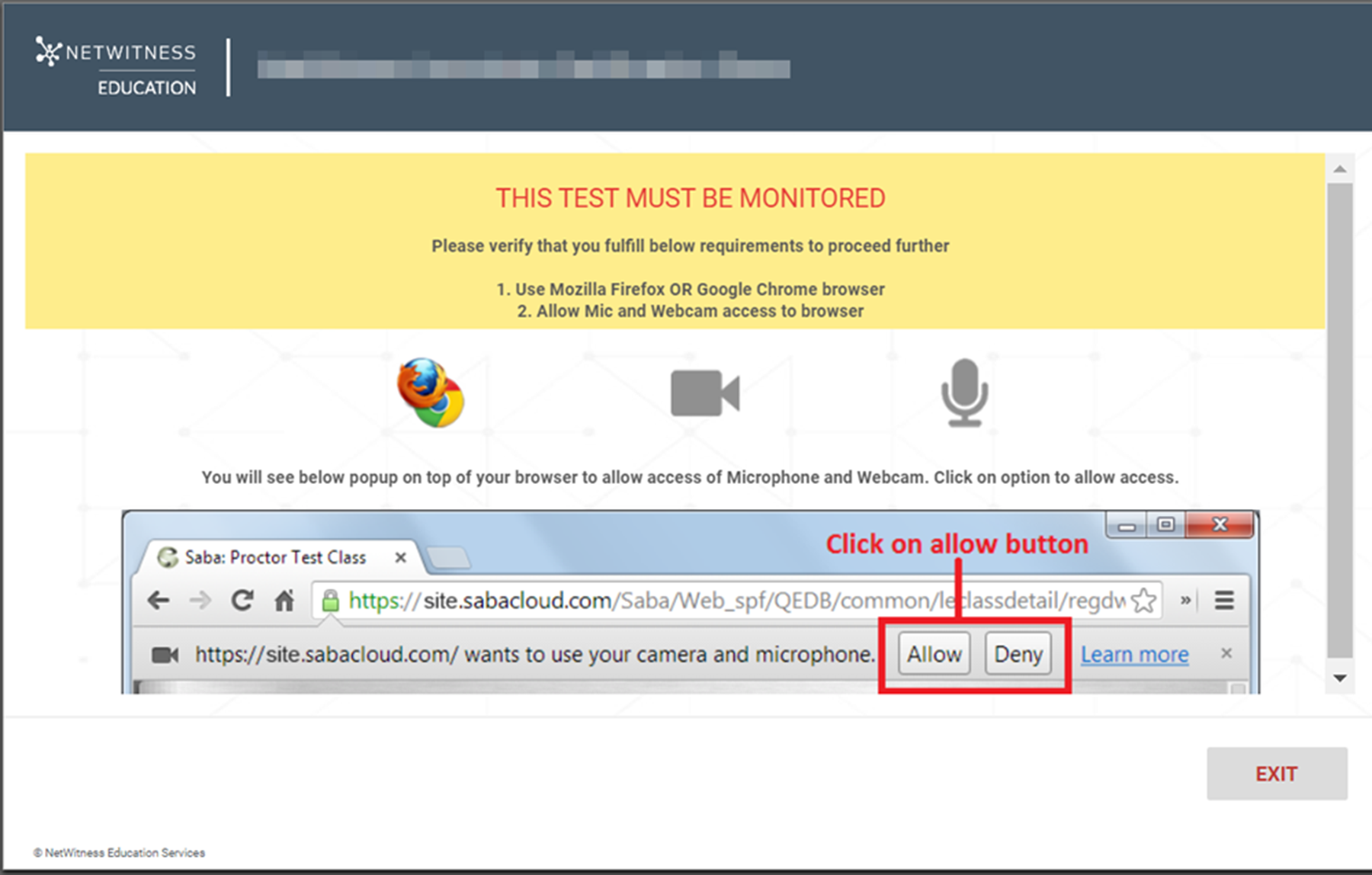
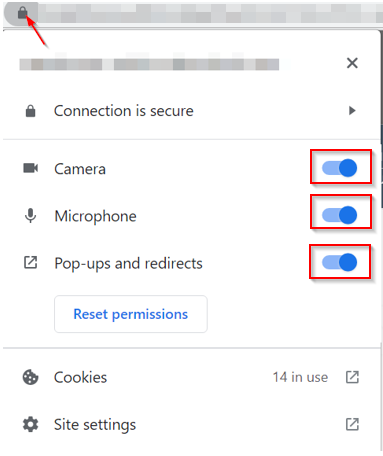
We use the SABA Cloud testing platform to conduct the assessments. SABA uses remote proctoring technology to supervise the exam.
This helps ensure integrity of the exam, for additional details click here.
Technical Instructions before starting the exam:

Check your Internet Connectivity.
Use Mozilla Firefox or Google Chrome browser.
Clear your browser cache.
Your Device/Laptop/PC should have a webcam.
Allow Mic and Webcam access to browser.
Avoid using Multiple Screens.
Avoid navigating to other browser tabs/windows.
Re-taking the Exam
There is no limit on the number of times that you can re-take the certification exam. However, 14 days is required before retaking the test a third time.
You must pay the full exam fee each time that you retake the exam.
Exam Registration for Customers/Partners
Exam Registration for NetWitness Employees
Specialist Administrator Certification
This certification reflects the fundamental knowledge required of administrators managing NetWitness Platform deployments. The prerequisite for this certification is the NetWitness Certified Associate certification.
$133.40 USD | 2,000 Training Credits
Exam Registration for Customers/Partners
Exam Registration for NetWitness Employees
Who Should Take the Exam
Anyone with at least two years experience as administrator using the NetWitness Platform (recommended versions 11.5 or 11.6)
and/or
Anyone who has successfully completed and mastered the content in these NetWitness Education courses:
- Introduction to NetWitness
- NetWitness Platform Foundations
- NetWitness Endpoint Foundations
- NetWitness Platform Administration I
Additional Recommended Background and Experience
Certification candidates are most likely to pass with a minimum of two years of experience in at least one of the following technical areas:
Take FREE Practice Test for Customers/Partners
Take FREE Practice Test for NW Employees
- Network operations
- Information security analysis
- Operating systems
- IT administration
Examination Domains
The NetWitness Certified Specialist – Administrator exam is comprised of several Domains or topical subject areas.
| Domain | % of Examination |
|---|---|
| Content Creation | 30% |
| General Product Knowledge | 20% |
| Configuration | 25% |
| Monitoring | 15% |
| User Management | 10% |
| Total | 100% |
Domain Details
Content Creation
Topics include the various content created to serve the investigation goals of your organization.
- Parsers
- Definition
- Distinguish between flex and log parsers
- Languages parsers can be written in
- Lua parser tokens
- Other content
- ESA basic and EPL rules
- Application rules
- Feeds
- Reporting rules
- Context menu actions
- STIX feeds
- CmdScript Plugin Collection
General Product Knowledge
- NetWitness architecture
- NetWitness Services
- Chef
- Security
- Orchestration
- RabbitMQ
Configuration
- Deployment
- Endpoint agent creation/installation
- Endpoint policies
- Event source configuration
- Functionality enablement
- ESA alerts
- Data retention thresholds
Monitoring
- Tools
- Config view
- NwConsole
- Health & Wellness policies and alerts
- REST API
- Services that can be monitored by REST
- Commands and their key parameters
User Management
- Roles
- Privileges associated with each role
- Custom role requirements
- Authentication
- Identity providers
- Threat Aware Authentication
Certification Overview
Examination Preparation
Although NetWitness Platform product training is not a strict requirement in preparation for the exam, it is highly recommended you complete the courses listed.
For more about our NetWitness Platform course offerings, visit: NetWitness Training Catalog
Exam Questions
The exam consists of 70 multiple choice questions to be completed in 85 minutes. One valid answer should be selected for each question. The exam is computer-based and closed book.
The minimum passing score is 70%.
Exam Costs
The fee for taking the exam is US$ 110.00.
Language Availability
NetWitness exams are available in North American English.
How is the testing conducted
We use the SABA Cloud testing platform to conduct the assessments. SABA uses remote proctoring technology to supervise the exam.
This helps ensure integrity of the exam, for additional details click here.
Technical Instructions before starting the exam
- Check your Internet Connectivity.
- Use Mozilla Firefox or Google Chrome browser.
- Clear your browser cache.
- Your Device/Laptop/PC should have a webcam.
- Allow Mic and Webcam access to browser.
- Avoid using Multiple Screens.
- Avoid navigating to other browser tabs/windows.
Re-taking the Exam
There is no limit on the number of times that you can re-take the certification exam. However, 14 days is required before retaking the test a third time.
You must pay the full exam fee each time that you retake the exam.
Exam Registration for Customers/Partners
Exam Registration for NetWitness Employees
Specialist Analyst Certification
The NetWitness Specialist Analyst certification reflects the fundamental knowledge required of security analysts performing incident response and analysis with the NetWitness Platform. The prerequisite for this certification is the NetWitness Certified Associate certification.
$133.40 USD | 2,000 Training Credits
SKU: ED-NW-CERT
Exam Registration for Customers/Partners
Exam Registration for NetWitness Employees
Who Should Take the Exam
Anyone with at least two years experience as an analyst using the NetWitness Platform (recommended versions 11.5 or 11.6)
and/or
Anyone who has successfully completed and mastered the content in these NetWitness Education courses:
- Introduction to NetWitness
- NetWitness Platform Foundations
- NetWitness Endpoint Foundations
- NetWitness Platform Analysis
- NetWitness Platform Intro to Hunting
Additional Recommended Background and Experience
Certification candidates are most likely to pass with a minimum of two years of experience in at least one of the following technical areas:
Take FREE Practice Test for Customers/Partners
Take FREE Practice Test for NW Employees
- Network operations
- Information security analysis
- Operating systems
- IT administration
Examination Domains
The exam is comprised of several Domains or topical subject areas.
| Domain | % of Examination |
|---|---|
| Investigation | 30% |
| Endpoint Investigation | 20% |
| Hunting | 20% |
| Incident Response | 15% |
| NetWitness Metadata | 15% |
| Total | 100% |
Domain Details
Investigation
Topics include the various techniques and tools used to investigate data in your organization.
- Investigative tools
- Navigate view
- Events view
- Queries
- Optimizing investigation
- Recommended methodology phases
- Profiles
- Enrichments for ESA alerts
Endpoint Investigation
Topics include the analysis tools provided by NetWitness Endpoint.
- Endpoint interface
- Risk score interpretation
- Risk score resets
- Reputations and signatures
- Endpoint investigation tools
- Application rules
- Blacklisting and whitelisting
- Image and kernel hook detection
- MFT analysis
- Endpoint memory dump
Hunting
Topics include the hunting tools provided by NetWitness Platform as well as recommended hunting methodologies.
- Hunting tools
- Content Packs
- Hunting Guide
- Hunt Cards
- Context Hub
- Methodology and concepts for hunters
- Recommended methodology phases
- Traffic flow filtering
- Investigation feed
- WebShells
Incident Response
Topics include general Incident Response roles and processes.
- Incident Response model
- Typical roles
- Model types
- Recommended Incident Response processes
- Prioritization of alerts (triage)
- Incident creation and assignment
- Add events to incident
- Review incident metadata
NetWitness Metadata
Topics include characteristics of metadata in NetWitness, as well as hands-on metadata analysis techniques.
- Characteristics of metadata in NetWitness
- Definition of NetWitness metadata
- Unified Data Model
- NetWitness Investigation Model
- Analysis techniques
- Indicators of suspicious activity
- Context-level meta keys
- Network layer queries
Certification Overview
Examination Preparation
Although NetWitness Platform product training is not a strict requirement in preparation for the exam, it is highly recommended you complete the courses listed.
For more about our NetWitness Platform course offerings, visit: NetWitness Training Catalog
Exam Questions
The exam consists of 70 multiple choice questions to be completed in 85 minutes. One valid answer should be selected for each question. The exam is computer-based and closed book.
The minimum passing score is 70%.
Exam Costs
The fee for taking the exam is US$ 110.00.
Language Availability
NetWitness exams are available in North American English.
How is the testing conducted
We use the SABA Cloud testing platform to conduct the assessments. SABA uses remote proctoring technology to supervise the exam.
This helps ensure integrity of the exam, for additional details click here.
Technical Instructions before starting the exam
- Check your Internet Connectivity.
- Use Mozilla Firefox or Google Chrome browser.
- Clear your browser cache.
- Your Device/Laptop/PC should have a webcam.
- Allow Mic and Webcam access to browser.
- Avoid using Multiple Screens.
- Avoid navigating to other browser tabs/windows.
Re-taking the Exam
There is no limit on the number of times that you can re-take the certification exam. However, 14 days is required before retaking the test a third time.
You must pay the full exam fee each time that you retake the exam.
Exam Registration for Customers/Partners
Exam Registration for NetWitness Employees
Learning Modalities
NetWitness Education offers many ways to learn our content. Please check out the offered modalities and reach out to us at education.support@netwitness.com if you have any questions:
On-Demand Subscriptions
- Access to On-Demand classrooms and labs, three subscription models:
- Platform On-Demand Subscription
- Admin On-Demand Subscription
- Analysis On-Demand Subscription
- 12-month access
- Self-paced
- Best overall value!
On-Demand Classes and Labs
- Individual classes or labs
- Self-paced
- 2 to 3 day classes
ILT Public Classes
- Live Instructor Led
- Public access
- 2 to 3 day courses
ILT Private Classes
- Live Instructor Led
- Private class, up to 10 students
- Recommended option if your organization has more than 5+ students, more savings than purchasing individual public seats