
Best Practices for Contacting NetWitness Support
Introduction
This document is designed to assist a NetWitness customer with connecting to NetWitness Support and address any current issues being experienced. A customer may reach out at any time for assistance with setting up a Community account, Case Portal account, and/or MyNetWitness portal account. Please see the appropriate Contacting Technical Support and Non-Technical Support in the sections below.
Getting Started
There are several different ways to contact NetWitness Support. These include phone, email, or the case portal. Deciding which way is best depends on the current situation being encountered and when that situation is happening.
When opening a NetWitness Support case it is important to collect some basic information.
- Account Name
- Account ID
- Current version of NetWitness running in the affected environment
- Making note of any troubleshooting performed
- Any recent changes within the NetWitness environment or associated connected network
- Current level of service interruption (see Determining Severity Level later in this document)
- Gather any diagnostic information (error logs, screenshots, traces, sosreports, nwraidtool outputs, etc.)
- How long someone will be available to work the issue, or when they will be available
When is Support Available
NetWitness Support is available to all customers that are current with their NetWitness maintenance. This support is provided during the customer’s normal business hours of Monday through Friday 8:00 AM – 5:00 PM, local time for the customer, and applies to all case severity levels.
Weekend support is available, but is limited based on the items outlined below:
- Support on weekends is exclusively for critical issues that qualify as a Severity 1 support case. Please see the Determining Severity Level later in this document.
- All non-Severity 1 cases will be addressed on the next regular business day, based off NetWitness’s Service Level Objectives. Please see the Service Level Objects section later in this document.
- Weekend Support is provided by our On-Call staff and is handled as a first come first served basis.
- Weekend Support can be requested via the Case Portal, by leaving a voicemail on one of our Technical Support phone numbers, or by sending an email to support@netwitness.com. See Contacting Technical Support, later in this document.
Determining Severity Level
Understanding the severity levels and their usage helps NetWitness Support to properly prioritize customer cases. Customers have the right to set the initial severity of their case during the case opening process. However, any changing of the case severity once a Support resource is engaged is at the discretion of the Support resource bases on the customer situation. Any changes in severity will be communicated with the customer along with the reason for the change. Below is the criteria used by NetWitness Support for determining case severity levels.
| Severity | State | Definition | Examples |
|---|---|---|---|
| Severity 1 (S1) | Critical | Sever problem preventing customer or workgroup from performing critical business functions. | - Production system down - Production system crash or hanging - Production data corruption (data loss, data unavailable) - Production system significant performance degradation |
| Severity 2 (S2) | High | Customer or workgroup able to perform job function, but performance of job function is degraded or severely limited. | - Production system functionality impaired - Production system non-critical performance degradation - Non-production data corruption (data loss, data unavailable) - Non-production system inoperative |
| Severity 3 (S3) | Medium | Customer or workgroup performance of job function is largely unaffected. | - Production or development system has encountered a non-critical error or defect - Questions concerning NetWitness, software, or other items |
| Severity 4 (S4) | Request | Minimal system impact. This includes feature requests and other non-critical items. | - Request for product enhancements - Discussions around documentation - Requests for new or updated parsers, etc. |
Service Level Objectives
| Severity | Initial Response | Work Effort | Communication Frequency |
|---|---|---|---|
| 1 | 1 hour (24x7) | Continuous 24 x 7 until relief is provided or severity is dropped | Every 3 to 4 hours, or as needed |
| 2 | 3 hours (24x5) | Daily during the customer’s business hours | Once per day, during business hours |
| 3 | 4 hours (9x5) | Weekly during customer’s business hours | Once per week |
| 4 | 10 hours (9x5) | Every other week during customer’s business hours | Twice per month |
Contacting Technical Support
As mentioned, there are several ways to contact NetWitness Support. Below provides more details around the following three methods: phone, email, and the case portal (preferred).
Connecting by Phone
Calling into NetWitness Support the customer will either speak with one of our Customer Relation Desk people (during weekdays), or they will reach our voicemail (weekends).
If talking with one of our Customer Relations Desk individuals, they will take down all the information about the issue being experienced. Please provide as much of the information outlined in Getting Started as possible.
If it is a weekend, the customer should leave the same amount of detail as they would if speaking to one of the Customer Relations Desk individuals. The time to get a case opened, using this method, can add about an hour to the normal wait time.
The Customer Relations Desk is currently available 24 x 5, starting Sunday at 6:00 pm (EST) and ends Friday at 6:00 PM (EST). Any calls after this time will be directed to our voicemail system.
| Global Region | Telephone Number(s) |
|---|---|
| Americas | + 1-888-480-0707 (Toll Free) 571-392-6000 (Local) |
| EMEA/META | Please use either the Americas or APJ numbers |
| APJ | India: +91 (6851) 096010 Japan: +81(3) 45789173 |
Connecting by Email
Sending an email to NetWitness Support will allow for a support case to be opened directly. Please provide all the information that is possible from the Getting Started section when submitting the email. This allows the NetWitness Support resource to better understand the situation and helps with routing to the correct resource. The NetWitness Support email address is: support@netwitness.com.
Connecting by Case Portal (Preferred)
This is the preferred method for requesting assistance of NetWitness Support. The customer’s case goes directly into the Support case queue for assignment. This is especially useful for weekend support requests as our On-Call staff monitor this queue during that time. During normal business hours, this queue is monitored by all Support staff, and cases are assigned based on case severity and support resource availability.
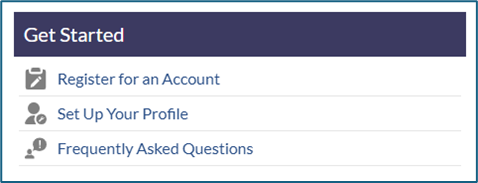
To use the case portal, the customer must be registered with the NetWitness Community. If you are not currently registered, please go to the NetWitness Community and follow the instructions under Getting Started -> Register for an Account.
If you receive any error messages, please send an email to support@netwitness.com for further assistance with registration.
Once registration is complete, go under Support in the navigation bar on the NetWitness Community, and click on Create Case. Answer the questions provided and make sure to add the information that was collected from the Getting Started section of this guide.
Important Note
Some of our customers may have been able to access the Support Case portal prior to January 2025 but no longer seem to have access. This is due to a migration where the NetWitness Community was split from RSA. Due to this split all customers must re-register on the Community. This is to make sure that all customers are properly setup from the migration. If there are any issues, please call or email NetWitness Support for assistance.
Contacting NetWitness Support for Non-Technical Inquiries
For non-technical assistance, customers can contact NetWitness Support via email at support@netwitness.com or by phone for help with login issues related to the NetWitness Community, Support Portal, or MyNetWitness.
You can also reach out to NetWitness Support through any of the three methods mentioned above for inquiries or guidance related to Education, Sales, Sales Operations, or other departments.