.png?width=180&height=32&name=NW%20Logo%20(2).png)
Issue
Below error occurs while running this command on SSH to Admin Server for installing Windows legacy collector in RSA Netwitness 11.x.
WLC denotes Windows Legacy Collector
[root@vnwserverxxx ~]# wlc-cli-client --host-display-name VNETWITxxx --service-display-name VNETWITxxx --host x.x.x.x --port 50101 --use-ssl false
Windows Log Collector REST Username:
Windows Log Collector REST Password:
Security Server Username:
Security Server Password:
2019-07-29 10:29:58.843 INFO 5993 --- [ main] Bootstrap : Service logs will be written to /var/log/netwitness/security-client
2019-07-29 10:29:58.861 INFO 5993 --- [ main] Bootstrap : Service configuration will be read from /etc/netwitness/security-client
2019-07-29 10:29:59.143 INFO 5993 --- [ main] Bootstrap : Starting security-client.7b21f502-8cf2-4249-8007-abcf6ccd4b17 (v0.0.0.0)
2019-07-29 10:30:00.019 INFO 5993 --- [ main] Bootstrap : Initialized service cryptography with 4 providers (BSAFE=CRYPTOJ 6.2.2 20161215 0745, FIPS-140=true).
2019-07-29 10:30:01.863 INFO 5993 --- [ main] c.r.n.i.s.client.SecurityApplication : Starting SecurityApplication on vnwserver001 with PID 5993 (/usr/bin/security-cli-client.jar started by root in /root)
2019-07-29 10:30:01.864 INFO 5993 --- [ main] c.r.n.i.s.client.SecurityApplication : The following profiles are active: amqp
2019-07-29 10:30:02.091 INFO 5993 --- [ main] Bootstrap : Service will accept AMQP requests at broker localhost:5672/rsa/system
2019-07-29 10:30:02.093 INFO 5993 --- [ main] Bootstrap : Service will use the deployment security-server
2019-07-29 10:30:05.917 INFO 5993 --- [ main] c.r.n.i.s.client.SecurityApplication : Started SecurityApplication in 9.229 seconds (JVM running for 10.612)
2019-07-29 10:30:06.318 INFO 5993 --- [shake Completed] Security : Accepted new connection with CN=a4b8011c-ae66-4dab-b73e-e2ca58594f97,OU=NetWitness Platform,O=RSA,L=Reston,ST=VA,C=US from localhost using TLS_DHE_RSA_WITH_AES_128_GCM_SHA256
2019-07-29 10:30:07.327 ERROR 5993 --- [ main] c.r.n.i.s.client.SecurityApplication : Exception processing request
org.springframework.web.client.HttpClientErrorException$NotFound: 404 Not Found
at org.springframework.web.client.HttpClientErrorException.create(HttpClientErrorException.java:85)
at org.springframework.web.client.DefaultResponseErrorHandler.handleError(DefaultResponseErrorHandler.java:122)
at org.springframework.web.client.DefaultResponseErrorHandler.handleError(DefaultResponseErrorHandler.java:102)
at org.springframework.web.client.ResponseErrorHandler.handleError(ResponseErrorHandler.java:63)
at org.springframework.web.client.RestTemplate.handleResponse(RestTemplate.java:777)
at org.springframework.web.client.RestTemplate.doExecute(RestTemplate.java:735)
at org.springframework.web.client.RestTemplate.execute(RestTemplate.java:709)
at org.springframework.web.client.RestTemplate.exchange(RestTemplate.java:597)
at com.rsa.netwitness.infrastructure.security.client.wlc.WlcRestClient.executeRequest(WlcRestClient.java:212)
at com.rsa.netwitness.infrastructure.security.client.wlc.WlcRestClient.getUuid(WlcRestClient.java:70)
at com.rsa.netwitness.infrastructure.security.client.SecurityClient.getWlcServiceId(SecurityClient.java:375)
at com.rsa.netwitness.infrastructure.security.client.SecurityApplication.run(SecurityApplication.java:209)
at org.springframework.boot.SpringApplication.callRunner(SpringApplication.java:813)
at org.springframework.boot.SpringApplication.callRunners(SpringApplication.java:797)
at org.springframework.boot.SpringApplication.run(SpringApplication.java:324)
at org.springframework.boot.SpringApplication.run(SpringApplication.java:1260)
at org.springframework.boot.SpringApplication.run(SpringApplication.java:1248)
at com.rsa.netwitness.infrastructure.security.client.SecurityApplication.main(SecurityApplication.java:76)
at sun.reflect.NativeMethodAccessorImpl.invoke0(Native Method)
at sun.reflect.NativeMethodAccessorImpl.invoke(NativeMethodAccessorImpl.java:62)
at sun.reflect.DelegatingMethodAccessorImpl.invoke(DelegatingMethodAccessorImpl.java:43)
at java.lang.reflect.Method.invoke(Method.java:498)
at org.springframework.boot.loader.MainMethodRunner.run(MainMethodRunner.java:48)
at org.springframework.boot.loader.Launcher.launch(Launcher.java:87)
at org.springframework.boot.loader.Launcher.launch(Launcher.java:50)
at org.springframework.boot.loader.PropertiesLauncher.main(PropertiesLauncher.java:593)
[2019-07-29T10:30:07+00:00] (ERROR) Failed, aborting...
[2019-07-29T10:30:07+00:00] (ERROR) Failed to retrieve WLC host id.
Windows Log Collector REST Username:
Windows Log Collector REST Password:
Security Server Username:
Security Server Password:
2019-07-29 10:29:58.843 INFO 5993 --- [ main] Bootstrap : Service logs will be written to /var/log/netwitness/security-client
2019-07-29 10:29:58.861 INFO 5993 --- [ main] Bootstrap : Service configuration will be read from /etc/netwitness/security-client
2019-07-29 10:29:59.143 INFO 5993 --- [ main] Bootstrap : Starting security-client.7b21f502-8cf2-4249-8007-abcf6ccd4b17 (v0.0.0.0)
2019-07-29 10:30:00.019 INFO 5993 --- [ main] Bootstrap : Initialized service cryptography with 4 providers (BSAFE=CRYPTOJ 6.2.2 20161215 0745, FIPS-140=true).
2019-07-29 10:30:01.863 INFO 5993 --- [ main] c.r.n.i.s.client.SecurityApplication : Starting SecurityApplication on vnwserver001 with PID 5993 (/usr/bin/security-cli-client.jar started by root in /root)
2019-07-29 10:30:01.864 INFO 5993 --- [ main] c.r.n.i.s.client.SecurityApplication : The following profiles are active: amqp
2019-07-29 10:30:02.091 INFO 5993 --- [ main] Bootstrap : Service will accept AMQP requests at broker localhost:5672/rsa/system
2019-07-29 10:30:02.093 INFO 5993 --- [ main] Bootstrap : Service will use the deployment security-server
2019-07-29 10:30:05.917 INFO 5993 --- [ main] c.r.n.i.s.client.SecurityApplication : Started SecurityApplication in 9.229 seconds (JVM running for 10.612)
2019-07-29 10:30:06.318 INFO 5993 --- [shake Completed] Security : Accepted new connection with CN=a4b8011c-ae66-4dab-b73e-e2ca58594f97,OU=NetWitness Platform,O=RSA,L=Reston,ST=VA,C=US from localhost using TLS_DHE_RSA_WITH_AES_128_GCM_SHA256
2019-07-29 10:30:07.327 ERROR 5993 --- [ main] c.r.n.i.s.client.SecurityApplication : Exception processing request
org.springframework.web.client.HttpClientErrorException$NotFound: 404 Not Found
at org.springframework.web.client.HttpClientErrorException.create(HttpClientErrorException.java:85)
at org.springframework.web.client.DefaultResponseErrorHandler.handleError(DefaultResponseErrorHandler.java:122)
at org.springframework.web.client.DefaultResponseErrorHandler.handleError(DefaultResponseErrorHandler.java:102)
at org.springframework.web.client.ResponseErrorHandler.handleError(ResponseErrorHandler.java:63)
at org.springframework.web.client.RestTemplate.handleResponse(RestTemplate.java:777)
at org.springframework.web.client.RestTemplate.doExecute(RestTemplate.java:735)
at org.springframework.web.client.RestTemplate.execute(RestTemplate.java:709)
at org.springframework.web.client.RestTemplate.exchange(RestTemplate.java:597)
at com.rsa.netwitness.infrastructure.security.client.wlc.WlcRestClient.executeRequest(WlcRestClient.java:212)
at com.rsa.netwitness.infrastructure.security.client.wlc.WlcRestClient.getUuid(WlcRestClient.java:70)
at com.rsa.netwitness.infrastructure.security.client.SecurityClient.getWlcServiceId(SecurityClient.java:375)
at com.rsa.netwitness.infrastructure.security.client.SecurityApplication.run(SecurityApplication.java:209)
at org.springframework.boot.SpringApplication.callRunner(SpringApplication.java:813)
at org.springframework.boot.SpringApplication.callRunners(SpringApplication.java:797)
at org.springframework.boot.SpringApplication.run(SpringApplication.java:324)
at org.springframework.boot.SpringApplication.run(SpringApplication.java:1260)
at org.springframework.boot.SpringApplication.run(SpringApplication.java:1248)
at com.rsa.netwitness.infrastructure.security.client.SecurityApplication.main(SecurityApplication.java:76)
at sun.reflect.NativeMethodAccessorImpl.invoke0(Native Method)
at sun.reflect.NativeMethodAccessorImpl.invoke(NativeMethodAccessorImpl.java:62)
at sun.reflect.DelegatingMethodAccessorImpl.invoke(DelegatingMethodAccessorImpl.java:43)
at java.lang.reflect.Method.invoke(Method.java:498)
at org.springframework.boot.loader.MainMethodRunner.run(MainMethodRunner.java:48)
at org.springframework.boot.loader.Launcher.launch(Launcher.java:87)
at org.springframework.boot.loader.Launcher.launch(Launcher.java:50)
at org.springframework.boot.loader.PropertiesLauncher.main(PropertiesLauncher.java:593)
[2019-07-29T10:30:07+00:00] (ERROR) Failed, aborting...
[2019-07-29T10:30:07+00:00] (ERROR) Failed to retrieve WLC host id.
Cause
This happens when Windows legacy collector is installed on different locale ( except English ) that has different separator which prevents core engine frameworks from starting windows legacy collector service. To confirm the same, you can perform below two checks:-
- SSH to Admin server and try to curl IP of windows legacy collector which returns in 404 error.
[root@vnwservexxx ~]# curl -u admin:netwitness "http://WLCIP:50101/event-broker?msg=identity&force-content-type=text/plain&op=get_lc"
404 Not Found: Not Found
[root@vnwserverxxx ~]# - Login to REST API
Not working set up:-
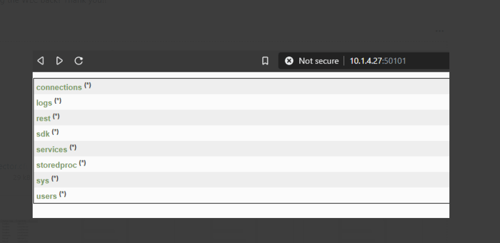
Working set up:-

Resolution
To fix this issue, change the decimal symbol to ( dot .) on the Windows machine where the Windows legacy collector is installed. Below are the steps to perform the following:-
- Login to the control panel of the Windows machine where the Windows legacy collector is installed.
- Click on "clock and region" and you'll see the format for the specific country. For example:- I've Russian format in this screenshot with a comma (,) as a decimal symbol.

- Click on "Additional settings" and change the "Decimal symbol" to ( dot . ) and apply the changes.
- Now, Install Windows legacy collector executing below command on the Admin server and it should be successful this time without 404 error.
#wlc-cli-client --host-display-name HOSTNAME --service-display-name SERVICENAME --host <IP IPADDRESSOFWLC --port 50101 --use-ssl false --username <admin credential for WLC> --password <admin credential for WLC> --ss-username <admin credentials for security server> --ss-password <admin credentials for security server>
Product Details
Approval Reviewer Queue
RSA NetWitness Suite Approval Queue