.png?width=180&height=32&name=NW%20Logo%20(2).png)
Tags: Version 11.5
Introduction
For a secure deployment, NetWitness Platform has installed internal RSA-issued certificates such as CA Certificate and Service certificates .
The validity for NetWitness Platform certificates are as follows:
- CA root certificate for 11.x deployment is valid for 10 years
- CA root certificate for 10.6.x deployment is valid for 5 years
- Service certificates are valid for 1000 days
When these certificates are about to expire or have expired, you must renew and reissue the certificates as soon as possible to avoid any issues with your NetWitness deployment.
Note: You can view the expiration details, by executing the ca-expire-test-sh script on the NetWitness Server. For more information, see Reissue root CA security certificates on RSA NetWitness Platform 11.x and download the script.
CA Certificate Reissue
To renew the CA certificates, do the following:
- Before you upgrade from 10.6.x to 11.x, check the expiry and reissue those certificates. For more information, see the Reissue root CA security certificates on RSA NetWitness Platform 11.x.
- If you are on 10.6.x , check the expiry and reissue all the certificates. For more information, see the Reissuing security certificates on RSA NetWitness Platform 10.6.x.
Note: If you have Windows Legacy Collectors (WLC) in your deployment, renew the CA certificate of the WLC after renewing the CA certificate of the NetWitness Admin Server.
Service Certificate Reissue
To renew the Service certificates, do the following:
- In case of a fresh installation of 11.3 or later, you must use the cert-reissue script. For more information, see the Reissuing Service Certificate .
- In case of a fresh installation of 11.1 or 11.2 or if you upgrade from 10.6.x to 11.x, you must use the nw-root-ca-update script. For more information, see the Reissue root CA security certificates on RSA NetWitness Platform 11.x.
Note: If you have a host that is decommissioned or plan to remove, do not renew the certificate for that host.
Reissuing Service Certificate
You can reissue service certificates in the following two ways.
- All at once
Reboot NW Server host after the cert-reissue --host-key command completes. - One at a time
Reissue the NW Server host certificates first, restart the host, then reissue each component host.
IMPORTANT: If you are reissuing certificates for each host individually (one at a time), you must reissue the certificate for the NW Server host before you can reissue certificates for any other host.
When to Use the --host-key Argument
Use the cert-reissue --host-key command string if you have a large number of hosts. Make sure that:
- All your hosts are running 11.4.0.0 or later.
- All your hosts are online.
- The NW Server host run time services are running.
cert-reissue Arguments and Options for All Hosts
The following tables lists the argument you can use to reissue certificates for all hosts at one time. See Appendix C. Troubleshooting Cert-Reissue Command for additional options you can use with Customer Support to troubleshoot errors.
- Arguments: --host-key
- Description:
Reissues certificates for all hosts at one time applying system health checks and restarts services.
Note: If even one host is not online, this command fails. If you have numerous hosts in your deployment, make sure that all hosts are up and running.
Caution: Make sure you do not run this argument on a node or host that you plan to remove or decommission.
When to Use the Individual Host Arguments (--host-id
, --host-name
, --host-addr
)
The cert-reissue --host-id
Make sure that:
- Each host is running 11.4.0.0 or later.
- Each host is online.
- The NW Server host run time services are running
- You reissue certificates for the NW Server host first.
cert-reissue Arguments and Options for a Single Host
The following tables lists the arguments and options you can use to reissue certificates for a single host (one host at a time). For more information, see the Appendix C. Troubleshooting Cert-Reissue Command section on the additional options you can use with Customer Support to troubleshoot errors.
Note: You must run the command for the NW Server host first and reboot that host before you run the command for each component host.
- Arguments: --host-id
- Description: Reissues certificate for the host identified by
(host identification code).
- Arguments: --host-name
- Description:
Reissues certificate for host identified by
. display-name is the value shown under Name in the
 (Admin) > Hosts View in the NetWitness Platform Interface.
- Arguments:
--host-addr
or
--host-addr - Description:
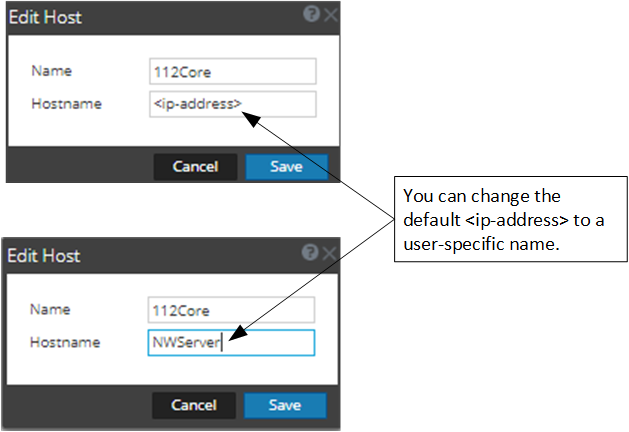
Reissues certificate for the host identified by the value shown under Hostname in the
 (Admin) > Hosts > Edit dialog in the NetWitness Platform Interface. This value can be an ip-addres (default) or a user-specified name.
Reissuing Certificates for All Hosts Except Windows Legacy Collection (WLC) host
Use the cert-reissue command to reissue certificates for all hosts except the WLC host with the following procedures.
Running the Cert-Reissue Command for All Hosts
- SSH to the NW Server host.
- Submit the appropriate command string.
cert-reissue --host-key
Running the Cert-Reissue Command for an Individual Host
- SSH to the NW Server host.
- Submit the appropriate command string (that is cert-reissue --host-id or --host-name or --host-addr). Each of the following command strings is an example of how you reissue certificates for a specific host.
- --host-id
- --host-name
- --host-addr
- --host-id
Reissuing Certificates for a WLC Host
You must use the wlc-cli-client utility to reissue certificates for a WLC host (you cannot use the cert-reissue command). You also need to specify a number of WLC identification parameters with this utility.
Note: The certificates for a Windows Legacy Server host are stored in the following directories on the host.
C:\ProgramData\netwitness\ng\logcollector_cert.pem
C:\ProgramData\netwitness\ng\logcollector_dh2048.pem
Th validity period of WLC certificates can range from 2 to 20 years. If you rename or remove the files and restart NwLogCollector Service, NetWitness regenerates them.
/ssl/truststore.pem - is no longer used in 11.x
Every reissue of a certificate on the Windows Legacy server creates a new private key.
To reissue certificates on a WLC host.
- SSH to the NW Server host.
- Submit the following command string.
wlc-cli-client --cert-renew --host--port 50101 --use-ssl false --username --password --ss-username --ss-password
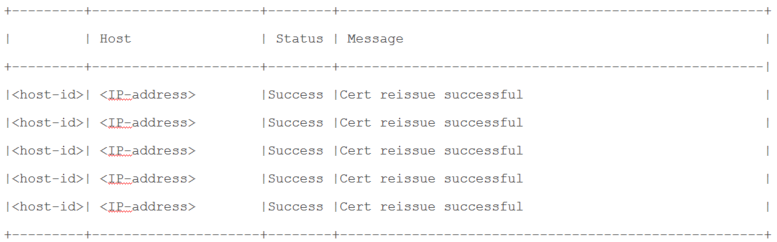
Successful Reissue Summary Report
When you run cert-reissue --host-key, the following summary report will be displayed if all hosts are online, all run time services are running, and all hosts on version 11.4.0.0 or later.
Unsuccessful Reissue Summary Reports
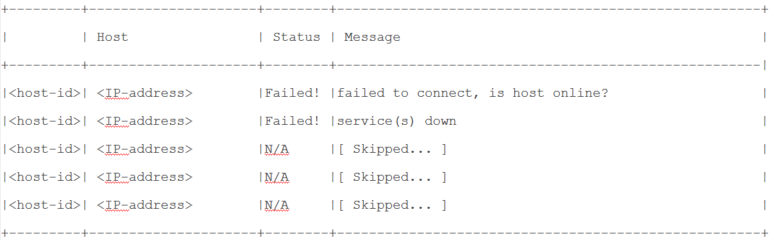
You must contact Customer Support (https://community.rsa.com/docs/DOC-1294) to troubleshoot problems. You know there is a problem if any
Reissue Failed for Host and Aborted Command
The following three examples illustrate the failure of certificate reissuing for any hosts.
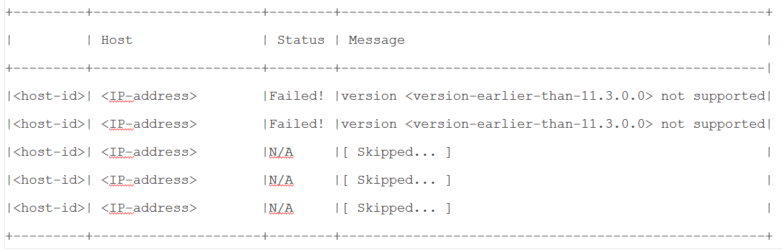
Reissue Certificate Partially Executed
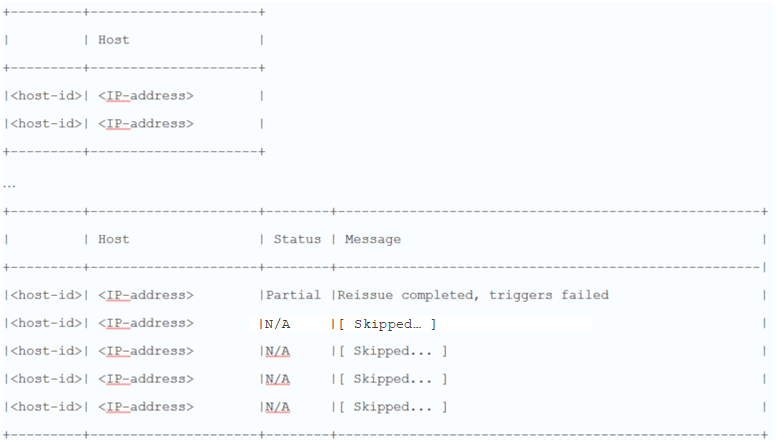
The NW Server Host certificates were reissued but failed to properly distribute the reissued certificates to one or more component hosts.