669323 - General Tab
Log Collection General TabLog Collection General Tab
This topic introduces features of the service Config view > General tab that relate specifically to Log Collector .
To access the Log Collection General tab:
- Go to
(Admin) > Services from the NetWitness menu. - Select a Log Collection service.
-
Click
> View > Config.The Service Config view is displayed with the Log Collector General tab open.
WorkflowWorkflow
This workflow illustrates the basic tasks needed to start collecting events through Log Collection.

What do you want to do?What do you want to do?
- Role: Administrator
- I want to...:
Perform basic Log Collection implementation.
- Documentation: Basic Implementation
- Role: Administrator
- I want to...: Set up a lockbox to maintain lockbox settings.
- Documentation: Set Up a Lockbox
- Role: Administrator
- I want to...: Start Log Collection services.
- Documentation: Start Collection Services
- Role: Administrator
- I want to...: Configure Log Collection protocols and event sources.
- Documentation: Configure Collection Protocols and Event Sources
- Role: Administrator
- I want to...: *Verify that Log Collection is working.
- Documentation: Verify That Log Collection Is Working
*You can perform this task here.
Related TopicsRelated Topics
- Configure AWS (CloudTrail) Event Sources in NetWitness
- Configure Check Point Event Sources in NetWitness
- Configure File Event Sources in NetWitness
- Configure Netflow Event Sources in NetWitness
- Configure ODBC Event Sources in NetWitness
- Configure SDEE Event Sources in NetWitness
- Configure SNMP Event Sources in NetWitness
- Configure Syslog Event Sources
- Configure VMware Event Sources in NetWitness
- Configure Windows Event Sources in NetWitness
- Windows Legacy and NetApp Collection Configuration
Quick LookQuick Look
The NetWitness administrator must configure event sources to send logs to the collectors. When event sources are configured they poll event sources, retrieve logs, and send the event data to NetWitness ).
System Configuration PanelSystem Configuration Panel
The System Configuration panel manages service configuration for a NetWitness service. When a service is first added, default values are in effect. You can edit these values to tune performance. Refer to the General tab for a description of these parameters.
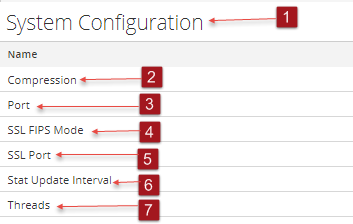
- Column 1: 1
- Column 2: System Configuration Panel manages service configuration for a NetWitness service.
- Column 1: 2
- Column 2: Compression: The minimum number of bytes that must be transmitted per response before compression. A setting of 0 disables compression. The default value is 0.
A change in value is effective immediately for all subsequent connections.
- Column 1: 3
- Column 2: Port: The port on which the service listens. The ports are:
- 50001 for Log Collectors
- 50002 for Log Decoders
- 50003 for Brokers
- 50004 for Decoders
- 50005 for Concentrators
- 50007 for other services
- Column 1: 4
- Column 2: SSL FIPS Mode: When enabled (on), the security of data transmission is managed by encrypting information and providing authentication with SSL certificates. The default value is off.
- Column 1: 5
- Column 2: SSL Port: The NetWitness Core SSL port on which the service listens. The ports are:
- 56001 for Log Collectors
- 56002 for Log Decoders
- 56003 for Brokers
- 56004 for Decoders
- 56005 for Concentrators
- 56007 for other services
- Column 1: 6
- Column 2: Stat Update Interval: The number of milliseconds between statistic updates on the system. Lower numbers cause more frequent updates and can slow down other processes. The default value is 1000.
A change in value is effective immediately.
- Column 1: 7
- Column 2: Threads: The number of threads in the thread pool to handle incoming requests. A setting of 0 lets the system decide. The default value is 15.
A change takes effect on service restart.
Collector Configuration PanelCollector Configuration Panel
The Collector Configuration panel provides a way to enable automatic start of log collection by event source type.
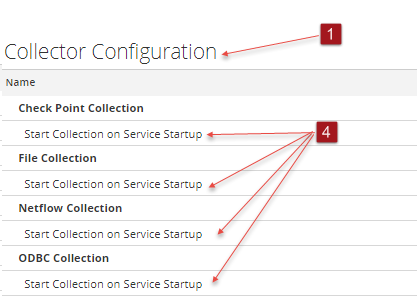
- Column 1: 1
- Column 2: Collector Configuration Panel provides a way to enable automatic start of log collection by event source type.
- Column 1: 2
- Column 2:
Enable All enables the automatic collection for all event types.
Enable All = start receiving events and collecting logs for all event types when the Log Collector service starts.
- Column 1: 3
- Column 2:
Disable all disables the automatic collection for all event types.
Disable All = (default) do not receive event data for all event types until you explicitly start collection.
- Column 1: 4
- Column 2: Start Collection on Service Startup enables automatic start, per event source type, of log collection when the Log Collector service starts. Valid values are:
- Selected = start collecting logs when the Log Collector service starts.
- Not selected = (default) do not collect event data until you explicitly start collection.
- Column 1: 5
- Column 2: Apply: Click Apply to save the changes to the parameter values.