.png?width=180&height=32&name=NW%20Logo%20(2).png)
ESA Analytics Mappings (11.1.x to 11.4.x)ESA Analytics Mappings (11.1.x to 11.4.x)
Note: The information in this topic applies ONLY to NetWitness versions 11.1.x to 11.4.x.
ESA Analytics is not supported in NetWitness 11.5 and later versions.
In the ESA Analytics Mappings panel (Admin > System > ESA Analytics), you define how the RSA Automated Threat Detection functionality should automatically detect advanced threats. You can analyze the data that resides on one or more Concentrators by selecting a preconfigured ESA Analytics module.
To better utilize your network resources and reduce unnecessary data flow, you can map multiple data sources, such as Concentrators, to available ESA Analytics services in order to process data more efficiently and take advantage of additional capacity.
Workflow
This workflow shows the process for creating and enabling an ESA Analytics mapping to start automatically detecting advanced threats.
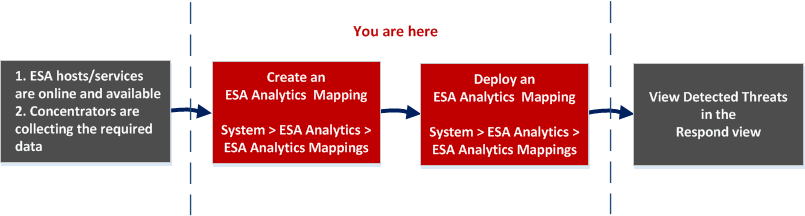
Before you create an ESA Analytics mapping, ensure that the ESA hosts and services that you want to use for your mappings are online and available. All of the services need to be in sync with a consistent time source. Also ensure that the Concentrators are collecting the required data. When you create an ESA Analytics mapping, you select an ESA Analytics module to map, such as Suspicious Domains. Then you select the data sources, such as Concentrators, to use for that module along with an ESA Analytics service to process the data. When you are ready to start aggregating data, you deploy the mapping. Analysts can view detected threats for that module in the Respond view.
What do you want to do?
*You can complete these tasks here (that is in the ESA Analytics Mappings panel).
Go to the NetWitness All Versions Documents page and find NetWitness Platform guides to troubleshoot issues.
Related Topics
- "Configure ESA Analytics" in the ESA Configuation Guide for NetWitness Platform 11.4
- "Update a Mapping" in the ESA Configuation Guide for NetWitness Platform 11.4
- "Undeploy a Mapping" in the ESA Configuation Guide for NetWitness Platform 11.4
- "Delete a Mapping" in the ESA Configuation Guide for NetWitness Platform 11.4
- "Change the Warm-up Period and Lag Time" in the ESA Configuation Guide for NetWitness Platform 11.4
- Module Settings (11.1.x to 11.4.x)
Quick Look
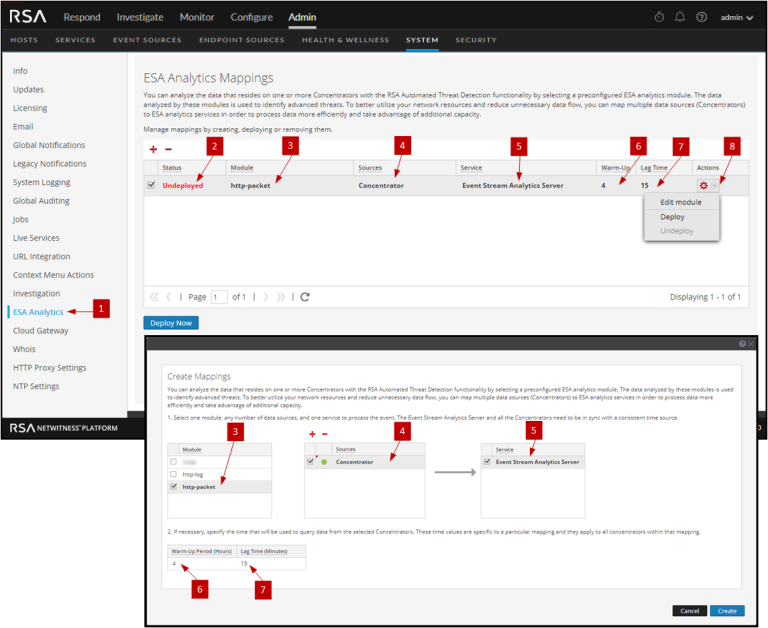
The following example illustrates an ESA Analytics mapping. The configuration defines the data sources for the selected module and the ESA Analytics service that will process the events from those data sources.
Toolbar Toolbar
The following table describes the toolbar actions.
Note: If you want to make changes to a deployed mapping, such as adding or removing Concentrators or changing the service, you must undeploy and delete the existing mapping and then create and deploy a new mapping for that module.
ESA Analytics MappingsESA Analytics Mappings
The following table describes the listed ESA Analytics mappings.