.png?width=180&height=32&name=NW%20Logo%20(2).png)
Module Settings (11.1.x to 11.4.x)Module Settings (11.1.x to 11.4.x)
Note: The information in this topic applies ONLY to NetWitness versions 11.1.x to 11.4.x.
ESA Analytics is not supported in NetWitness 11.5 and later versions.
After you create or deploy a module mapping in the ESA Analytics Mappings panel (Admin > System > ESA Analytics), you have the option to change some module configurations for that mapping.
What do you want to do?
Go to the NetWitness All Versions Documents page and find NetWitness Platform guides to troubleshoot issues.
Related Topics
- "Mapping ESA Data Sources to Analytics Modules" in the ESA Configuation Guide for NetWitness Platform 11.4
- ESA Analytics Mappings (11.1.x to 11.4.x)
Quick Look
To access the module settings, in the ESA Analytics Mappings panel, select the mapping that you want to change and in the Actions column, select  > Edit Module. The Module Settings dialog has a Configurations section and a Warm-Up State section.
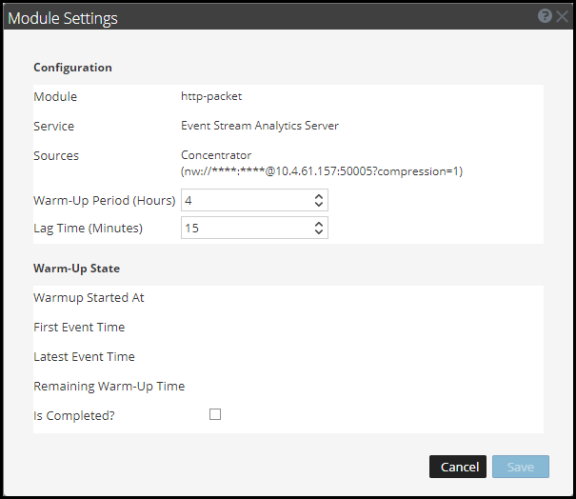
ConfigurationsConfigurations
The Configurations section enables you to change the Warm-Up Period and Lag Time configurations.
The following table describes the settings available for an ESA Analytics module mapping.
Warm-Up StateWarm-Up State
The Warm-Up State section provides information about the warm-up state, which you can use to determine the appropriate adjustments to the warm-up period.