.png?width=180&height=32&name=NW%20Logo%20(2).png)
Services TabServices Tab
This topic provides an overview of the  (Configure) > ESA Rules > Services tab. The Services tab shows the status of the deployments on each ESA service.
What do you want to do?What do you want to do?
Related TopicsRelated Topics
Quick LookQuick Look
The following figure shows the Services tab: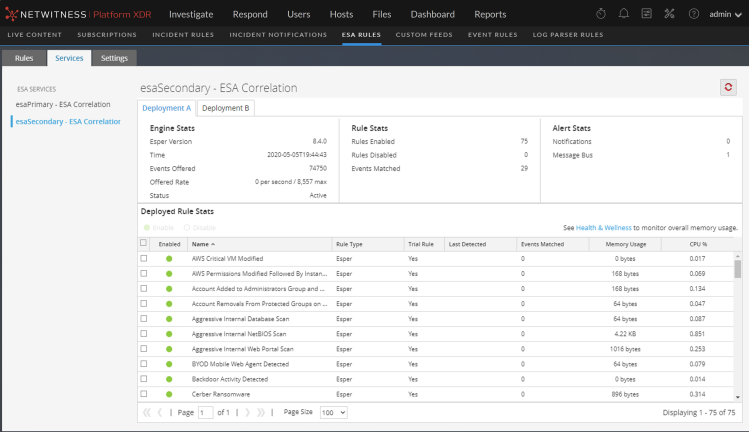
(This option is available in NetWitness version 11.3 and later.) If an ESA Correlation service has multiple deployments, under the service name, you will see a tab for each deployment. In the above example, there are two deployment tabs, Deployment A and Deployment B. Each tab displays information specific to that deployment.
The Services tab has the following sections:
- ESA Services panel (on the left)
- General Stats panel (top right)
- Deployed Rule Stats panel (bottom right)
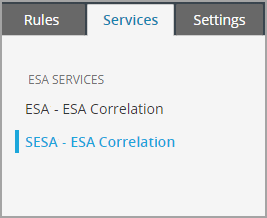
ESA Services PanelESA Services Panel
The ESA Services panel lists the name of each ESA service added to NetWitness.
General Stats PanelGeneral Stats Panel
The General Stats panel provides information on the Esper engine, rules, and alerts.
The General Stats panel contains the following sections:
- Engine Stats
- Rule Stats
- Alert Stats
The following figure shows the General Stats panel.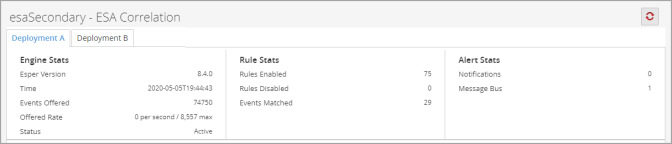
The following table lists and describes the parameters in each section.
Deployed Rule Stats PanelDeployed Rule Stats Panel
The Deployed Rule Stats panel provides details on the rules that are deployed on the ESA service.
The following figure shows the Deployed Rule Stats panel.
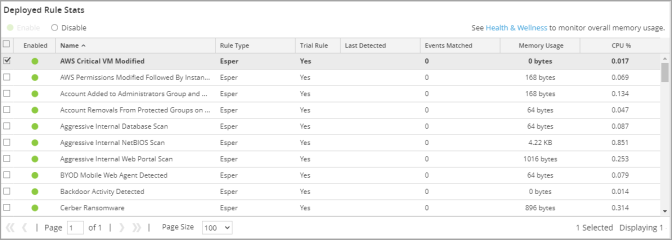
The table lists the various parameters in the view and their description.