Skip to content
  • There are no suggestions because the search field is empty.

Release Notes 11.7.1.2: Upgrade Instructions

Upgrade InstructionsUpgrade Instructions

You need to read the information and follow these procedures for upgrading NetWitness version 11.7.1.2.

  • Upgrade Path: From 11.5.3.2 to 11.7.1.2
  • Downloads Required:
    • 11.7.0.0 base pack
    • 11.7.1.0 service pack

    • 11.7.1.1 patch release
    • 11.7.1.2 patch release

  • Upgrade Path: From 11.5.3.3 to 11.7.1.2
  • Downloads Required:
    • 11.7.0.0 base pack
    • 11.7.1.0 service pack
    • 11.7.1.1 patch release
    • 11.7.1.2 patch release

  • Upgrade Path: From 11.6.0.0 to 11.7.1.2
  • Downloads Required:
    • 11.7.0.0 base pack
    • 11.7.1.0 service pack
    • 11.7.1.1 patch release
    • 11.7.1.2 patch release

  • Upgrade Path:

    From 11.6.0.1 to 11.7.1.2

  • Downloads Required:
    • 11.7.0.0 base pack
    • 11.7.1.0 service pack
    • 11.7.1.1 patch release
    • 11.7.1.2 patch release

  • Upgrade Path: From 11.6.1.0 to 11.7.1.2
  • Downloads Required:
    • 11.7.0.0 base pack
    • 11.7.1.0 service pack
    • 11.7.1.1 patch release
    • 11.7.1.2 patch release

  • Upgrade Path:

    From 11.6.1.1 to 11.7.1.2

  • Downloads Required:
    • 11.7.0.0 base pack
    • 11.7.1.0 service pack
    • 11.7.1.1 patch release
    • 11.7.1.2 patch release

  • Upgrade Path:

    From 11.6.1.2 to 11.7.1.2

  • Downloads Required:
    • 11.7.0.0 base pack
    • 11.7.1.0 service pack
    • 11.7.1.1 patch release
    • 11.7.1.2 patch release

  • Upgrade Path:

    From 11.6.1.3 to 11.7.1.2

  • Downloads Required:
    • 11.7.0.0 base pack
    • 11.7.1.0 service pack
    • 11.7.1.1 patch release
    • 11.7.1.2 patch release

  • Upgrade Path:

    From 11.6.1.4 to 11.7.1.2

  • Downloads Required:
    • 11.7.0.0 base pack
    • 11.7.1.0 service pack
    • 11.7.1.1 patch release
    • 11.7.1.2 patch release

  • Upgrade Path:

    From 11.7.0.0 to 11.7.1.2

  • Downloads Required:
    • 11.7.1.0 service pack
    • 11.7.1.1 patch release
    • 11.7.1.2 patch release

  • Upgrade Path:

    From 11.7.0.1 to 11.7.1.2

  • Downloads Required:
    • 11.7.1.0 service pack
    • 11.7.1.1 patch release
    • 11.7.1.2 patch release

  • Upgrade Path:

    From 11.7.0.2 to 11.7.1.2

  • Downloads Required:
    • 11.7.1.0 service pack
    • 11.7.1.1 patch release
    • 11.7.1.2 patch release

  • Upgrade Path:

    From 11.7.1.0 to 11.7.1.2

  • Downloads Required:
    • 11.7.1.1 patch release
    • 11.7.1.2 patch release

  • Upgrade Path:

    From 11.7.1.1 to 11.7.1.2

  • Downloads Required:
    • 11.7.1.2 patch release

You can upgrade 11.7.1.2 patch using one of the following options:

  • If the NetWitness Server has internet connectivity to Live Services, the NetWitness Platform User Interface can be used to apply the patch.
  • If the NetWitness Server does not have internet connectivity to Live Services, the Command Line Interface (CLI) or the NetWitness Platform User Interface can be used to apply the patch.

Note: If you are using S4s device that utilizes SD cards, SSH to NW Server and run the following command before starting the upgrade process.
manage-stig-controls --disable-control-groups 7 --host-id .

For upgrading from 11.5.3.2, see the NetWitness Platform 11.7 Upgrade Guide.

Running in Mixed ModeRunning in Mixed Mode

Running in mixed mode occurs when some services are upgraded to the latest version and some services are on older versions. See "Running in Mixed Mode" in the NetWitness Platform Hosts and Services Getting Started Guide for further information.

Note: If you are running Endpoint Log Hybrid in mixed mode, make sure Endpoint Broker is on the same version as one of the Endpoint Servers.

Upgrade TasksUpgrade Tasks

Important Notes - Read This FirstImportant Notes - Read This First

Synchronize Time on Component Hosts with NW Server HostSynchronize Time on Component Hosts with NW Server Host

Before upgrading your hosts, make sure that the time on each host is synchronized with the time on the NetWitness Server.
To synchronize the time, do one of the following:

  • Configure the NTP Server. For more information, see"Configure NTP Servers" in the System Configuration Guide.
  • Perform the following steps on each host:
    1. SSH to a component host.
    2. Run the following commands.
      systemctl stop ntpd
      ntpdate nw-node-zero
      systemctl start ntpd

Mixed Mode Unsupported for ESA HostsMixed Mode Unsupported for ESA Hosts

Mixed mode is not supported for ESA hosts in NetWitness Platform version 11.5 and later. The NetWitness server, ESA primary host, and ESA secondary host must all be on the same NetWitness Platform version.

Respond Server Service Not Enabled Until NW Server and Primary ESA Host Upgraded to 11.7.1.2Respond Server Service Not Enabled Until NW Server and Primary ESA Host Upgraded to 11.7.1.2

After upgrading the primary NW Server (including the Respond Server service), the Respond Server service is not automatically re-enabled until after the Primary ESA host is also upgraded to 11.7.1.2. The Respond post-upgrade tasks only apply after the Respond Server service is upgraded and is in the enabled state.

Task 1: Upgrade External RepositoryTask 1: Upgrade External Repository

Note: Perform the below steps only if you are using an external repository for 11.7.1.2.

To upgrade the external repository which is an externally managed server, do the following:

  1. Upgrade the external repository with the latest upgrade content for the RSA netwitness-11.7.1.2.zip.
    The following is the structure after upgrading the external repository:

    11.7.1.2

Task 2: Disable Decoder ServicesTask 2: Disable Decoder Services

Before upgrading to 11.7.1.2, you must disable Capture AutoStart on Network Decoder and Network Hybrid Services.

To disable Capture Autostart:

  1. Go to netwitness_adminicon_29x25.png (Admin) > Services.
    The Administration Services view is displayed.
  1. Select a Network Decoder or Network Hybrid service and select netwitness_actions_icon.png > View > Config.
    The services config view for the selected Network Decoder or Network Hybrid is displayed.
  1. In the Decoder Configuration panel, deselect the Capture Autostart and click Apply.

Task 3: Upgrade the PatchTask 3: Upgrade the Patch

You can choose one of the following upgrade methods based on your internet connectivity.

Upgrade OptionsUpgrade Options

Option 1: Online Method (Connectivity to Live Services): Upgrade Using NetWitness Platform User Interface Option 1: Online Method (Connectivity to Live Services): Upgrade Using NetWitness Platform User Interface

You can use this method if the NetWitness Server host is connected to Live Services and can obtain the package.

Note: If the NetWitness Server does not have access to Live Services, use Option 3: Offline Method (No connectivity to Live Services): Upgrade using the Command Line Interface . or use Option 2: Offline Method (No connectivity to Live Services): Upgrade using the NetWitness Platform User Interface

PrerequisitesPrerequisites

Make sure that:

  1. The Automatically download information about new upgrades every day option is selected and is applied in netwitness_adminicon_29x25.png (Admin) > System > Updates.
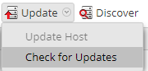
  2. Go to netwitness_adminicon_29x25.png (Admin) > Hosts > Update > Check for Updates to check for upgrades. The Host page displays the Update Available status.
  3. 11.7.1.2 is available under Update Version column.

Note: If you have custom certificates, move any custom certificates from /etc/pki/nw/trust/import/ directory to /root/cert. Follow these steps to move the certificates:
1.) mkdir /root/cert.
2.) mv /etc/pki/nw/trust/import/* /root/cert.

ProcedureProcedure

  1. Go to netwitness_adminicon_29x25.png (Admin) > Hosts.
  2. Select the NetWitness Server (nw-server) host.
  3. Check for the latest updates.
    netwitness_chk4upds.png

    Note: In 11.7.1.0 and later versions, the (optional) Pre Stage Host option is added in the Update drop-down list. For more information, see Option 4 (Optional): Pre-Stage Upgrade Repo.

  4. Update Available is displayed in the Status column if you have a version upgrade in your Local Update Repository for the selected host.
  5. Select 11.7.1.2 from the Update Version column. If you:
    • Want to view a dialog with the major features in the upgrade and information on the updates, click the information icon (netwitness_ic-inline_help.png) to the right of the upgrade version number.
    • Cannot find the version you want, select Update > Check for Updates to check the repository for any available updates. If an update is available, the message "New updates are available" is displayed and the Status column upgrades automatically to show Update Available. By default, only supported upgrades for the selected host are displayed.
  6. Click Update > Update Host from the toolbar.
  7. Click Begin Update.
  8. Click the Reboot Host when prompted.
  9. Repeat steps 6 to 8 for other hosts.

Note: You can select multiple hosts to upgrade at the same time only after updating and rebooting the NetWitness Server host. All ESA, Endpoint, and Malware Analysis hosts should be upgraded to the same version as that of NW Admin Server or NetWitness Server host.

Note: Not all components have been changed for 11.7.1.2, so after you perform the upgrade steps, it is normal to see some components with different version numbers. For a list of the components that were upgraded for this release, see Build Numbers.

Option 2: Offline Method (No connectivity to Live Services): Upgrade using the NetWitness Platform User InterfaceOption 2: Offline Method (No connectivity to Live Services): Upgrade using the NetWitness Platform User Interface

Follow the instructions in Appendix A. Offline Method (No connectivity to Live Services): Upgrade using the NetWitness Platform User Interface.

Option 3: Offline Method (No connectivity to Live Services): Upgrade using the Command Line Interface Option 3: Offline Method (No connectivity to Live Services): Upgrade using the Command Line Interface

You can use this method if the NetWitness Server host is not connected to Live Services.

Note: Alternatively, you can upgrade using the Option 2: Offline Method (No connectivity to Live Services): Upgrade using the NetWitness Platform User Interface

Download the 11.7.1.2 PatchDownload the 11.7.1.2 Patch

Download the NetWitness 11.7.1.2 Upgrade Pack file, which contains all the NetWitness 11.7.1.2 upgrade files, from the NetWitness Community https://community.netwitness.com/t5/netwitness-platform-downloads/tkb-p/netwitness-downloads to a local directory.
netwitness-11.7.1.2.zip

  • Upgrading from:

    11.5.3.2

  • Download and Stage file:

    netwitness-11.7.0.0.zip, netwitness-11.7.1.0.zip, netwitness-11.7.1.1.zip, and netwitness-11.7.1.2.zip


  • Upgrading from:

    11.5.3.3

  • Download and Stage file:

    netwitness-11.7.0.0.zip, netwitness-11.7.1.0.zip, netwitness-11.7.1.1.zip, and netwitness-11.7.1.2.zip


  • Upgrading from:

    11.6.0.0

  • Download and Stage file:

    netwitness-11.7.0.0.zip, netwitness-11.7.1.0.zip, netwitness-11.7.1.1.zip, and netwitness-11.7.1.2.zip


  • Upgrading from: 11.6.0.1
  • Download and Stage file: netwitness-11.7.0.0.zip, netwitness-11.7.1.0.zip, netwitness-11.7.1.1.zip, and netwitness-11.7.1.2.zip

  • Upgrading from:

    11.6.1.0

  • Download and Stage file:

    netwitness-11.7.0.0.zip, netwitness-11.7.1.0.zip, netwitness-11.7.1.1.zip, and netwitness-11.7.1.2.zip


  • Upgrading from: 11.6.1.1
  • Download and Stage file: netwitness-11.7.0.0.zip, netwitness-11.7.1.0.zip, netwitness-11.7.1.1.zip, and netwitness-11.7.1.2.zip

  • Upgrading from: 11.6.1.2
  • Download and Stage file: netwitness-11.7.0.0.zip, netwitness-11.7.1.0.zip, netwitness-11.7.1.1.zip, and netwitness-11.7.1.2.zip

  • Upgrading from: 11.6.1.3
  • Download and Stage file: netwitness-11.7.0.0.zip, netwitness-11.7.1.0.zip, netwitness-11.7.1.1.zip, and netwitness-11.7.1.2.zip

  • Upgrading from: 11.6.1.4
  • Download and Stage file: netwitness-11.7.0.0.zip, netwitness-11.7.1.0.zip, netwitness-11.7.1.1.zip, and netwitness-11.7.1.2.zip

  • Upgrading from: 11.7.0.0
  • Download and Stage file: netwitness-11.7.1.0.zip, netwitness-11.7.1.1.zip, and netwitness-11.7.1.2.zip

  • Upgrading from: 11.7.0.1
  • Download and Stage file: netwitness-11.7.1.0.zip, netwitness-11.7.1.1.zip, and netwitness-11.7.1.2.zip

  • Upgrading from: 11.7.0.2
  • Download and Stage file: netwitness-11.7.1.0.zip, netwitness-11.7.1.1.zip, and netwitness-11.7.1.2.zip

  • Upgrading from: 11.7.1.0
  • Download and Stage file: netwitness-11.7.1.1.zip and netwitness-11.7.1.2.zip

  • Upgrading from: 11.7.1.1
  • Download and Stage file: netwitness-11.7.1.2.zip

Note: If you are using external repository, you can upgrade the external repository with the latest upgrade content. For more information see, Task 1: Upgrade External Repository.

ProcedureProcedure

You need to perform the upgrade steps for NetWitness Server host and for component hosts.

Note: Ensure that you have enough space in the NetWitness Server root and tmp directory before you unzip the package files.

Note: If you copy paste the commands from PDF to Linux SSH terminal, the characters do not work. It is recommended to type the commands.

Note: If you copied the .zip file to the created staging directory to unzip, make sure that you delete the initial .zip file that you copied to the staging location after you extract it.

  • If you are upgrading from 11.5.3.2 to 11.7.1.2, you only need to stage 11.7.0.0, 11.7.1.0, 11.7.1.1, and 11.7.1.2. Log into the /root to the directory of the NetWitness Server and create the following directory:
    /tmp/upgrade/11.7.0.0

    /tmp/upgrade/11.7.1.0

    /tmp/upgrade/11.7.1.1

    /tmp/upgrade/11.7.1.2
    and then copy the package zip files to the /root directory of the NetWitness Server and extract the package files from /root to the /tmp/upgrade/11.7.1.2 directory:
    unzip netwitness-11.7.0.0.zip -d /tmp/upgrade/11.7.0.0

    unzip netwitness-11.7.1.0.zip -d /tmp/upgrade/11.7.1.0

    unzip netwitness-11.7.1.1.zip -d /tmp/upgrade/11.7.1.1

    unzip netwitness-11.7.1.2.zip -d /tmp/upgrade/11.7.1.2

  • If you are upgrading from 11.5.3.3 to 11.7.1.2, you only need to stage 11.7.0.0, 11.7.1.0, 11.7.1.1, and 11.7.1.2. Log into the /root to the directory of the NetWitness Server and create the following directory:
    /tmp/upgrade/11.7.0.0

    /tmp/upgrade/11.7.1.0

    /tmp/upgrade/11.7.1.1

    /tmp/upgrade/11.7.1.2
    and then copy the package zip files to the /root directory of the NetWitness Server and extract the package files from /root to the /tmp/upgrade/11.7.1.2 directory:
    unzip netwitness-11.7.0.0.zip -d /tmp/upgrade/11.7.0.0

    unzip netwitness-11.7.1.0.zip -d /tmp/upgrade/11.7.1.0

    unzip netwitness-11.7.1.1.zip -d /tmp/upgrade/11.7.1.1

    unzip netwitness-11.7.1.2.zip -d /tmp/upgrade/11.7.1.2

  • If you are upgrading from 11.6.0.0 to 11.7.1.2, You only need to stage 11.7.0.0, 11.7.1.0, 11.7.1.1, and 11.7.1.2. There are two options to stage 11.7.1.2.

      • Option 1 (Manual) : Log into the /root to the directory of the NetWitness Server and create the following directory:

        /tmp/upgrade/11.7.0.0

        /tmp/upgrade/11.7.1.0

        /tmp/upgrade/11.7.1.1

        /tmp/upgrade/11.7.1.2
        and then copy the package zip files to the /root directory of the NetWitness Server and extract the package files from /root to the /tmp/upgrade/11.7.1.2 directory:

        unzip netwitness-11.7.0.0.zip -d /tmp/upgrade/11.7.0.0

        unzip netwitnes ,,,,,,, ,,,,,,, ,,,,,,, ,,,,,,, ,,,,,,, ,,,,,,, ,,,,,,, ,,,,,,, ,,,,,,, ,,,,,,, ,,,,,,, 11.7.1.0, 11.7.1.1, and 11.7.1.2 package zip files to the /root/NW directory of the NetWitness Server.

        ,,,,, run the below command to extract, validate, and initialize the 11.7.1.2 zip files:,,,,, ,,,,,,, ,,,,,,, is the location where you need to copy the netwitness-11.7.0.0.zip, netwitness-11.7.1.0.zip, netwitness-11.7.1.1.zip, and netwitness-11.7.1.2.zip if it is downloaded to the local directory earlier.,,,, ,,,,,,, only then the initialization process will begin.,,,,,,, run the command [root@SA ~]# upgrade-cli-client --init --stage-dir /tmp/upgrade --download-path --version 11.7.1.2 again to stage 11.7.1.2.,,,,,,, if the initialization fails, run the command upgrade-cli-client –-init --version 11.7.1.2 --stage-dir /tmp/upgrade. If the initialization succeeds, ignore the first step under Upgrading the NetWitness Server and component hosts and proceed with the further steps in it.,,,,, ,,,,,,, ,,,,,,, You only need to stage 11.7.0.0, 11.7.1.0, 11.7.1.1, and 11.7.1.2. There are two options to stage 11.7.1.2. ,,,, ,,,,,,, ,,,,,,, ,,,,,,, ,,,,,,, ,,,,,,, ,,,,,,, ,,,,,,, ,,,,,,, ,,,,,,, ,,,,,,, ,,,,,,, ,,,,,,, ,,,,,,, ,,,,,,, ,,,,,,, ,,,,,,, ,,,,,,, ,,,,,,, ,,,,,,, ,,,,,,, ,,,,,,, 11.7.1.0, 11.7.1.1, and 11.7.1.2 package zip files to the /root/NW directory of the NetWitness Server. ,,,,, run the below command to extract, validate, and initialize the 11.7.1.2 zip files:,,,,, ,,,,,,, ,,,,,,, is the location where you need to copy the netwitness-11.7.0.0.zip, netwitness-11.7.1.0.zip, netwitness-11.7.1.1.zip, and netwitness-11.7.1.2.zip if it is downloaded to the local directory earlier.,,,, ,,,,,,, only then the initialization process will begin.,,,,,,, run the command [root@SA ~]# upgrade-cli-client --init --stage-dir /tmp/upgrade --download-path --version 11.7.1.2 again to stage 11.7.1.2.,,,,,,, if the initialization fails, run the command upgrade-cli-client –-init --version 11.7.1.2 --stage-dir /tmp/upgrade. If the initialization succeeds, ignore the first step under Upgrading the NetWitness Server and component hosts and proceed with the further steps in it.,,,,, ,,,,,,, ,,,,,,, You only need to stage 11.7.0.0, 11.7.1.0, 11.7.1.1, and 11.7.1.2. There are two options to stage 11.7.1.2. ,,,, ,,,,,,, ,,,,,,, ,,,,,,, ,,,,,,, ,,,,,,, ,,,,,,, ,,,,,,, ,,,,,,, ,,,,,,, ,,,,,,, ,,,,,,, ,,,,,,, ,,,,,,, ,,,,,,, ,,,,,,, ,,,,,,, ,,,,,,, ,,,,,,, ,,,,,,, ,,,,,,, ,,,,,,, 11.7.1.0, 11.7.1.1, and 11.7.1.2 package zip files to the /root/NW directory of the NetWitness Server. ,,,,, run the below command to extract, validate, and initialize the 11.7.1.2 zip files:,,,,, ,,,,,,, ,,,,,,, is the location where you need to copy the netwitness-11.7.0.0.zip, netwitness-11.7.1.0.zip, netwitness-11.7.1.1.zip, and netwitness-11.7.1.2.zip if it is downloaded to the local directory earlier.,,,, ,,,,,,, only then the initialization process will begin.,,,,,,, run the command [root@SA ~]# upgrade-cli-client --init --stage-dir /tmp/upgrade --download-path --version 11.7.1.2 again to stage 11.7.1.2.,,,,,,, if the initialization fails, run the command upgrade-cli-client –-init --version 11.7.1.2 --stage-dir /tmp/upgrade. If the initialization succeeds, ignore the first step under Upgrading the NetWitness Server and component hosts and proceed with the further steps in it.,,,,, ,,,,,,, ,,,,,,, You only need to stage 11.7.0.0, 11.7.1.0, 11.7.1.1, and 11.7.1.2. There are two options to stage 11.7.1.2. ,,,, ,,,,,,, ,,,,,,, ,,,,,,, ,,,,,,, ,,,,,,, ,,,,,,, ,,,,,,, ,,,,,,, ,,,,,,, ,,,,,,, ,,,,,,, ,,,,,,, ,,,,,,, ,,,,,,, ,,,,,,, ,,,,,,, ,,,,,,, ,,,,,,, ,,,,,,, 11.7.1.0, 11.7.1.1, and 11.7.1.2 package zip files to the /root/NW directory of the NetWitness Server. ,,,,, run the below command to extract, validate, and initialize the 11.7.1.2 zip files:,,,,, ,,,,,,, ,,,,,,, is the location where you need to copy the netwitness-11.7.0.0.zip, netwitness-11.7.1.0.zip, netwitness-11.7.1.1.zip, and netwitness-11.7.1.2.zip if it is downloaded to the local directory earlier.,,,, ,,,,,,, only then the initialization process will begin.,,,,,,, run the command [root@SA ~]# upgrade-cli-client --init --stage-dir /tmp/upgrade --download-path --version 11.7.1.2 again to stage 11.7.1.2.,,,,,,, if the initialization fails, run the command upgrade-cli-client –-init --version 11.7.1.2 --stage-dir /tmp/upgrade. If the initialization succeeds, ignore the first step under Upgrading the NetWitness Server and component hosts and proceed with the further steps in it.,,,,, ,,,,,,, ,,,,,,, You only need to stage 11.7.0.0, 11.7.1.0, 11.7.1.1, and 11.7.1.2. There are two options to stage 11.7.1.2. ,,,, ,,,,,,, ,,,,,,, ,,,,,,, ,,,,,,, ,,,,,,, ,,,,,,, ,,,,,,, ,,,,,,, ,,,,,,, ,,,,,,, ,,,,,,, ,,,,,,, ,,,,,,, ,,,,,,, ,,,,,,, ,,,,,,, ,,,,,,, ,,,,,,, ,,,,,,, 11.7.1.0, 11.7.1.1, and 11.7.1.2 package zip files to the /root/NW directory of the NetWitness Server. ,,,,, run the below command to extract, validate, and initialize the 11.7.1.2 zip files:,,,,, ,,,,,,, ,,,,,,, is the location where you need to copy the netwitness-11.7.0.0.zip, netwitness-11.7.1.0.zip, netwitness-11.7.1.1.zip, and netwitness-11.7.1.2.zip if it is downloaded to the local directory earlier.,,,, ,,,,,,, only then the initialization process will begin.,,,,,,, run the command [root@SA ~]# upgrade-cli-client --init --stage-dir /tmp/upgrade --download-path --version 11.7.1.2 again to stage 11.7.1.2.,,,,,,, if the initialization fails, run the command upgrade-cli-client –-init --version 11.7.1.2 --stage-dir /tmp/upgrade. If the initialization succeeds, ignore the first step under Upgrading the NetWitness Server and component hosts and proceed with the further steps in it.,,,,, ,,,,,,, ,,,,,,, ,,,,,,, You only need to stage 11.7.0.0, 11.7.1.0, 11.7.1.1, and 11.7.1.2. There are two options to stage 11.7.1.2. ,,,, ,,,,,,, ,,,,,,, ,,,,,,, ,,,,,,, ,,,,,,, ,,,,,,, ,,,,,,, ,,,,,,, ,,,,,,, ,,,,,,, ,,,,,,, ,,,,,,, ,,,,,,, ,,,,,,, ,,,,,,, ,,,,,,, ,,,,,,, ,,,,,,, ,,,,,,, 11.7.1.0, 11.7.1.1, and 11.7.1.2 package zip files to the /root/NW directory of the NetWitness Server. ,,,,, run the below command to extract, validate, and initialize the 11.7.1.2 zip files:,,,,, ,,,,,,, ,,,,,,, is the location where you need to copy the netwitness-11.7.0.0.zip, netwitness-11.7.1.0.zip, netwitness-11.7.1.1.zip, and netwitness-11.7.1.2.zip if it is downloaded to the local directory earlier.,,,, ,,,,,,, only then the initialization process will begin.,,,,,,, run the command [root@SA ~]# upgrade-cli-client --init --stage-dir /tmp/upgrade --download-path --version 11.7.1.2 again to stage 11.7.1.2.,,,,,,, if the initialization fails, run the command upgrade-cli-client –-init --version 11.7.1.2 --stage-dir /tmp/upgrade. If the initialization succeeds, ignore the first step under Upgrading the NetWitness Server and component hosts and proceed with the further steps in it.,,,,, ,,,,,,, ,,,,,,, ,,,,,,, You only need to stage 11.7.0.0, 11.7.1.0, 11.7.1.1, and 11.7.1.2. There are two options to stage 11.7.1.2. ,,,, ,,,,,,, ,,,,,,, ,,,,,,, ,,,,,,, ,,,,,,, ,,,,,,, ,,,,,,, ,,,,,,, ,,,,,,, ,,,,,,, ,,,,,,, ,,,,,,, ,,,,,,, ,,,,,,, ,,,,,,, ,,,,,,, ,,,,,,, ,,,,,,, ,,,,,,, 11.7.1.0, 11.7.1.1, and 11.7.1.2 package zip files to the /root/NW directory of the NetWitness Server. ,,,,, run the below command to extract, validate, and initialize the 11.7.1.2 zip files:,,,,, ,,,,,,, ,,,,,,, is the location where you need to copy the netwitness-11.7.0.0.zip, netwitness-11.7.1.0.zip, netwitness-11.7.1.1.zip, and netwitness-11.7.1.2.zip if it is downloaded to the local directory earlier.,,,, ,,,,,,, only then the initialization process will begin.,,,,,,, run the command [root@SA ~]# upgrade-cli-client --init --stage-dir /tmp/upgrade --download-path --version 11.7.1.2 again to stage 11.7.1.2.,,,,,,, if the initialization fails, run the command upgrade-cli-client –-init --version 11.7.1.2 --stage-dir /tmp/upgrade. If the initialization succeeds, ignore the first step under Upgrading the NetWitness Server and component hosts and proceed with the further steps in it.,,,,, ,,,,,,, ,,,,,,, ,,,,,,, You only need to stage 11.7.1.0, 11.7.1.1, and 11.7.1.2. There are two options to stage 11.7.1.2. ,,,,, ,,,,,,, ,,,,,,, ,,,,,,, ,,,,,,, ,,,,,,, ,,,,,,, ,,