.png?width=180&height=32&name=NW%20Logo%20(2).png)
Add Role Mapping Dialog
In NetWitness each user role has its own set of permissions. You can map one or more NetWitness roles to an external group, which grants the group the same set of permissions that each role has.
What do you want to do?
Quick Look
To access this dialog, go to  (Admin) > Security, click the External Group Mapping tab. In the column on the left, click either Active Directory, PAM, or SSO to show groups for the selected type and in the toolbar, click
  . The Add Role Mapping dialog for the external authentication method that you set up is displayed.
- Add Role Mapping dialog when Active Directory is selected.
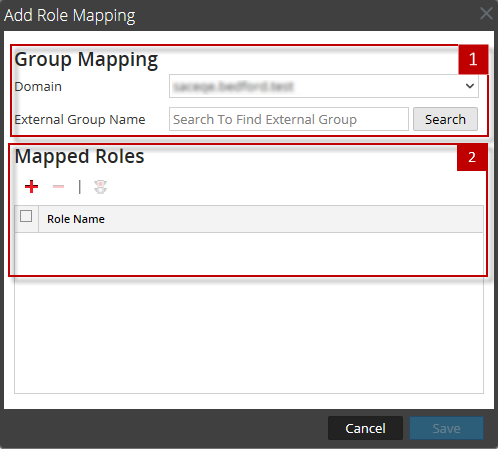
- Add Role Mapping dialog when PAM is selected.
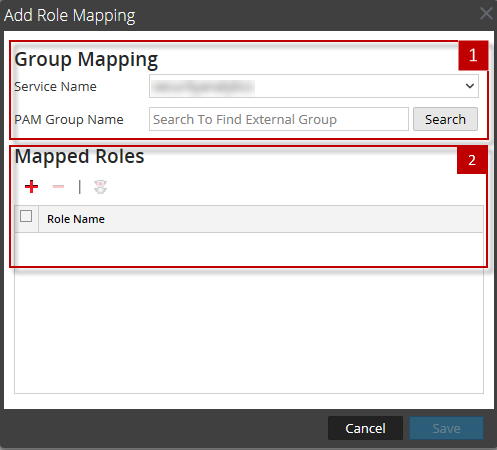
- Add Role Mapping dialog when SSO is selected.
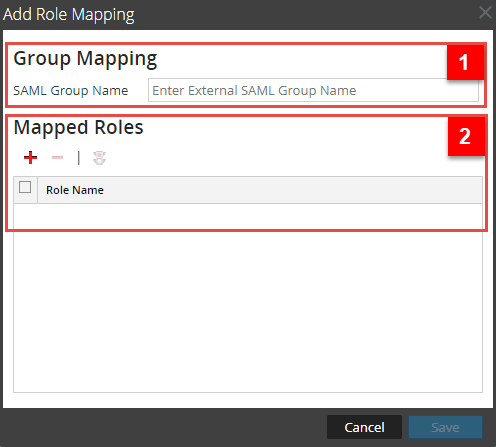
Note: The Add Role Mapping and the Edit Role Mapping dialogs are nearly identical. The only difference is that you cannot search in the Edit Role Mapping dialog.
The Add Role Mapping tab includes the following sections.
Group Mapping
The following table describes the Group Mapping section features.
Mapped Roles
The following table describes the Mapped Roles section features.