.png?width=180&height=32&name=NW%20Logo%20(2).png)
Advanced EPL Rule TabAdvanced EPL Rule Tab
The Advanced EPL Rule tab enables you to define rule criteria with an Event Processing Language (EPL) query.
What do you want to do?What do you want to do?
Related TopicsRelated Topics
Quick LookQuick Look
To access the Advanced EPL Rule tab:
-
Go to
 (Configure) > ESA Rules.
The Configure view is displayed with the Rules tab open by default.
-
In the Rule Library toolbar, select
 > Advanced EPL.
The Advanced EPL Rule tab is displayed.
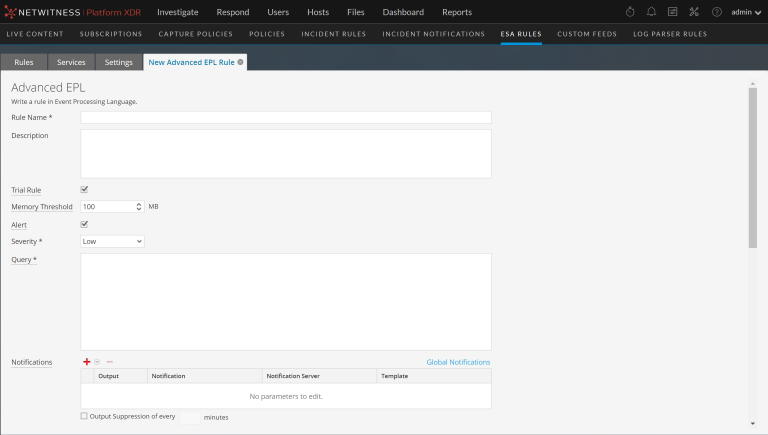
The following figure shows the Advanced EPL Rule tab.
The following figure shows the Advanced EPL Rule tab scrolled down with the Test Rule section in view.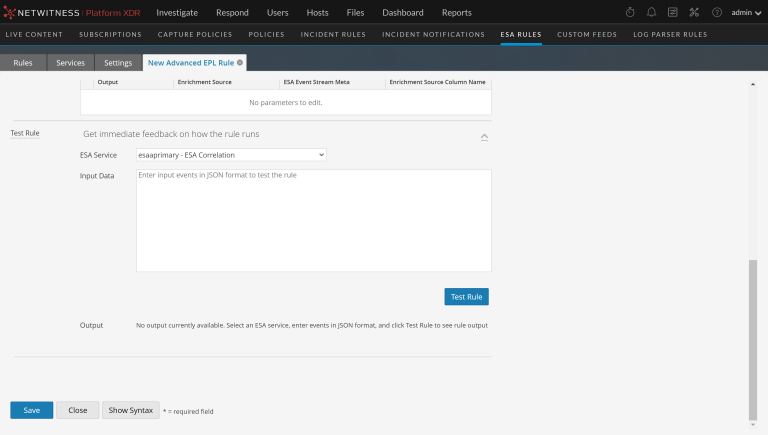
The following table lists the parameters in the Advanced EPL Rule tab.
Notifications SectionNotifications Section
In the Notifications section, you can choose how to be notified when ESA generates an alert for the rule.
For more information on the alert notifications, see Add Notification Method to a Rule.
The following figure shows the Notifications section.

Enrichments SectionEnrichments Section
In the Enrichments section, you can add a data enrichment source to a rule.
For more information on the enrichments, see Add an Enrichment to a Rule.
The following figure shows the Enrichments section.
Test Rule SectionTest Rule Section
Note: The Test Rule section is available in NetWitness Platform 11.5 and later.
In the Test Rule section, you can validate your ESA rule to determine if the rule logic is working as expected before deploying the rule.
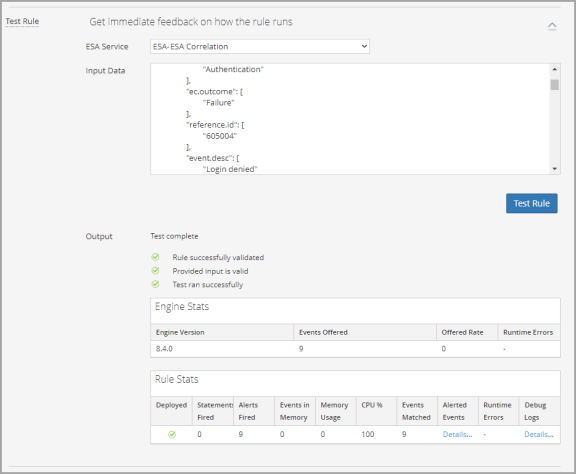
The following table describes the test rule output Engine Stats.
The following table describes the test rule output Rule Stats.
SyntaxSyntax
Click Show Syntax to view the EPL syntax of conditions, statements, and debugging parameters. It also provides a warning when the syntax is invalid. For more information, see Rule Syntax Dialog.