.png?width=180&height=32&name=NW%20Logo%20(2).png)
Configure Netflow Event Sources in NetWitness
This topic tells you how to configure the Netflow collection protocol.
Configure a Netflow Event Source
To configure a Netflow Event Source:
- Go to
 (Admin) > Services from the NetWitness menu.
 - Select a Log Collection service.
- Select
 > View > Config to display the Log Collection configuration parameter tabs.
 -
Click the Event Sources tab.
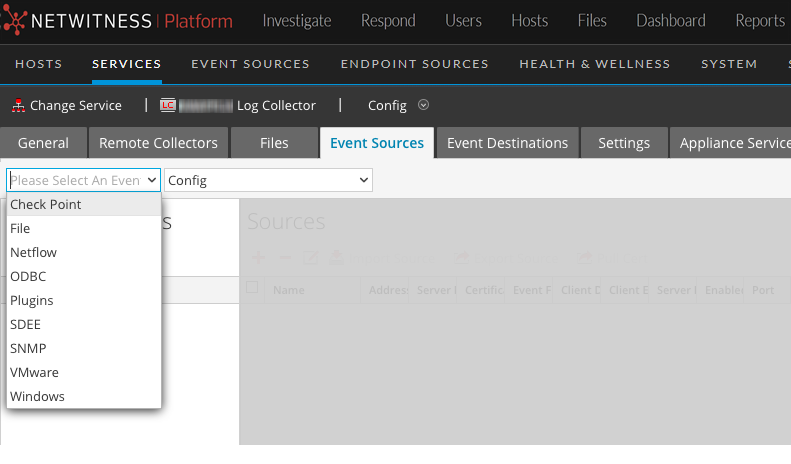
- In the Event Sources tab, select Netflow/Config from the drop-down menu.
-
In the Event Categories panel toolbar, click
 .
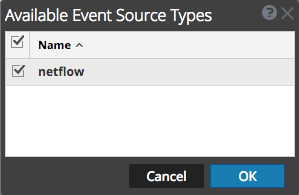
.The Available Event Source Types dialog is displayed.
-
Select the netflow event source type and click OK.
The newly added event source type is displayed in the Event Categories panel.
-
Select the new type in the Event Categories panel and click
in the Sources toolbar.The Add Source dialog is displayed.
-
Enter a port number in the Port field, and ensure the Enabled box is checked.
Note: NetWitness opens the 2055, 4739, 6343, and 9995 ports on the firewall by default. You can open other ports for Netflow if required.
For details of other parameters, see Netflow Collection Parameters below.
- Click OK.
The new event source is displayed in the list.
Netflow Collection ParametersNetflow Collection Parameters
The following table provide descriptions of the basic Netflow Collection parameters.
The following table provide descriptions of the advanced Netflow Collection parameters.