.png?width=180&height=32&name=NW%20Logo%20(2).png)
Configure Password Complexity
Passwords are an important part of your network security strategy. They provide critical front-line protection for your computer systems and help prevent attacks and unauthorized access to private information.
Password policies, designed to enhance the security of corporate networks, vary depending on the industry, corporate requirements, and regulations. Because of these password policy variations, NetWitness software allows you to configure the password complexity requirements for internal NetWitness users to conform to your corporate password policy guidelines.
Password complexity requirements apply only to internal users and are not enforced for external users. External users rely on their own methods and systems to enforce password complexity.
In addition, you can set a global default user expiration period and determine if and when internal users receive notification that their passwords are about to expire. The password expiration notification consists of a password expiration message when a user logs on to NetWitness.
Password Strength
Strong passwords make it more difficult for attackers to guess user passwords and help prevent unauthorized access to your organization's network. You can define the appropriate level of password strength for your NetWitness users. When you configure the password strength settings, they apply to internal NetWitness users, including the admin user.
You can choose to enforce any combination of the following password strength requirements when a NetWitness user creates or changes their password:
- Minimum password length
- Minimum number of uppercase characters
- Minimum number of lowercase characters
- Minimum number of decimals (0 through 9)
- Minimum number of special characters
- Minimum number of non-Latin alphabetic characters (includes Unicode characters from Asian languages)
- Whether or not the password can contain the username
For example, you can create a strong password requirement that has a minimum of 9 characters, cannot contain the username of the user, and contains a mix of uppercase and lowercase letters, numbers, and special characters.
If you choose to enforce a minimum number of non-Latin alphabetic characters, ensure that your users have these characters available to them when setting their passwords.
For an example of a strong password policy, see the "STIG Compliant Passwords" in the System Maintenance Guide.
Configure Password Strength
- In NetWitness, go to
 (Admin) > Security.
The Security view is displayed with the Users tab open. - Click the Settings tab.
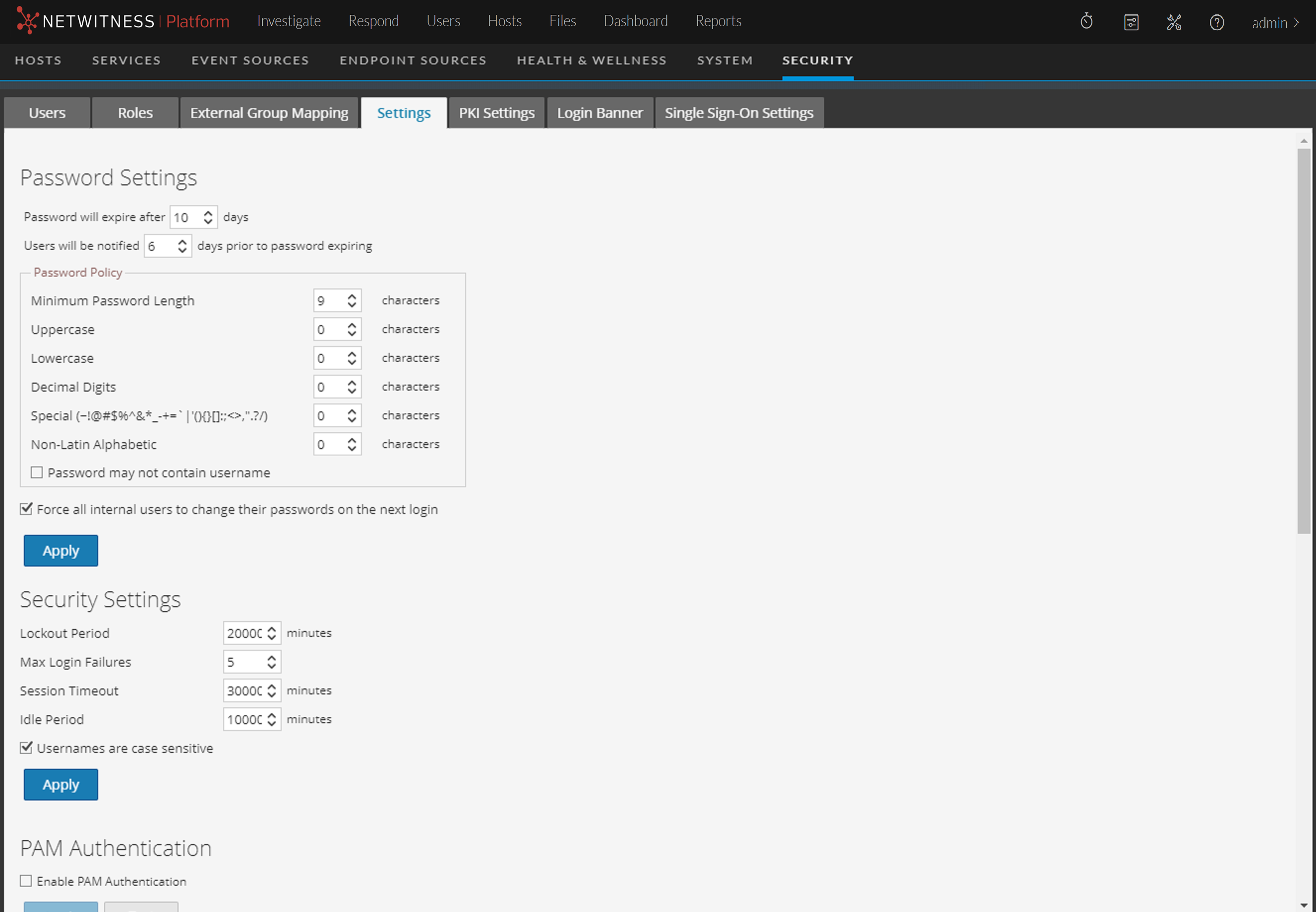
- In the Password Settings section, select the password complexity requirements to enforce when NetWitness users set their passwords and specify the minimum characters required, if applicable. Set the value to 0 for requirements you do not want to enforce, except for Minimum Password Length, which has a minimum value of 9 characters.
Note: In 11.2 and previous versions, the minimum password length is 8. Hence, on upgrade or update from previous versions to 11.3, you must set the minimum password length to 9 characters.
- If you want your password policy changes to take effect at the next login instead of the next password change, select Force all internal users to change their passwords on the next login. Note that this setting is selected by default.
- Click Apply.
The password strength settings take effect when internal users create or change their passwords. If you selected Force all internal users to change their passwords on the next login, all internal users must change their password the next time they log on to NetWitness.