.png?width=180&height=32&name=NW%20Logo%20(2).png)
Context Hub Data Sources Tab
In the Data Sources tab, you can configure one or more data sources for Context Hub service. Navigate to  (Admin) > Services > Select Context Hub service > View > Config > Data Sources tab.
Workflow
This workflow shows the procedure to configure data sources for Context Hub service to view contextual information in the Respond / Investigate views.
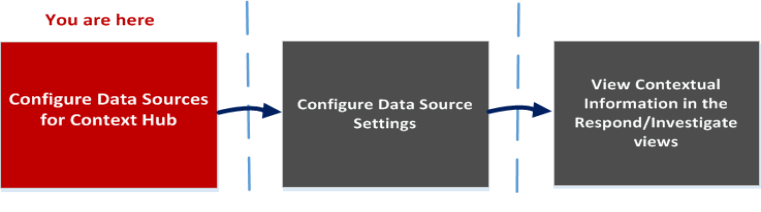
- The first task is to add a data source
- The second task is to configure data sources settings to enhance your deployment. This task is optional as the settings for each data source is already configured with default values for optimal performance.
- And the third task is to view and analyze the contextual information in the Context Summary panel of the Respond or Investigate views.
What do you want to do?
*You can complete this task here (that is in the Context Hub Data Sources Tab.)
Related Topics
- Configure Lists as a Data Source
- Configure Archer as Data Source
- Configure Active Directory as a Data Source
- Configure NetWitness Endpoint as a Data Source
- Configure Respond as a Data Source
- Configure REST API as a Data Source
- Configure File Reputation Server as a Data Source
- Configure STIX as a Data Source
- Configure REST API as a Data Source
Quick Look
The following example illustrates how to add a data source for Context Hub service.
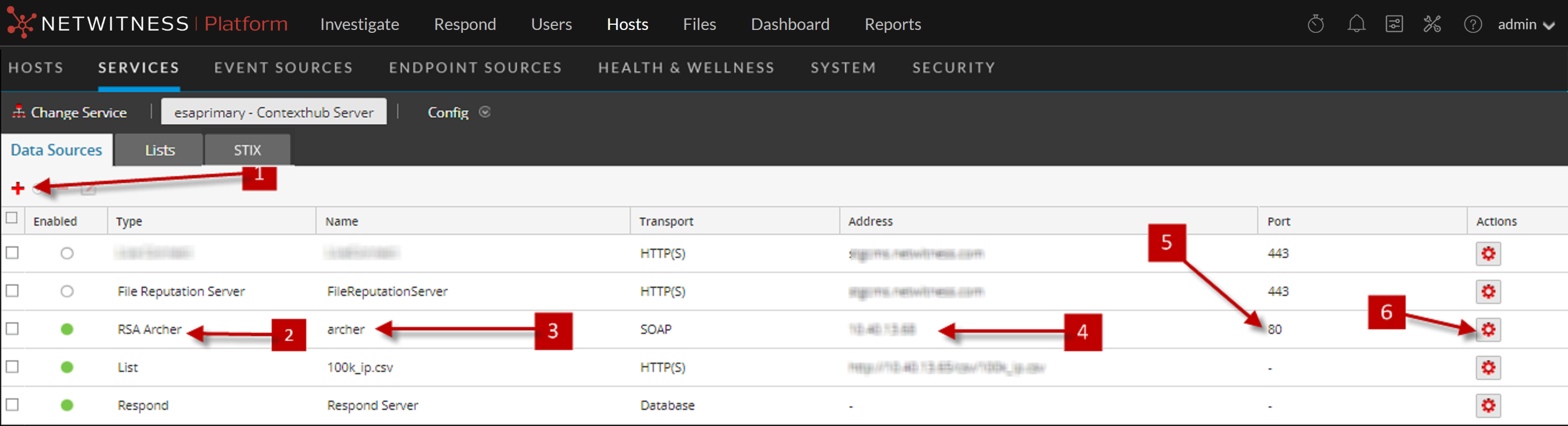
Toolbar
The following table describes the toolbar actions.
Data Source Configurations
The following table describes the listed configurations.