.png?width=180&height=32&name=NW%20Logo%20(2).png)
Generate List PanelGenerate List Panel
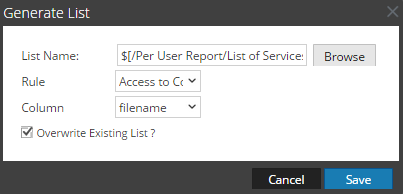
The Generate List dialog allows you to generate and customize a list.
Workflow
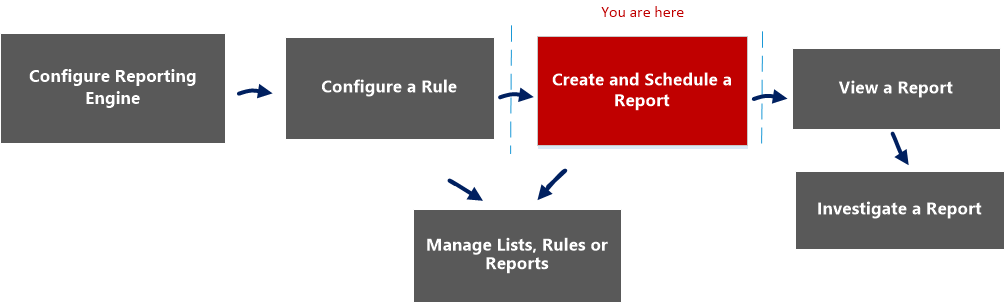
This workflow shows the procedure to create and schedule a report.
What do you want to do?
*You can complete these tasks here.
Related Topics
Quick View
The following figure is an example of the Generate List dialog.
To access this view:
-
Go to Reports.
The Manage tab is displayed.
-
Click Reports.
The Report view is displayed.
-
In the Reports panel, select a report and click
 > Schedule Report.
The Schedule a Report view tab is displayed.
-
In the Output Actions section, in Dynamic List panel, click
 .
.The Generate List dialog is displayed.
Features
The following table lists the features in the Generate List dialog.
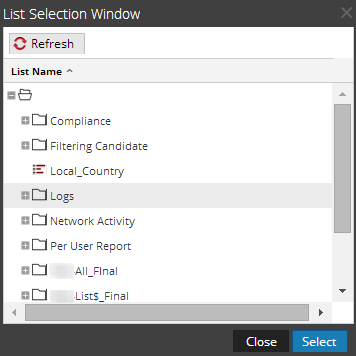
The List Selection Window dialog consists of lists that are defined in the Lists panel. Here, you can select a list to associate it with the report. The following figure shows the dialog.