.png?width=180&height=32&name=NW%20Logo%20(2).png)
Hosts View - Anomalies TabHosts View - Anomalies Tab
Note: The information in this topic applies to NetWitness Version 11.3 and later.
The Anomalies panel provides a list of image hooks, suspicious threads, kernel hooks, and registry discrepancies running on the host. To access this tab, select a host from the Hosts view and click the Anomalies tab.
Workflow
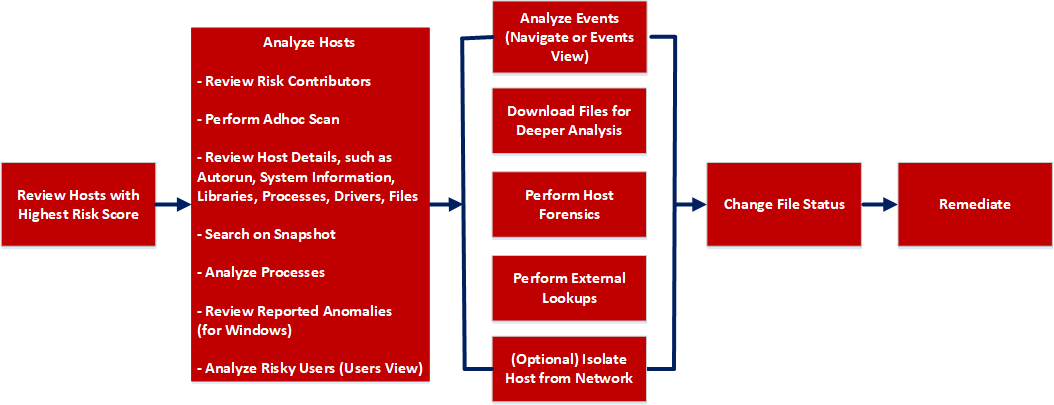
What do you want to do?
*You can perform this task in the current view.
Related Topics
- Focusing on Endpoint Analysis
- Investigating Hosts
- Analyzing Downloaded Files
- Changing File Status or Remediate
- Analyzing Events
- Performing Host Forensics
- Isolating Hosts from Network
Quick Look
Below is an example of the Anomalies tab:
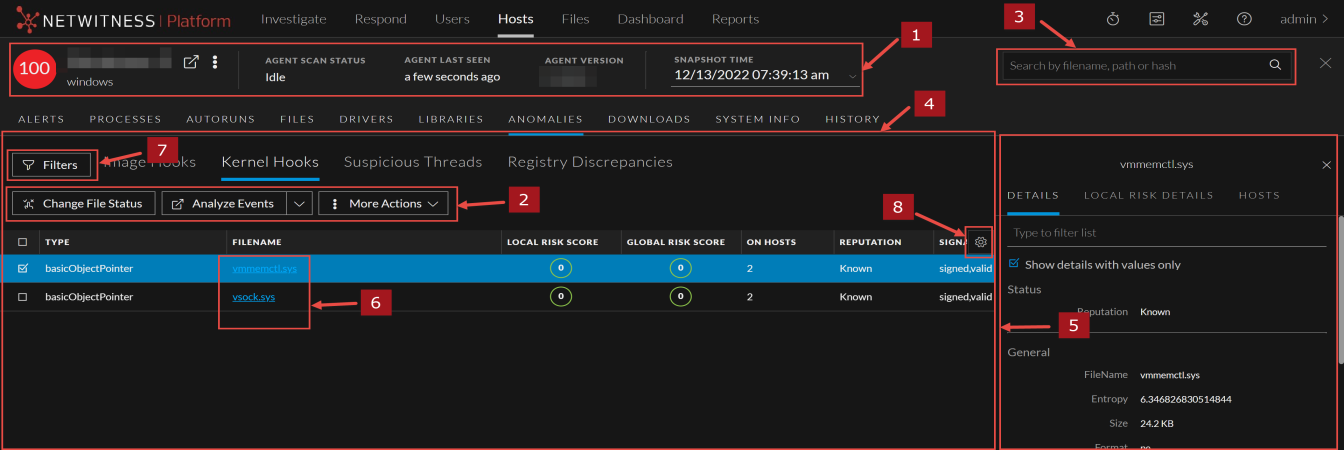
Image HooksImage Hooks
Image hooks found in executable image are displayed in the following columns.
Kernel HooksKernel Hooks
Hooks found on kernel objects are displayed in the following columns.
Suspicious ThreadsSuspicious Threads
Threads whose service table was hooked are displayed in the following columns.
Registry DiscrepanciesRegistry Discrepancies
Configuration settings and options on Microsoft Windows operating systems that are stored are displayed in the following columns.