.png?width=180&height=32&name=NW%20Logo%20(2).png)
Issue
Each meta key that is indexed in the RSA NetWitness Platform has a valueMax value associated with it. This is the maximum number of unique values that can be stored in the index for this meta key.This is defined in the index-concentrator.xml and index-concentrator-custom.xml values on a Security Analytics concentrator.
For example:
Tasks
We wish to be alerted if a metakey becomes full so that we can plan accordingly. To do this1. Install the RSA Security Analytics Parsers from RSA Link here: Live Services Management Guide for 12.5.1
2. Add the following message to the RSA Security Analytics parser above the tag.
level="1"
parse="1"
parsedefvalue="1"
tableid="1"
id1="Index:45"
id2="Index"
eventcategory="1612010000"
content="<@event_description:Index Key Full>[warning] Index key <metakey> has reached max capacity of <fld2> values and will ignore new values for this slice."/>
4. Add the following to your Log Decoder at /etc/netwitness/ng/envision/etc/table-map-custom.xml
5. When the Index Key becomes full the event description "Index Key Full" will become populated.
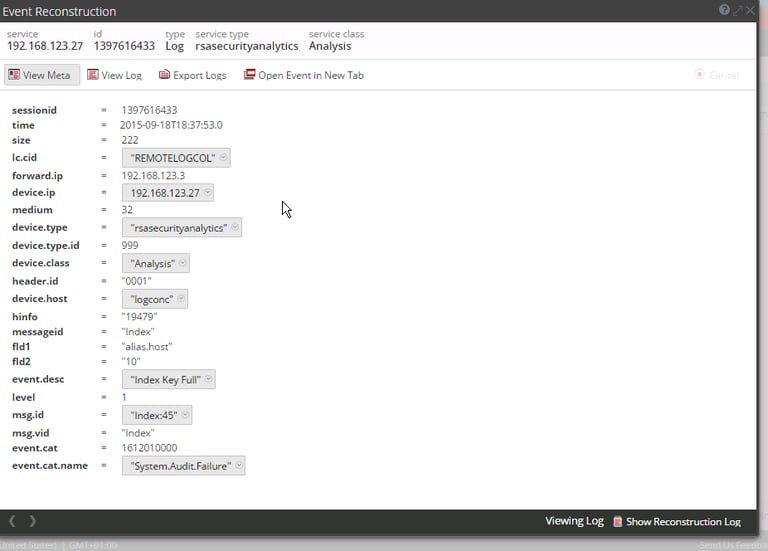
percentage used. Note: Horizontal is not compatible with appendHeaders.
Resolution
If an index key does become full then there are several options.
- Create more index slices
- Increase the valueMax value for the IndexKey
- Switch off indexing for the key
- Do nothing - it may not be practical to capture all unique values for the key or it may be that all possible unique values have been captured.
The best option will depend on your environment and what you wish to achieve, so please contact RSA Customer Support if further advice is required.
Attached to this article is a pair of scripts to help report on your current index slices. Please note the index-profile.pl script is meant for 10.X releases while the
index-profile.py is meant for 11.X releases. Please download and follow the instructions of the one that best fits your environment.
For Customers using version 10.X:
Please use the index-profile-10.X.zip file. This contains a perl script.
Usage: ./index-profile.pl concentrator_ip [out_file_name]
For example, to take an index profile snapshot every 30 min create a cron job for every concentrator as follows:
0,30 * * * * /root/index-profile-1.2.pl <Concentrator1_IP> index-snap-1.csv >> index-snap-1.csv
# Concentrator 2
0,30 * * * * /root/index-profile-1.2.pl <Concentrator2_IP> index-snap-2.csv >> index-snap-2.csv
This will generate a CSV file which then can be easily analyzed, so the optimal values of ValueMax, save.session.count or the index save scheduler can be worked out.
The sample output:
Product Details
RSA Product Set: Security Analytics, NetWitness Logs & NetworkRSA Product/Service Type: Concentrator, Log Decoder
Platform: CentOS 6, CentOS 7
Attachments:
index-profile-10.X.zip