.png?width=180&height=32&name=NW%20Logo%20(2).png)
Legacy Event Reconstruction ViewLegacy Event Reconstruction View
The Event Reconstruction view is deprecated in favor of the Events view. The Legacy Events view provides a reconstruction of a selected event from the Legacy Events view. By default, NetWitness displays the best reconstruction for the event determined by the event content, or the default reconstruction that you have selected in the Default Session View setting for Investigate. You can use the options in the Event Reconstruction toolbar to change the reconstruction method, view top-to-bottom or side-by-side results, select request and response views, export an event, export meta values, extract files, open an email attachment, and open the event in a new tab.
To access this view, do one of the following:
- In any Legacy Events view, double-click an event.
- In the Legacy Events view with Detail View selected, right-click Events at the end of the event, and select Event Reconstruction.
- In the Event Reconstruction toolbar of previewed reconstruction, click Open Event in New Tab.
- In the Navigate view, select Actions > Go to event in Event Reconstruction, and enter an event ID.
What do you want to do?What do you want to do?
*You can perform this task in the current view.
Related TopicsRelated Topics
Quick LookQuick Look
This figure is an example of the Event Reconstruction view. The following table describes the toolbar options.
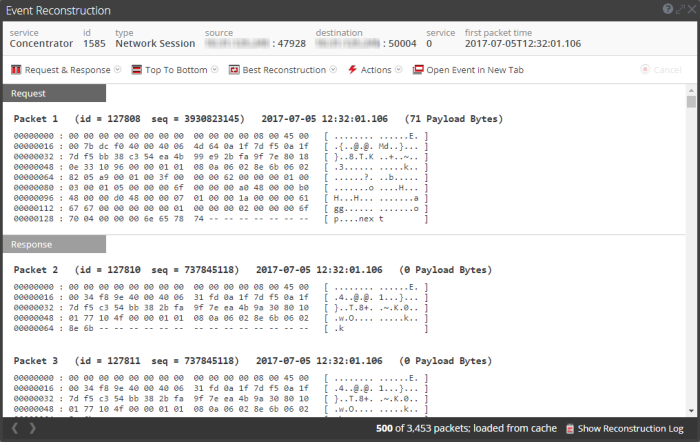
Beneath the toolbar is a list of meta keys and values. Some of the keys offer a drop-down menu with available actions.
The bar at the bottom of the view offers several options.