.png?width=180&height=32&name=NW%20Logo%20(2).png)
Lists Permissions DialogLists Permissions Dialog
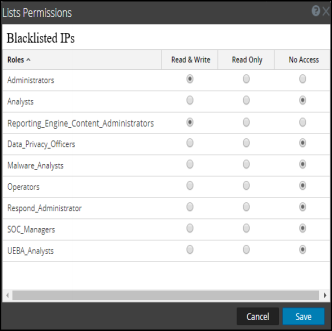
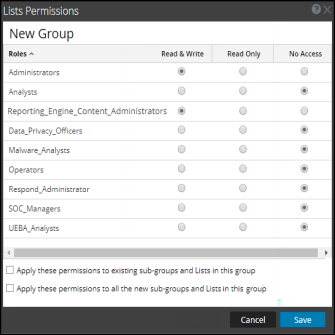
In the Lists Permissions dialog, you can manage access permissions for a user role at the list or list group level. Only a user with Read and Write permission can configure the list in the Reporting Module.
Workflow
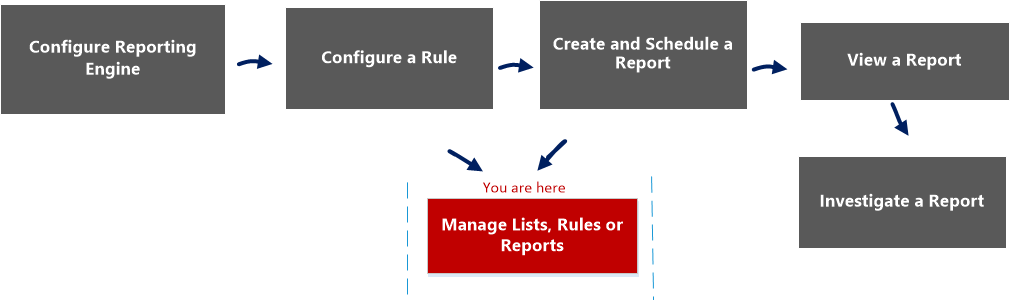
This workflow shows the procedure to manage lists or list groups. You can set access control at the list or list group level so that only users with specific roles can access the lists. You can use lists to define rules for generating reports, charts and alerts.
You must ensure that Reporting Engine is configured on NetWitness.
What do you want to do?
*You can complete these tasks here.
Related Topics
- List View
- List section in the "Role Permissions" topic in the System Security and User Management Guide.
Quick View
The following figures are examples of the Lists Permissions dialog and List Group Permission dialog:
To access this view
- Go to Reports.
The Manage tab is displayed. - Click Lists.
The Lists view is displayed. - In the Lists view, select a report.
- In the Lists toolbar, click
 > Permissions.
The Reports Permissions dialog is displayed.
The following table describes the features in the Lists Permissions dialog: