.png?width=180&height=32&name=NW%20Logo%20(2).png)
PKI Settings Tab
The Public Key Infrastructure (PKI) Settings tab enables you to configure PKI authentication for NetWitness.
Workflow

What do you want to do?
Quick Look
To access this view, go to  (Admin) > Security and click the PKI Settings tab.
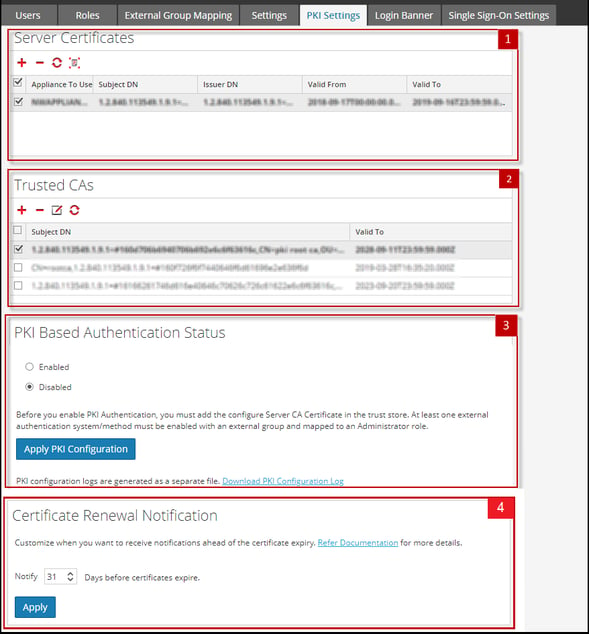
The PKI Settings tab includes the following sections.
Server Certificates
The Server Certificates section enables you to import a server certificate with its private key to NetWitness Server. The following table lists the Server Certificates features and their description.
Trusted CAs
The Trusted CAs section enables you to import a Certificate Authority (CA) certificate to NetWitness. The following table lists the Trusted CAs features and their description.
PKI Based Authentication Status
The PKI Based Authentication Status section enables you to enable PKI authentication in NetWitness. The following table list the PKI Based Authentication Status features and their description.
Certificate Renewal Notification
NetWitness Platform 12.5 introduces the Certificate Renewal Notification section which enables you to choose a notification period of up to 240 days before the certificate expiration date. The following table list the Certificate Renewal Notification features and their description.