Skip to content
  • There are no suggestions because the search field is empty.

Add New Configuration Dialog

Add New Configuration DialogAdd New Configuration Dialog

In the NetWitness Platform XDR, Administration System view Global Audit Logging Configurations panel, you can create multiple global audit logging configurations. These configurations are used to forward global audit logs to a central location to perform user audits.

Procedures related to global audit logging are described in Configure Global Audit Logging.

To access the Add New Configuration dialog:

  1. Go to select netwitness_adminicon_25x22.png (Admin) > System.
  2. In the options panel, select Global Auditing.
  3. In the Global Audit Logging Configurations panel, click netwitness_add.png.

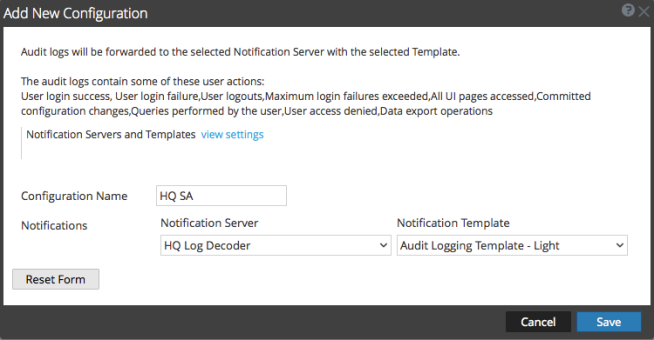
    The Add New Configuration dialog is displayed.
    netwitness_galcfgdb_654x340.png

    The Notifications section enables you to select a syslog notification server for the global audit logging configuration and a template to use for the global audit logs. The template defines the details of the global audit log entries.

FeaturesFeatures

The following table describes the features in the Add New Configuration and Edit Configuration dialogs.

  • Feature: Notifications Servers and Templates view settings link
  • Description: Takes you to the Global Notifications panel where you can view or configure the notification server and template settings. A syslog notification server and an audit logging template are required before you can create a global audit configuration.

  • Feature: Configuration Name
  • Description: Specifies the unique name used to identify the global audit logging configuration.

  • Feature: Notification Server
  • Description: Specifies the syslog notification server to send the selected audit log information. Configure a Destination to Receive Global Audit Logs provides instructions on how to create a Syslog Notification Server for global audit logging.

  • Feature: Notification Template
  • Description: Specifies the template to use for the global audit logging configuration. The template should be an Audit Logging template.
    For Log Decoders, use the Default Audit CEF Template. You can add or remove fields from the Common Event Format (CEF) template if you have specific requirements. Define a Template for Global Audit Logging provides instructions.
    For third-party syslog servers, you can use a default audit logging template or define your own format (CEF or non-CEF). Define a Template for Global Audit Logging provides instructions and Supported Global Audit Logging Meta Key Variables describes the available variables.

  • Feature: Reset Form button
  • Description: Clears the configuration settings in the dialog.

User Actions LoggedUser Actions Logged

The following table provides examples of some of the user actions logged from NetWitness. These actions are the minimum user actions logged when applicable.

  • User Action: User login success
  • Example: A user logs on with valid credentials.

  • User Action: User login failure
  • Example: A user tries to log on using invalid credentials.

  • User Action: User logouts
  • Example:

    A user logs out from NetWitness (Administration > Sign Out) or a user logs out due to a session timeout.


  • User Action: Max login failures exceeded
  • Example:

    A user tries to log on using invalid credentials five times. Five (5) is the number of Max Login Failures defined in Administration Security view > Settings tab (Administration > Security > Settings tab).


  • User Action: All UI pages accessed
  • Example:

    When a user accesses the Reporting module (Administration > Reports), it logs as [REP] Reports. When a user accesses the Administration System view (Administration > System), it logs as [ADM] System.


  • User Action: Committed configuration changes
  • Example:

    A user changes his or her password and or any security setting (Administration > Security > Settings tab).


  • User Action: Queries performed by the user
  • Example:

    A user performs an investigation query.


  • User Action: User access denied
  • Example: A user tries to access a module and does not have permissions to access it.

  • User Action: Data export operations
  • Example: A user exports data from the Events view (Investigation > Events > Actions > Export).

The following table shows examples of internal audit logs logged from NetWitness

  • User Actions: User Login success
  • Audit Log Examples: {"type":"fileclone","hostname":"UpdateStackAdminServer",
    "timegenerated":"2019-05-23T13:55:42.764124+00:00","syslogtag":
    "ADMIN-SERVER","@version":"1","fromhost-ip":"110.10.10.1”,
    "deviceVendor":"RSA","deviceService":"admin-server”,
    "deviceVersion":"11.3.1.0” “uri":"/oauth/token",
    "referrer":"https://10.111.201.10/login","success":"true",
    "identity":"AdminNorm","action":"Logon-Web","deviceServiceId":
    "247cedcb-cXXX-4XXX-8XXX-5XXXXa","deviceProduct":"NetWitness",
    "category":"Security","operation":"Logon-Web",”outcome":
    "success","remoteAddress":"101.181.15.10","message":null,
    "logTime":"2019-05-23T13:55:42.769Z","@timestamp":"2019-05
    -23T13:55:42.769Z","timereported":"2019-05-23T13:55:42+00:00",
    "node_id":"e0XXX8-4XXX-4XXX-8XXXX-6d4b8XXXX09"}

  • User Actions: User Login Failure
  • Audit Log Examples: {"type":"fileclone","hostname":"UpdateStackAdminServer",
    "timegenerated":"2019-05-23T13:42:38.485701+00:00","syslogtag":
    "ADMIN-SERVER","@version":"1","fromhost-ip":"111.1.10.11",
    "deviceVendor":"RSA","deviceService":"adminserver","device
    Version":"11.3.1.0","uri":"/oauth/token","referrer":"https:
    //10.111.201.10/login","success":"false","identity":"AdminNorm",
    "reasonForFailure":"Bad Credentials","action":"Logon-Web",
    "deviceServiceId":"2XXXX-cXXX-4XXX-8XXX-5feXXXX2a","device
    Product":"NetWitness","category":"Security","operation":
    "Logon-Web",“outcome":"failed","remoteAddress":"101.181.15.10",
    "message":null,"logTime":"2019-05-23T13:42:38.494Z","@timestamp":
    "2019-05-23T13:42:38.494Z","timereported":"2019-05-23T13:
    42:38+00:00","node_id":"e0XXXX-4XXX-4XXX-8XXX-6dXXXXX809"}

  • User Actions: User Logouts
  • Audit Log Examples: {"type":"fileclone","hostname":"UpdateStackAdminServer",
    "timegenerated":"2019-06-06T13:43:57.112760+00:00","syslogtag":
    "SOURCE-SERVER","@version":"1","fromhost-ip":"107.0.110.1,”device
    Vendor":"RSA","deviceService":"source-server","deviceVersion":
    "11.3.1.0","size":"0","success":"true","identity":"system",
    "action":"sourceCountUpdate","deviceServiceId":"c872d520-b06b-
    46cb-b5c1-8e240b105020","deviceProduct":"NetWitness","category":
    "SystemOperation","operation":"sourceCountUpdate","parameters":
    "{\"size\":\"0\"}","outcome":"success"},"message":null,"logTime"
    :"2019-06-06T13:43:57.117Z","@timestamp":"2019-06-06T13:43:57
    .117Z","timereported":"2019-06-06T13:43:57+00:00","node_id":
    "e07b16f8-4xxx-4xx1-895b-6xxxxx09"}

  • User Actions: All UI pages accessed
  • Audit Log Examples:

    {"type":"fileclone","hostname":"UpdateStackAdminServer",
    "timegenerated":"2019-05-23T14:03:16.094611+00:00","syslogtag":
    "SA_SERVER","@version":"1","fromhost-ip":"117.10.10.11", “json”:

    {"severity":"6","deviceVendor":"RSA","identity":"AdminNorm",
    "deviceService":"SA_SERVER","deviceProduct":"NetWitness","device
    Version":"11.3.1.0","category":"DATA_ACCESS","userRole":
    "Administrators","operation":"HttpRequest",outcome":"Success"},
    "message":null,"logTime":"2019-05-23T14:03:16.115Z","@timestamp":
    "2019-05-23T14:03:16.115Z","timereported":"2019-05-23T14:03:16Z",
    "node_id":"e0XXXX-4XXX-4XXX-8XXX-6d5XXXX09"}

    {"type":"fileclone","hostname":"UpdateStackAdminServer",
    "timegenerated":"2019-05-23T14:04:17.305585+00:00","syslogtag":
    "SA_SERVER","@version":"1","fromhost-ip":"117.10.10.1","json":

    {"severity":"6","deviceVendor":"RSA","identity":"AdminNorm",
    "deviceService":"SA_SERVER","deviceProduct":"NetWitness","device
    Version":"11.3.1.0","category":"SYSTEM","userRole":
    "Administrators","operation":"Page Accessed","key":"[ADM] Hosts",
    "outcome":"Success"},"message":null,"logTime":"2019-05-23T14:
    04:17.309Z","@timestamp":"2019-05-23T14:04:17.309Z","time
    reported":"2019-05-23T14:04:17Z","node_id":"e07XXXX-4XXX-4XXX-
    8XXX-6d55XXXXX09"}


  • User Actions:

    Committed configuration changes

  • Audit Log Examples:

    {"type":"fileclone","hostname":"UpdateStackAdminServer",
    "timegenerated":"2019-05-23T14:09:09.741982+00:00","syslogtag":
    "SA_SERVER","@version":"1","fromhost-ip":"117.101.0.11","json":
    {"severity":"6","deviceVendor":"RSA","deviceService":"SA_SERVER"
    ,"deviceVersion":"11.3.1.0","identity":"AdminNorm","device
    Product":"NetWitness","category":"CONFIGURATION","userRole":
    "Administrators","operation":"Modified","parameters":"save",
    "value":"[10.10.201.10]","key":"ntp-servers","outcome":"Success"},
    "message":null,"logTime":"2019-05-23T14:09:09.748Z","@timestamp":
    "2019-05-23T14:09:09.748Z","timereported":"2019-05-23T14:09:09Z",
    "node_id":"e07XXXX-4XXX-4XXX-8XXX-6dXXXXX9"}


  • User Actions: Queries performed by the user
  • Audit Log Examples: {"type":"fileclone","hostname":"UpdateStackAdminServer",
    "timegenerated":"2019-05-23T14:12:02.909062+00:00","syslogtag":
    "INVESTIGATE-SERVER","@version":"1","fromhost-ip":"117.10.10.11",
    "json":{"deviceVendor":"RSA","deviceService":"investigate-
    server","deviceVersion":"11.3.1.0*","success":"true","identity":
    "AdminNorm","action":"update","deviceServiceId":"f8XXXX5-bXXX-
    4XXX-bXXX-fXXXXX6","deviceProduct":"NetWitness","category":
    "Predicate","operation":"update","updated":"UserPredicateEntity
    (id=5cXXXXXXXXXX9dd, userId=AdminNorm, predicateEntity=Predicate
    Entity(id=ff53, legacyId=null, query=user.all='solay', display
    Name=user.all='solay'), lastUsed=2019-05-23T14:12:02.897Z",
    "outcome":"success"},"message":null,"logTime":"2019-05-23T14:
    12:02.920Z","@timestamp":"2019-05-23T14:12:02.920Z","time
    reported":"2019-05-23T14:12:02+00:00","node_id": "e0XXXX-4XXX-
    4XXX-8XXX-6d5XXXXXX09"}

  • User Actions:

    Data export operations

  • Audit Log Examples:

    2019-02-11 11:20:30,188 deviceVersion: "11.3.0.0" deviceService:
    "SA_SERVER" category: DATA_ACCESS operation: "submitExtractPcap"
    parameters: "deviceId=6 collectionName= predicateHandle=c6cf
    sessionIds=[9285468, 9286362, 9628535, 9629308, 10013047, 10017581,
    10428756, 10439924, 10819088, 10820894, 11164416] startDate=2019-
    02-11T08:20:00.000Z endDate=2019-02-11T11:19:59.000Z id1=1 id2=
    287399592" outcome: "Success" identity: "admin" userRole:
    "Administrators"


The following table shows examples of Global Audit Logs using the default Common Event Format (CEF) template. After you create a Global Audit Logging configuration, audit logs automatically go to the external syslog system in the format specified in the selected Audit Logging template.

  • User Actions: User Login Success
  • CEF Examples:

    May 23 2019 13:52:39 updatestackadminserver CEF:0|RSA|NetWitness Audit|11.3.1.0|Security|Logon-Web|6|rt=May 23 2019 13:52:39 scope=scope suser=AdminNorm sourceServiceName=admin-server deviceExternalId=eXXXX-4XXX-4XXX-8XXX-6dXXXXX09 deviceProcessName=ADMIN-SERVER outcome=success remoteAddress=110.10.10.1 uri=/oauth/token referrerURL=https://10.111.201.10/login


  • User Actions: User Login Failure
  • CEF Examples:

    May 23 2019 13:42:38 updatestackadminserver CEF:0|RSA|NetWitness Audit|11.3.1.0|Security|Logon-Web|6|rt=May 23 2019 13:42:38 scope=scope suser=AdminNorm sourceServiceName=admin-server deviceExternalId=eXXXX-4XXX-4XXX-8XXX-6XXXXXX09 deviceProcessName=ADMIN-SERVER outcome=failed remoteAddress=110.10.10.1 reasonForFailure=Bad credentials uri=/oauth/token referrerURL=https://10.111.201.10/login


  • User Actions: User Logouts
  • CEF Examples: Jun 06 2019 13:01:25 updatestackadminserver CEF:0|RSA|NetWitness Audit|11.3.1.0|Security|Logoff|6|rt=Jun 06 2019 13:01:25 scope=scope suser=admin sourceServiceName=admin-server deviceExternalId=e07b16f8-4xxx-4xx1-895b-6dxxxxx809 deviceProcessName=ADMIN-SERVER outcome=success remoteAddress=101.101.007.101 reason=User Triggered referrerURL=https://10.111.117.115/respond/incidents uri=/oauth/logout action=Logoff,"uri":"/oauth/logout”

  • User Actions: All UI pages accessed
  • CEF Examples:

    May 23 2019 14:01:13 updatestackadminserver CEF:0|RSA|NetWitness Audit|11.3.1.0|DATA_ACCESS|HttpRequest|6|rt=May 23 2019 14:01:13 scope=scope suser=AdminNorm userRole=Administrators sourceServiceName=SA_SERVER deviceExternalId=e0XXX8-4XXX-4XXX-8XXX-6XXXXXX09 deviceProcessName=SA_SERVER outcome=Success remoteAddress=110.11.10.1 uri=/admin/appliances referrerURL=https://10.111.201.10/admin/services

    May 23 2019 14:01:13 updatestackadminserver CEF:0|RSA|NetWitness Audit|11.3.1.0|SYSTEM|Page Accessed|6|rt=May 23 2019 14:01:13 scope=scope key=[ADM] Hosts suser=AdminNorm userRole=Administrators sourceServiceName=SA_SERVER deviceExternalId=e0XXXX-4XXX-4XXX-8XXX-6d5XXXXX09 deviceProcessName=SA_SERVER outcome=Success


  • User Actions:

    Committed configuration changes

  • CEF Examples: May 23 2019 14:08:03 updatestackadminserver CEF:0|RSA|NetWitness Audit|11.3.1.0|CONFIGURATION|Modified|6|rt=May 23 2019 14:08:03 scope=scope key=ntp-servers value={10.10.20.10\=true} suser=AdminNorm userRole=Administrators sourceServiceName=SA_SERVER deviceExternalId=e07XXX-4XXX1-4XXX-8XXX-6d5XXXXX809 deviceProcessName=SA_SERVER params=validate

  • User Actions: Queries performed by the user
  • CEF Examples: May 23 2019 14:12:32 updatestackadminserver CEF:0|RSA|NetWitness Audit|11.3.1.0|Predicate|update|6|rt=May 23 2019 14:12:32 scope=scope suser=AdminNorm sourceServiceName=investigate-server deviceExternalId=e0XXXX-4XXX-4XXX-8XXX-6d5XXXXX09 deviceProcessName=INVESTIGATE-SERVER outcome=success “updated":"UserPredicateEntity(id\=5cXXXXXXdd, userId\=AdminNorm, predicateEntity\=PredicateEntity(id\=ff53, legacyId\=null, query\=user.all\='solay', displayName\=user.all\='solay'), lastUsed\=2019-05-23T14:12:32.406Z)"}

  • User Actions:

    Data export operations

  • CEF Examples:

    May 23 2019 14:17:05 updatestackadminserver CEF:0|RSA|NetWitness Audit|11.3.1.0|DATA_ACCESS|submitExtractPcap|6|rt=May 23 2019 14:17:05 scope=scope suser=AdminNorm userRole=Administrators sourceServiceName=SA_SERVER deviceExternalId=e0XXXX8-4XXX-4XXX-8XXX-6d5XXXXX9 deviceProcessName=SA_SERVER outcome=Success params=deviceId\=17 collectionName\= predicateHandle\=8629 sessionIds\=null startDate\=2019-05-23T10:59:00.000Z endDate\=2019-05-23T13:58:59.999Z id1\=1 id2\=393378


The following table shows examples of global audit logs using the default human-readable format template on a third-party syslog server.

  • User Actions: User Login
    Success
  • Human-Readable Format Output:

    Jun 11 2019 05:02:07 UpdateStackAdminServer Jun 11 2019 05:02:07
    BROKER [audit] Event Category: AUTHENTICATION Operation: login
    Outcome: success Description: null User: admin Role: admin.owner,
    aggregate,concentrator.manage,connections.manage,everyone,index.
    manage,logs.manage,sdk.content,sdk.manage,sdk.meta,sdk.packets,
    services.manage,storedproc.execute,storedproc.manage,sys.manage,
    users.manage params=null


  • User Actions: User Login Failure
  • Human-Readable Format Output: Jun 11 2019 05:22:11 updatestackadminserver Jun 11 2019 05:22:11
    admin-server [audit] Event Category: Security Operation: Logon-
    Web Outcome: failed Description: null User: admin Role: null
    params={"referrer":"https://10.101.101.101/login","method":"POST",
    "reasonForFailure":"Bad credentials","userAgent":"Mozilla/5.0
    (Windows NT 10.0; Win64; x64) AppleWebKit/537.36 (KHTML, like
    Gecko) Chrome/75.0.3770.80 Safari/537.36","uri":"/oauth/token",
    "remoteAddress": "10.101.102.103"}

  • User Actions: User Logouts
  • Human-Readable Format Output: Jun 11 2019 02:06:24 updatestackadminserver Jun 11 2019 02:06:24
    admin-server [audit] Event Category: Security Operation: Logoff
    Outcome: success Description: null User: admin Role: null params
    ={"reason":"User Triggered","referrer":"https://10.101.101.101/
    respond/incidents","method":"POST","userAgent":"Mozilla/5.0
    (Windows NT 10.0; WOW64) AppleWebKit/537.36 (KHTML, like Gecko)
    Chrome/74.0.3729.169 Safari/537.36","uri":"/oauth/logout",
    "remoteAddress":"10.101.102.103"}

  • User Actions: All UI pages accessed
  • Human-Readable Format Output: Jun 11 2019 02:06:25 updatestackadminserver Jun 11 2019 02:06:25
    SA_SERVER [audit] Event Category: DATA_ACCESS Operation: Http
    Request Outcome: Success Description: null User: Unknown
    identityRole: null params ,
    method\=GET, X-Forwarded-For\=10.201.111.111, userAgent\=Mozilla/
    5.0 (Windows NT 10.0; WOW64)AppleWebKit/537.36 (KHTML, like Gecko)
    Chrome/74.0.3729.169 Safari/537.36,queryString\=, uri\=/display/
    security/securitybanner/get, remoteAddress\=10.101.102.103}, "Add.Permission":"[admin-server.
    process.manage, admin-server.configuration.manage, admin-server.
    health.read, admin-server.security.manage, admin-server.metrics.
    read, admin-server.security.read, admin-server.logs.manage]"},
    queued 00:00:00, execute 00:00:00) User: adminRole: null params=
    queryPriority\=20 id1\=1 id2\=324751797 size\=0 flags\=0
    threshold\=0 query\="select event.time , sessionid , alias.host,
    reference.id ,host.src , user.dst , event.type , , , , , , see Global Audit Logging Operation Reference. , , , , , , , , , , , , , ,