.png?width=180&height=32&name=NW%20Logo%20(2).png)
Issue
NetWitness has introduced a new troubleshooting database intended to gather parser statistics (log or packet). By default, these stats write to the new parsestatdb, location on the decoder root volume, which is usually smaller and intended simply as a holding spot for larger mounts intended for the actual packet/log and meta databases.
This new subdirectory, named parsestatdb on the decoder/logdecoder root mount will appear as follows.
[root@NET-HYBRID ~]# ls -lrth /var/netwitness/decoder/
total 76K
drwxr-xr-x. 3 root root 49 Aug 9 13:45 cache
drwxr-xr-x. 2 root root 4.0K Jan 14 16:21 parsestatdb
drwxr-xr-x. 2 root root 8.0K Jan 14 16:21 statdb
drwxr-xr-x. 2 root root 4.0K Jan 14 16:22 sessiondb
drwxr-xr-x. 25 root root 4.0K Jan 14 16:22 index
drwxr-xr-x. 2 root root 4.0K Jan 14 16:22 metadb
drwxr-x---. 3 netwitness netwitness 4.0K Jan 17 03:16 packetdb
With new parsestatdb and the existing statdb , the service default sizes mean that the volume, usually allocated only 10-20 GB, can fill up and cause H&W alarms or the decoder/logdecoder services to stop.
Cause
The cause of this is that the predefined service limits for the parsestatdb and statdb can often exceed the allocated space on /var/netwitness/decoder or /var/netwitness/logdecoder, which may be allocated as little as 10GB on the Almalinux filesystem.
Workaround
Follow the steps in the above Resolution section to lower the statdb and parsestatdb sizes so they do not fill the /var/netwitness/decoder or /var/netwitness/logdecoder root directories.
Resolution
Given that these databases are only intended for troubleshooting, and therefore do not need to contain a large amount of historic statistics, the NetWitness administrator should adjust the allocated space on the respective nwdecoder or nwlogdecoder services in the Explore UI interface with these following steps. Please note that both the new parsestatdb and the existing statdb sizes should be adjusted as follows:
- Login to the NW UI
- Go to Admin>Services
- Choose the Log Decoder or Decoder service's gear icon, and select "Explore"
- For the statdb:
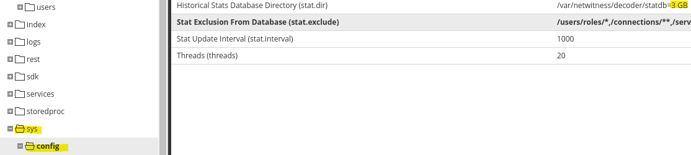
- Expand Decoder\sys\config
- Find the value titled: "Historical Stats Database Directory (stat.dir)"
- Update the value to the lower recommended size of "3 GB"
- Example: /var/netwitness/decoder/statdb=3 GB
- Click outside the box or press enter to commit
- For the parsestatdb:
- Expand the Decoder\decoder\parsers\config page
- Find the value titled "Parser Stat Database Directory (parser.stat.dir)"
- Update the value to the lower recommended size of "3 GB"
- Example: /var/netwitness/decoder/parsestatdb=3 GB
- Click outside the box or press enter to commit

- Afterwards, go in to the Decoder|Logdecoder >System page, and restart the service via the UI (note the "Shutdown Service" button simply restarts the service, it does not shut it down):

- Once complete, check to ensure the following:
- Execute a "df -h" and ensure it shows /var/netwitness/decoder or /var/netwitness/logdecoder are no longer being utilized at or near 100%
- Execute a "du -sh" on the /var/netwitness/
/parsestadb and statdb to ensure they're not exceeding 3GB in side. Examples below:
[root@NET-HYBRID ~]# du -sh /var/netwitness/decoder/* | grep -i statdb
578M /var/netwitness/decoder/parsestatdb
2.9G /var/netwitness/decoder/statdb

[root@LOG-HYBRID ~]# du -sh /var/netwitness/logdecoder/* | grep -i statdb
360M /var/netwitness/logdecoder/parsestatdb
46M /var/netwitness/logdecoder/statdb
- For the statdb:
Product Details
NetWitness Product Set: NetWitness Logs & Network
NetWitness Product/Service Type: Packet Decoder, Log Decoder
NetWitness Version/Condition: 12.4 and above
Platform: AlmaLinux
Summary
After upgrading or installing NetWitness 12.4 or later, the root of the volume for /var/netwitness/decoder (Network Decoders) or /var/netwitness/logdecoder (Log Decoders) begins filling to 100%. In this scenario, you may receive a H&W alarm or the decoder or logdecoder services may stop. Often times this is confused with the captured data subdirectories filling up (such as packetdb or metadb), but when running a df -h to examine the filesystem via the CLI, it is observed that those directories, contained on their own mount points, are still being maintained fine and not exceeding the pre-defined limit of 95%. The directory(s) that are now filling up this volume are likely comprised of the statdb (pre-existing) and the new parsestatdb (new as of 12.4).
Approval Reviewer Queue
Technical approval queue