Skip to content
  • There are no suggestions because the search field is empty.

Aggregation Rules Tab (11.0 and earlier)

Aggregation Rules Tab (11.0 and earlier)Aggregation Rules Tab (11.0 and earlier)

The Aggregation Rules tab enables you to create and manage aggregation rules for automating the incident creation process. NetWitness provides 11 preconfigured rules. You can add to and adjust these rules for your own environment.

Note: This topic applies to NetWitness version 11.0 and earlier.

What do you want to do?What do you want to do?


  • Role: Incident Responders, Analysts, Content Experts, SOC Manager
  • I want to ...: View the results of my aggregation rule (View Detected Threats).
  • Show me how: See "Responding to Incidents" in the NetWitness Respond User Guide.

Related TopicsRelated Topics

Quick LookQuick Look

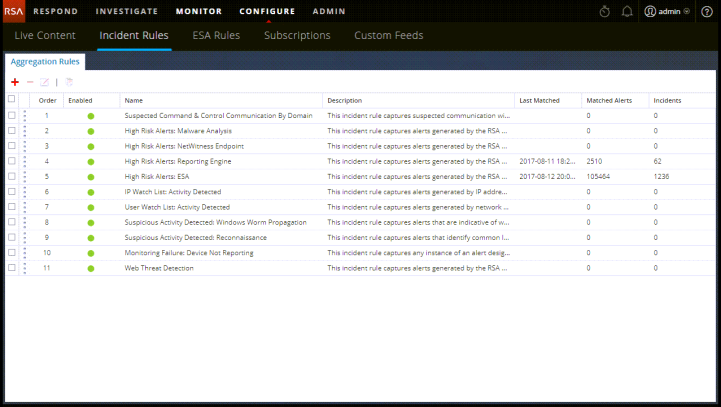
To access the Aggregation Rules tab, go to Configure > Incident Rules > Aggregation Rules tab.
netwitness_confaggrulestab_721x407.png

The Aggregation Rules tab consists of a list and toolbar.

Aggregation Rules ListAggregation Rules List

The following table describes the columns in the Aggregation Rules list.

  • Column:

    Select

  • Description:

    Enables you to select a rule in order to take an action, such as Clone or Delete.


  • Column: Order
  • Description: Shows the order in which the rule is placed. The rule order determines which rule takes effect if the criteria for multiple rules match the same alert. If two rules match an alert, only the rule with the highest priority is evaluated.

  • Column: Name
  • Description: Displays the name of the rule.

  • Column: Enabled
  • Description: Shows whether the rule is enabled or not.
    The netwitness_green_dot.png specifies the rule is enabled.

  • Column: Description
  • Description: Displays the description of the rule.

  • Column: Last Matched
  • Description: Displays the time when an alert was successfully matched with the rule. This value is reset once a week.


Aggregation Rules ToolbarAggregation Rules Toolbar

The following table shows the operations that can be performed in the Aggregation Rules tab.

  • Option: netwitness_icon_add.png
  • Description: Allows you to add a new rule.

  • Option: netwitness_icon_edit.png
  • Description: Allows you to edit a rule.

  • Option: netwitness_delete_rule_icon_im.png
  • Description: Allows you to delete a rule.

  • Option: netwitness_clone_rule_icon_im.png
  • Description: Allows you to duplicate a rule.