.png?width=180&height=32&name=NW%20Logo%20(2).png)
Issue
When trying to download software from the RSA Download Central (https://download.rsasecurity.com) website an HTTP 403 Forbidden error is displayed in the pop-up window for the Akamai Download Manager as below: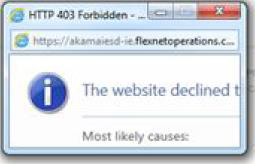
Cause
RSA uses the Akamai Download Manager for software downloads from Download Central which needs to be installed in the web browser. The installation is often blocked by a customer’s network restrictions, proxy settings and/or Java Security level.
Resolution
The resolution for this issue depends on the web browser you are using however all browsers will require the customer to ensure their pop-up blocker is not set to block all pop-ups and that their network settings such as a proxy server will not block the installation of the Akamai Download Manager add-on.If the issue is not related to a pop-up blocker or network restrictions then follow the below browser specific steps:
Chrome and Firefox
A. Go to Control Panel on your PC and open Java:

B. In the Java Control Panel click ‘Edit Site List’:

C. Add the following URL’s:
- https://akamaiesd-ie.flexnetoperations.com
- https://a248.e.akamai.net
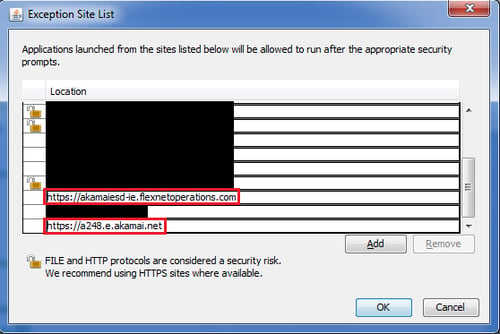
D. Once complete you should be able to install and use the Akamai Download Manager.
Internet Explorer
With Internet Explorer you may need to perform a number of steps to resolve the issue. After each of the following steps attempt the download again to confirm successful installation and use of the Akamai Download Manager:
Step 1:
A. Go to Tools/Settings
 > Internet Options > Security > Trusted Sites > Sites
B. Add the following URL’s:
- https://rsasecurity.subscribenet.com
- https://*.flexnetoperations.com

C. Click Close
D. Click OK
Step 2:
A. Go to Tools/Settings
 > Internet Options > Connections tab > LAN settings
B. Uncheck Use a proxy server for your LAN
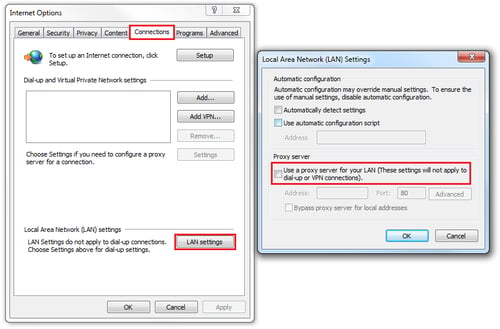
C. Click OK and then OK again
Step 3:
A. Go to Tools/Settings
 > Compatibility View Settings
B. Add the following URL’s:
- https://rsasecurity.subscribenet.com
- https://*.flexnetoperations.com
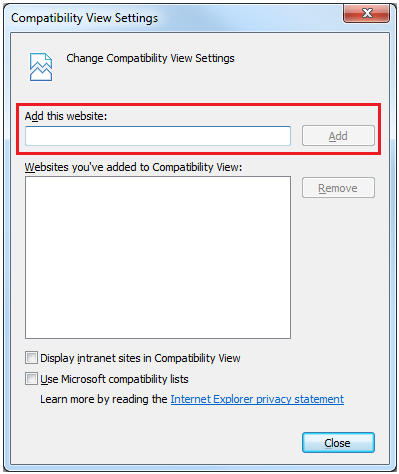
C. Click Close
Step 4:
If the Akamai Download Manager installed but still does not work, check that the add-on is enabled as below:
A. Go to Tools/Settings
 > Manage Add-ons
B. Select All add-ons from the ‘Show:’ drop down menu

C. Locate Akamai Technologies Inc. > DLM Control to ensure it is installed
D. If Disabled click the Enable button

E. Click Close
Product Details
RSA Product Set: All RSA ProductsApproval Reviewer Queue
ADP Approval Group