.png?width=180&height=32&name=NW%20Logo%20(2).png)
Archiver Collection DialogArchiver Collection Dialog
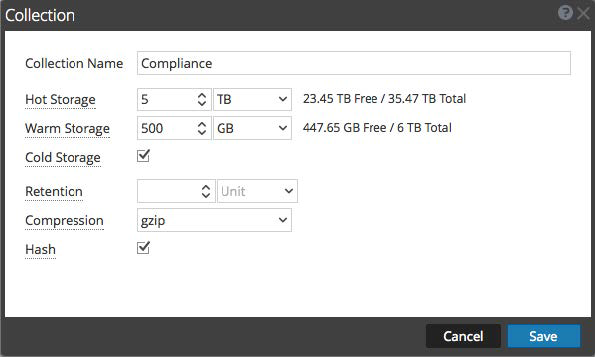
On the  (Admin) > Services > Config view > Data Retention tab of an Archiver, administrators can define the criteria for log retention and storage. In the Collection dialog, which is accessible from the Collections section, you can define individual storage collections to use for different log types. For example, you may want to create collections for compliance reasons or to selectively retain critical logs.
Workflow
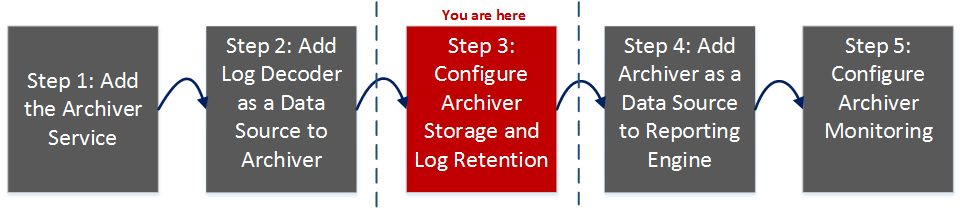
This workflow illustrates the end-to-end installation and configuration process for an Archiver.
What do you want to do?
*You can perform this task here.
Related Topics
Quick Look
To access the Collection dialog:
- Go to (Admin) > Services, click
 , and select Archiver.
 -
In the Actions column, click
 > View > Config.
The Services Config view of Archiver is displayed with General tab open.
- Click the Data Retention tab.
-
In the Collections section, click
 .
.The Collection dialog is displayed.
Note: When decreasing collection storage allocations or lowering retention time, it may take several minutes to hours for the data to move and space to become available depending on the amount of moving (rolling) data. The default times are every 20 minutes for a size roll and every six hours for a time roll.
The following table describes the fields in the Collection Dialog.