Build a Statement Dialog
Build a Statement DialogBuild a Statement Dialog
The Build a Statement dialog allows you to construct a condition statement when creating a new Rule Builder rule.
What do you want to do?What do you want to do?
- Role: Content Expert
- I want to ...: Configure a rule statement.
- Show me how: Step 2. Build a Rule Statement
- Role: Content Expert
- I want to ...: Add conditions to the rule.
- Show me how: Step 3. Add Conditions to a Rule Statement
Related TopicsRelated Topics
Quick LookQuick Look
To access the Build a Statement dialog:
-
Go to
(Configure) > ESA Rules.The Configure ESA Rules view is displayed with the Rules tab open.
-
In the Rule Library toolbar, select
> Rule Builder.A New Rule tab is displayed..
-
In the Conditions section, click
.The Build a Statement dialog is displayed.
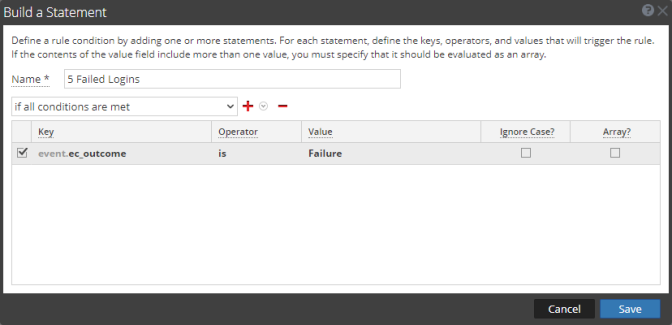
The following table describes the parameters in the Build a Statement dialog.
- Parameter: Name
- Description: Purpose of the statement.
- Parameter: Select
- Description: Conditions the rule requires. There are two options:
- If all conditions are met
- If any of these conditions are met
- Parameter: Key
- Description: Key for ESA to check in the rule statement.
- Parameter: Operator
- Description: Relationship between the meta key and value for the key:
- is
- is not
- is not null
- is greater than (>)
- is greater than or equal to (>=)
- is less than (<)
- is less than or equal to (<=)
- is one of (For array type meta)
- is not one of (For array type meta)
- contains
- not contains
- begins with
- ends with
- Parameter: Value
- Description: Value for ESA to look for in the key.
- Parameter: Ignore Case?
- Description: This field is designed for use with string and array of string values. By choosing the Ignore Case field, the query will treat all string text as a lowercase value. This ensures that a rule that searches for the user named Johnson would trigger if the event contains "johnson," "JOHNSON," or "JoHnSoN."
- Parameter: Array?
- Description: Choice to indicate if contents of Value field represent one value or multiple values:
- Select the box to indicate multiple values.
- Clear the box to indicate one value.
- Parameter:

- Description: Add a statement. You can add a meta condition, whitelist condition, or blacklist condition.
- Parameter:

- Description: Delete selected statement.
- Parameter: Save
- Description: Add statement to the Conditions section of the Rule Builder tab.
The following table shows the operators you can use in the Rule Builder:
- Operator: is
- Required Value: Singular string value
- Usage: The meta key is equal to the value field.
- Example: user_dst is John Doe.
- Meaning: user_dst is equal to the string "John Doe".
- Operator: is
- Required Value: Array string value
- Usage: The meta key is equal to one of the elements of the value field.
- Example: user_dst is John, Doe, Smith.
- Meaning: user_dst is equal either to the string "John" or to the string "Doe" or to the string "Smith" (Note, the spaces are stripped.).
- Operator: is not
- Required Value: Singular string value
- Usage: The meta key is not equal to the value field.
- Example: size is not 200.
- Meaning: size is not equal to the number 200 (size is a numeric value).
- Operator: is not
- Required Value: Array string value
- Usage: The meta key is not equal to any of the elements of the value field.
- Example: size is not 200, 300, 400.
- Meaning: size is equal neither to 200 nor to 300 nor to 400.
- Operator: is not null
- Required Value: N/A (looks for any value)
- Usage: The meta key value is not null.
- Example: user_dst is not null.
- Meaning: user_dst is a meta that contains a value.
- Operator: is greater than (>)
- Required Value: Number
- Usage: The numeric value of the meta key is greater than the number in the value field.
- Example: payload is greater than 7000.
- Meaning: payload is a numeric value that is greater than 7000.
- Operator: is greater than or equal to (>=)
- Required Value: Number
- Usage: The numeric value of the meta key is greater than or equal to the number in the value field.
- Example: payload is greater than or equal to 7000.
- Meaning: payload is a numeric value that is greater than or equal to 7000.
- Operator: is less than (<)
- Required Value: Number
- Usage: The numeric value of the meta key is less than the number in the value field.
- Example: ip_dstport is less than 1024.
- Meaning: ip_dstport is a numeric value that is less than the numeric value 1024.
- Operator: is less than or equal to (<=)
- Required Value: Number
- Usage: The numeric value of the meta key is less than or equal to the number in the value field.
- Example: ip_dstport is less than or equal to 1024.
- Meaning: ip_dstport is a numeric value that is less than or equal to numeric value 1024.
- Operator: is one of
- Required Value: Array string value
- Usage: The meta key is one of the array string values in the value field.
- Example: alias_host is one of Facebook, UTube, Instagram.
- Meaning: alias_host is one of the array string values Facebook, UTube, Instagram.
- Operator: is not one of
- Required Value: Array string value
- Usage: The meta key is not one of the array string values in the value field.
- Example: alias_host is not one of Facebook, UTube, Instagram.
- Meaning: alias_host is not one of the array string values Facebook, UTube, Instagram.
- Operator: contains
- Required Value: String
- Usage: The value field is a substring of the meta key. (This operator is only available for a string-valued meta key).
- Example: ec_outcome contains failure.
- Meaning: ec_outcome is a string that contains the substring "failure".
- Operator: not contains
- Required Value: String
- Usage: The value field is not a substring of the meta key (This operator is only available for a string-valued meta key).
- Example: ec_outcome not contains failure.
- Meaning: ec_outcome is a string that does not contain the substring"failure".
- Operator: begins with
- Required Value: String
- Usage: The value field is the beginning of the meta key (This operator is only available for a string-valued meta key).
- Example: ip_dst begins with 127.0.
- Meaning: ip_dst is a string that starts with "127.0".
- Operator: ends with
- Required Value: String
- Usage: The value field is the end of the meta key (This operator is only available for a string-valued meta key).
- Example: user_dst ends with son.
- Meaning: user_dst is a string that ends in"son".
- Operator:
Note: Terms in bold italics are Meta that may not exist in all customer environments.