Skip to content
  • There are no suggestions because the search field is empty.

Build Chart View

Build Chart ViewBuild Chart View

In the Build Chart view, you can define and test a chart. You build a chart by assigning a name and then selecting a rule to include.

Note: Only the NetWitness DB rules can be used in charts.

Workflow
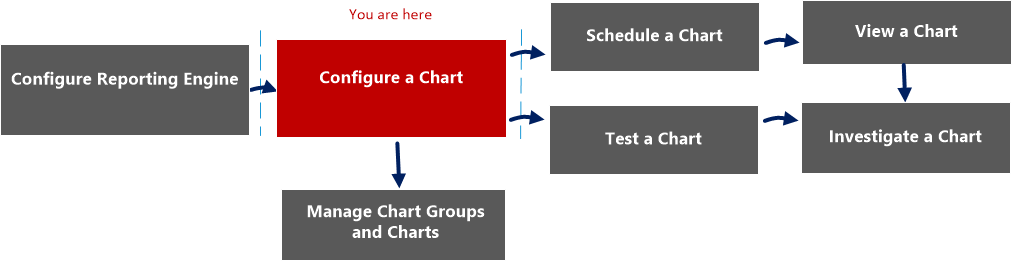
netwitness_build_chart_workflow.png

What do you want to do?

  • Role:

    Administrator/ Analyst

  • I want to ...:

    Configure Reporting Engine

  • Documentation:

    For more information, see "Configure Reporting Engine" in the Reporting Engine Configuration Guide.


  • Role: Administrator/ Analyst
  • I want to ...: Configure a chart*
  • Documentation: Configure a Chart

  • Role:

    Administrator/ Analyst

  • I want to ...:

    Schedule a chart

  • Documentation:

    Schedule a Chart


  • Role:

    Administrator/ Analyst

  • I want to ...:

    View a chart

  • Documentation:

    View a Chart


  • Role: Administrator/ Analyst
  • I want to ...: Test a chart
  • Documentation: Test a Chart

  • Role: Administrator/ Analyst
  • I want to ...: Investigate a chart
  • Documentation: Investigate a Chart


*You can complete these tasks here.

Quick View

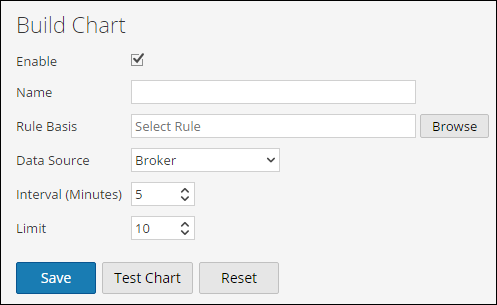
The following figure is an example of the Build Chart view.
netwitness_build_chart.png

The following table describes the features in the Build Chart view.

  • Field: Enable
  • Description:

    Specifies if the Reporting Engine must collect the data and generate chart results. If the Enable checkbox is not selected, the results are not rendered.


  • Field: Chart Name
  • Description:

    Identifies the name of the chart.


  • Field: Rule Basis
  • Description:

    Displays the Add Rules dialog box from which you select a rule that is the basis of a chart. The rule that you select must be a rule which is not sorted by none.


  • Field: Data Source
  • Description:

    If the default data source is configured in the Reporting Engine, the data source is displayed on the Build Chart page. If a chart is configured to run on any other data source, that data source is displayed on the Build Chart page instead of the default data source. The Reporting module works with the following data sources:

    • Broker
    • Concentrator
    • Decoder
    • Log Decoder
    • Log Collector

  • Field: Interval (Minutes)
  • Description:

    The chart data refresh interval in minutes.


  • Field: Limit
  • Description:

    The number of records for which a chart is generated.


  • Field: Save
  • Description:

    Saves a chart to the database.


  • Field: Test Chart
  • Description:

    Plots a test chart based on the chart definition.


  • Field:

    Reset

  • Description:

    Resets the chart details.