.png?width=180&height=32&name=NW%20Logo%20(2).png)
Issue
User “jordi” was created and mapped to role “ayshay” but when logged in as “jordi”, he cannot select any data source for scheduling reports.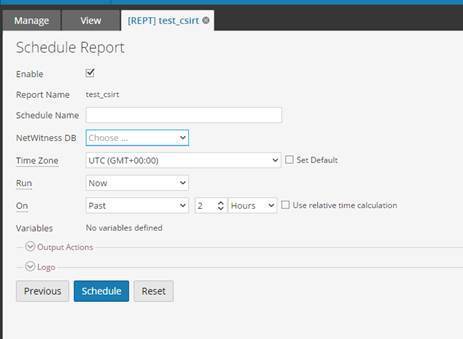
Cause
This is because the role “ayshay” does not have the permission under Reporting Engine Data Source.
Resolution
Version 11.xAdmin -> Services -> Reporting Engine Service -> View Config -> Select one of the Concentrators or Broker sources that you would need to configure permissions -> Click Set Permissions
Version 10.6.x
Go to RE --> View Config --> Sources --> Select one of the sources for instance a Concentrator --> Click Set Permissions
Change it from "No Access" to “Read Only” for the desired role.

Product Details
RSA Product Set: RSA NetWitness Logs & NetworkRSA Product/Service Type: RSA NetWitness for Logs and Network
Summary
This kb article describes how to fix permission issues on RE Data Sources.
Approval Reviewer Queue
RSA NetWitness Suite Approval Queue