.png?width=180&height=32&name=NW%20Logo%20(2).png)
Configure Chain of Remote CollectorsConfigure Chain of Remote Collectors
This topic describes how to chain Remote Collectors (also referred to as VLCs).
You can set up a chain of Remote Collectors to push event data to a Remote Collector, or you can configure a Remote Collector to pull event data from a chain of Remote Collectors.
- Remote Collectors to push data. Push data from a Remote Collector to other Remote Collectors or Local Collectors.
- Remote Collector to pull data. Use a Remote Collector to pull data from one or more Remote Collectors.
Configure Remote Collector to Push Event Data to Remote CollectorConfigure Remote Collector to Push Event Data to Remote Collector
- Go to
 (Admin) > Services.
 - In Services, select a Remote Collector.
-
Under Actions, select
 > View > Config to display the Log Collection configuration parameter tabs.
The Log Collector Service Config view is displayed with the Log Collector General tab open.
- Select the Local Collectors tab.
- Select Destinations in the Select Configurations drop-down menu.
-
In the Destination Groups panel section, select
 .
.The Add Remote Destination dialog is displayed.
-
Set up a Destination Group:
- Enter a Destination Name.
- (Optional) Enter a Group Name. If you leave Group Name blank, NetWitness sets it to the value that you specified in Destination Name.
- Select one or more collection protocols in the Collections drop-down list.
-
Under Log Collectors Addresses, click
 to select a Remote Collector.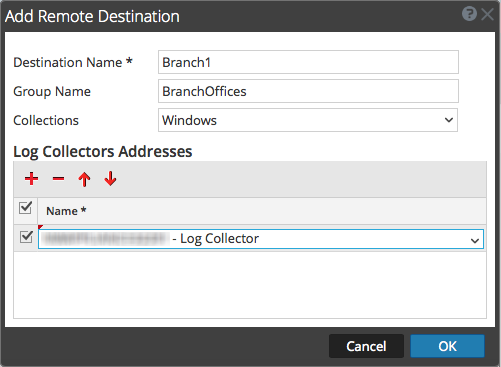
Note: If you do not select a collection protocol, the Remote Collector pushes all collection protocols to the Remote Collectors.
Configure Remote Collector to Pull Event Data from a Remote CollectorConfigure Remote Collector to Pull Event Data from a Remote Collector
- Go to (Admin) > Services.
- In Services, select a Remote Collector.
-
Under Actions, select
> View > Config to display the Log Collection configuration parameter tabs.The Service Config view is displayed with the Log Collector General tab open.
- Select the Local Collectors tab.
-
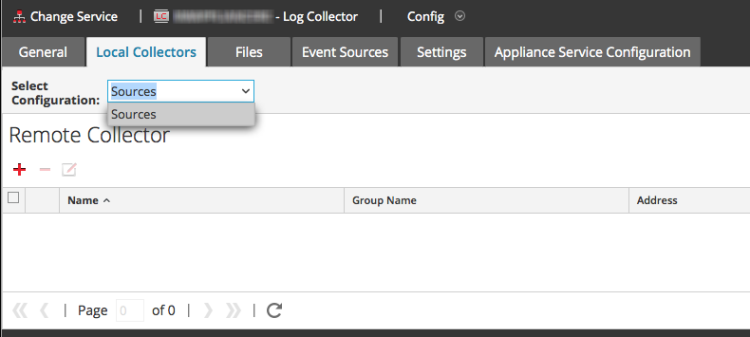
Select Sources in the Select Configurations drop-down menu.
-
In the Remote Collectors panel, select
 .
.The Add Source dialog is displayed.
-
In the Add Source dialog:
-
Select one or more collection protocols.
If you do not select a collection protocol, the Remote Collector pulls all collection protocols from the Remote Collector.
- Click OK.
-
The Remote Collector is added to the Remote Collector section. When the Log Collector starts collecting data, it pulls event data from this Remote Collector.