.png?width=180&height=32&name=NW%20Logo%20(2).png)
Configure SNMP Event Sources in NetWitness
This topic tells you how to configure the SNMP collection protocol.
Configure the SNMP Trap Event Source
To add the SNMP Event Source:
Note: If you have previously added the snmptrap type, you cannot add it again. You can edit it, or manage users.
- Go to
 (Admin) > Services from the NetWitness menu.
 - Select a Log Collection service.
- Under Actions, select
 > View > Config to display the Log Collection configuration parameter tabs.
 -
Click the Event Sources tab.
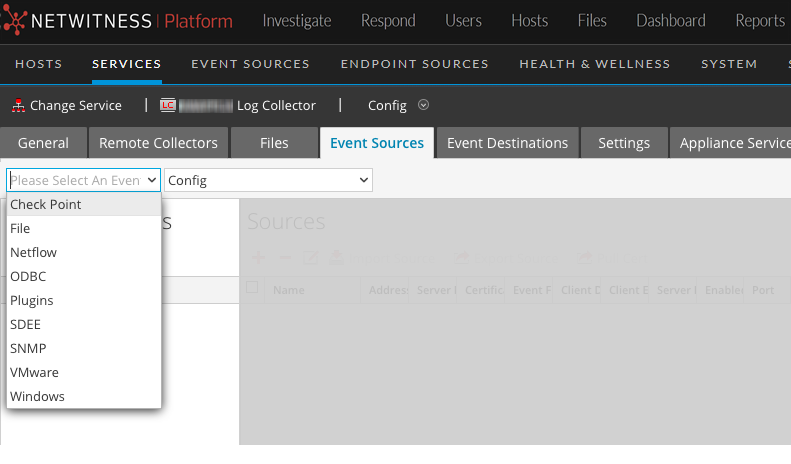
- In the Event Sources tab, select SNMP/Config from the drop-down menu.
-
In the Event Categories panel toolbar, click
 .
.The Available Event Source Types dialog is displayed.
-
Select the snmptrap event source type and click OK.
The newly added event source type is displayed in the Event Categories panel.
- Select snmptrap in the Event Categories panel.
-
Select snmptrap in the Sources panel and then click the Edit icon,
 , to edit the parameters.
 - Update any of the parameters that you need to change and click OK.
(Optional) Configure SNMP Users
If you are using SNMPv3, follow this procedure to update and maintain the SNMP v3 users.
To configure SNMPv3 Users:
-
Go to
(Admin) > Services. -
In the Services grid, select a Log Collector service.
-
Click
under Actions and select View > Config. -
In the Log Collector Event Sources tab, select SNMP/SNMP v3 User Manager from the drop-down menu.
The SNMPv3 User panel is displayed with the existing users, if any.
-
Click
to open the Add SNMP User dialog. - Fill in the dialog with the necessary parameters. The available parameters are described below.
SNMP User Parameters
The following table describes the parameters that you need to enter when you create an SNMPv3 user.
Note: Required parameters are marked with an asterisk. All other parameters are optional.