.png?width=180&height=32&name=NW%20Logo%20(2).png)
Issue
How to configure NetWitness Decoder Application Rules to create meta based on session size.
Resolution
As per the knowledgebase article Why are NetWitness Investigate session size and packet count values inaccurate? , the session size is an estimation. However, users often want to drill into large sessions using the investigation page or create reports based on session size using Reporting Engine.
You can create application rules on your decoder that alerts on size characteristics of sessions and you can query on those alert meta values. Multiple decoder rules can be created:
- one for sessions below a certain size
- l- (lower bound), (size = l-16000) would specify a range between the lowest possible value to 16000.
- one or several to tag sessions in a range between a lower and upper size
- (lower bound) - (upper bound), (size = 16000 - 30000) would specify range between 16000 and 30000
- (lower bound) - (upper bound), (size = 30000 - 64000) would specify range between 30000 and 64000
- one for a sessions above a certain size
- (upper bound) - u ,(size = 64000-u) would specify a range between 64000 and above
To create an App Rule for Decoders not managed by Centralize Content Management (CCM), kindly follow the steps in this guide.
To create an App Rule for Decoders managed by CCM, kindly follow the steps in this guide.
Example Rules:
Decoder App Rule 1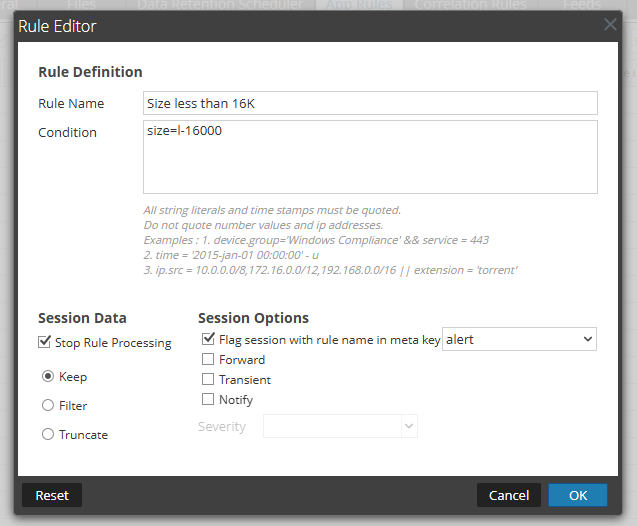
Decoder App Rule 2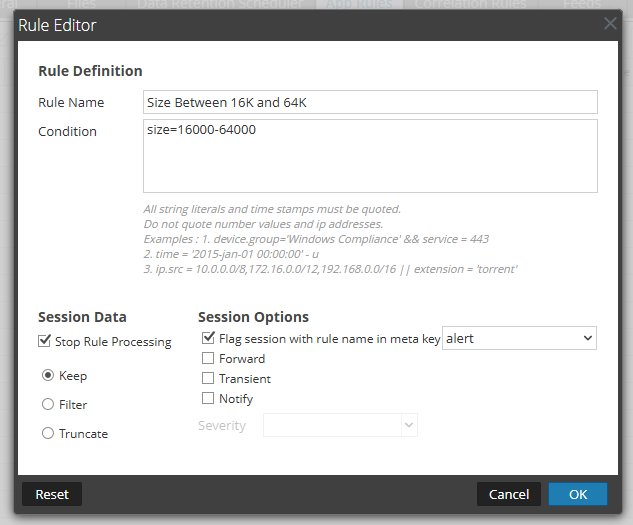
Decoder App Rule 3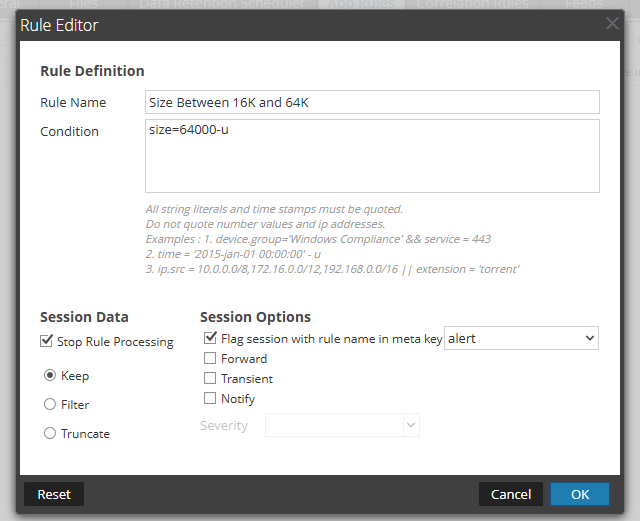
For more details on how to write App Rule conditions, kindly check this article.
Each application rule above will create a meta value in "alert" meta key with the rule name as the actual meta value. For example, App rule 3 'Size greater 64k' will create a meta value called 'Size greater 64k' in the Investigate 'Risk Info' meta, which tags all sessions with size meta value greater than 64kb.
Notes
Per the knowledgebase article Why are NetWitness Investigate session size and packet count values inaccurate?, because size meta value for a session is an estimate and could be at the low end, so sessions tagged by App Rules above could also be estimates.Internal Comments
UserName:hawkir - 10/2/2012 4:55:33 PM - Decoder - App Rules to create meta based on session size
Solution 668
UserName:shurtj - 8/12/2014 7:11:36 PM - Updated Article
Updated article and made changes to abide by Primus best practices.
Omar Imam - 15 May 2024
Updated version, product name, screenshots, links to articles and guides
Fixed Broken links and updated screenshots with relevant meta
Evan Pols -- 14 Mar 2025
Rewrote some portions for clarity, adjusted formatting and moved some items around.
Product Details
NetWitness Product Set: NetWitness Logs & Network
NetWitness Product/Service Type: Packet Decoder
NetWitness Version/Condition: 10.x, 11.x, 12.x
Platform: CentOS / AlmaLinux
Approval Reviewer Queue
Technical approval queue