.png?width=180&height=32&name=NW%20Logo%20(2).png)
Issue
While following the storage configuration guide found at Storage: Configure Storage Using the REST API an error occurs when attempting to perform the raidnew step with a Log Decoder, Network Decoder, or Archiver PowerVault that contains mixed sized drives.
Bad Request: Enclosure does not have a slot numbered ##
Mixed size drives, in this instance, mean that all the required drives for the array being created are not of the same size in Terabytes. This can occur within PowerVaults when an RMA replaces an older Dell hard drive that has been retired with a newer larger drive. When these larger drives are used to replace a failed drive in a functioning PowerVault array, there are no issues. The array seamlessly rebuilds onto the larger drives. However, if the PowerVault is completely reset for a re-provision or re-purpose, these mixed size drives will cause a configuration failure when being set up with the REST API. The error above will denote the slot(s) the mismatched drive is in.
Resolution
The instructions within this section provide the required perccli command necessary to get passed the raidnew creation step within the REST API instructions. Once the below perccli commands are ran successfully, please go back to the Storage: Configure Storage Using the REST API guide to complete the storage setup.
- Look at the raidlist command output referenced in the storage configuration guide under Task 2, Step 1. It should look similar to the example below.
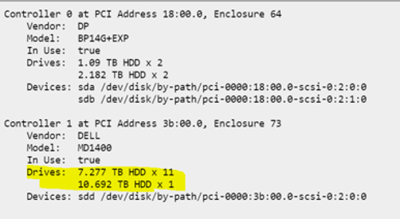
- From the raidlist output in the example above, the highlighted area shows one drive that is larger than the others (10.692 TB compared to 7.277 TB). This is how it can easily be determined when a drive mismatch is causing the Bad Request error message. Once it is confirmed the issue is due to a drive mismatch, collect the following information from the raidlist output.
- Controller Number: In the example output above it is 1.
- Enclosure Number: In the example output above it is 73.
- Drive Slots: In the example output, this will be 0 to 11 since there are a total of 12 drives and the slot count starts at 0.
- SSH to the appliance the storage is being set up on as the next commands will need to be run from the appliance's command-line interface.
- Using the Controller, Enclosure, and Drive Slot numbers, refer to the perccli commands below that are associated with the correct appliance type the PowerVault storage is attached to.
Network Decoder
Decodersmall RAID 5 virtual disk creation command.
Decoder RAID 5 virtual disk creation command
Log Decoder
Logdecodersmall RAID 5 virtual disk creation command.
Logdecoder RAID 5 virtual disk creation command
Archiver
Archiver RAID 6 virtual disk creation command.
- Once the necessary perccli commands are successful, return to the Storage: Configure Storage Using the REST API guide and start at Task 3 - Allocate Block Devices to Partitions, Volume Groups, and Logical Volumes.
If there are any issues running the commands above or need further assistance with setting up the PowerVault storage, reach out to RSA NetWitness Support.
Product Details
RSA Product Set: NetWitness PlatformRSA Product/Service Type: Network/Log Decoder, Archiver
RSA Version/Condition: 11.4.x
Platform: CentOS
O/S Version: 7
Summary
This article is to help address an error that is seen during a complete rebuild of storage on PowerVaults that contains mixed sized drives.
Approval Reviewer Queue
RSA NetWitness Suite Approval Queue