.png?width=180&height=32&name=NW%20Logo%20(2).png)
Issue
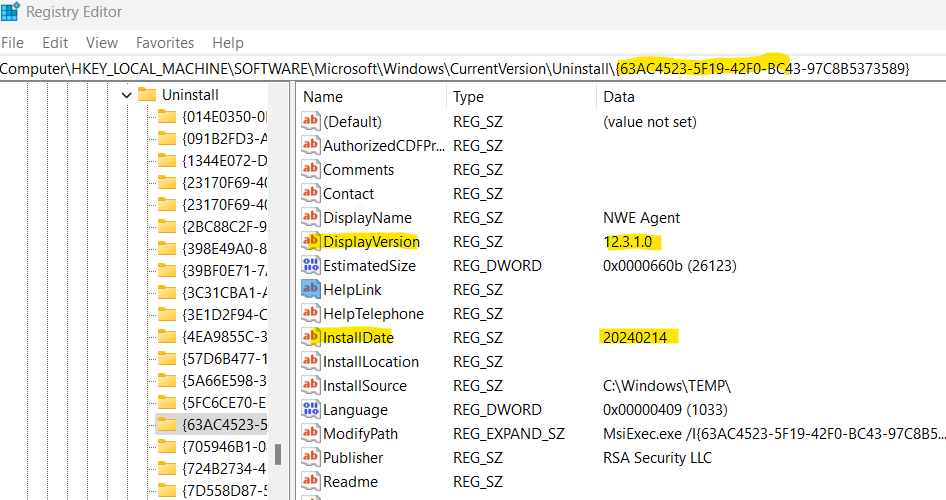
Verification using SCCM or other tools that bulk push out updates may be difficult to verify that they have been performed successfully. Since the agent rolls back failed upgrades, the version number in the registry should still show the old agent version. Hence, targeting the DisplayVersion and InstallDate registry values may yield information about the agent.
Cause
The causes for agent failure to install have multiple reasons and are not necessary for this article's discussion.
Resolution
Using SCCM or another software solution, verify the output of the following registry keys:- HKEY_LOCAL_MACHINE\SOFTWARE\Microsoft\Windows\CurrentVersion\Uninstall\{63AC4523-5F19-42F0-BC43-97C8B5373589}\DisplayVersion
- HKEY_LOCAL_MACHINE\SOFTWARE\Microsoft\Windows\CurrentVersion\Uninstall\{63AC4523-5F19-42F0-BC43-97C8B5373589}\InstallDate
Taken together, it becomes possible to verify if an agent upgrade succeeded or failed as these values would rollback to their previous entries if an installation fails. Note this applies to upgrades mainly; for fresh installs, a separate registry key located in the services directory called ServerSS is useful to determine if the agent checked in to the server after installation.
Notes
To the Uninstall registry location, it is identical between the original Endpoint agent, and the Insights agent, although the values will be different in some cases. The two values used in this article do not change, so both can be treated the same for testing if an upgrade succeeded or failed.
Internal Comments
Updated to reflect Endpoint information rather than ECAT.
Product Details
NetWitness Product Set: NetWitness EndpointNetWitness Product/Service Type: NetWitness Endpoint
NetWitness Version/Condition: Endpoint Agent 11.1.x-11.2.x
Platform: Windows
Summary
For SCCM purposes, it may be desired to confirm the upgrade status the NetWitness Endpoint agent from the Windows registry. If so, this can be done by targeting a specific set of registry entries.
Approval Reviewer Queue
Technical approval queue