.png?width=180&height=32&name=NW%20Logo%20(2).png)
Issue
The Context Hub Server Config page ((Admin) > Services > select the ContextHub Server > View > Config) keeps loading if the RSA Endpoint (ECAT Data Sources) is not removed from the Context Hub Server before upgrading from 11.7 and older versions to 12.0, 12.1, or 12.1.x.x versions. Therefore, you cannot access the Data Sources.
Cause
In 12.0 and later versions, the ECAT Integration, such as the RSA Endpoint (ECAT Data Sources) in the ContextHub Server, is not supported by NetWitness Platform XDR.
Resolution
To load the contexthub server config page, follow the below instructions.Step 1: SSH to the Admin Server.
Step 2: Enter the below command to log in to Mongo DB and go to the ContextHub collection.
1. mongo -u deploy_admin -p
2. show dbs
3. use contexthub-server
Step 3: After getting inside context hub-server db use the following commands to search for RSA Endpoint Document.
Step 4: If this doesn’t show any result, then use third-party tools like robo 3T software or mongod compass to log in and navigate to the context hub db and delete RSA Endpoint from the Admin Server Mongo using GUI option.
1. show collections
2. db.ds_connections.find({"name":"RSAEndpoint"}).pretty()
3. db.ds_connections.remove({"name":"RSAEndpoint"})
Step 5: Run the following command to restart the Mongo from GUI.
service mongod restart
Step 6: Run the following command to restart the context hub server from the ESA box.
service rsa-nw-contexthub-server restart
The Config page loaded properly.
Important: RSA Endpoint is the ECAT Data Source used in the ContextHub Server and not the Endpoint Agent.
If using a GUI tool to manage mongod for, say Robo 3T in this case, then follow the below instructions:
1. Once the GUI opens up, go to File and click on Connect button and click on Create button to open a pop-up as shown in the image.
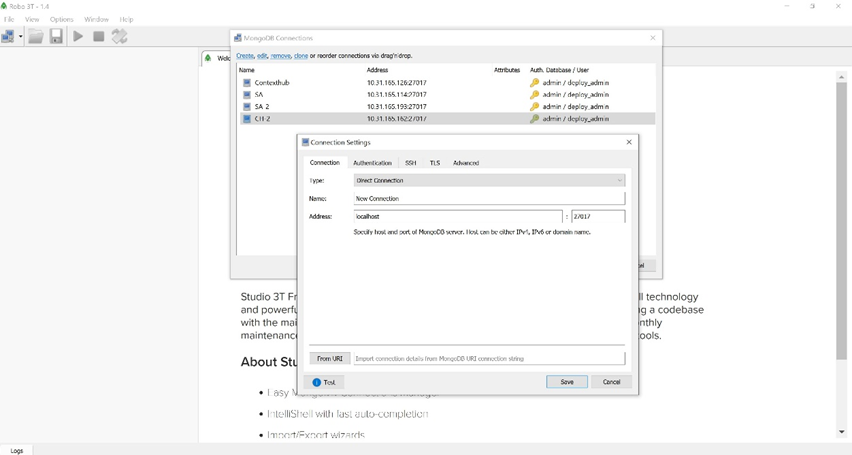
2. Replace localhost with head node IP address and move to the Authentication tab, as shown in the image.
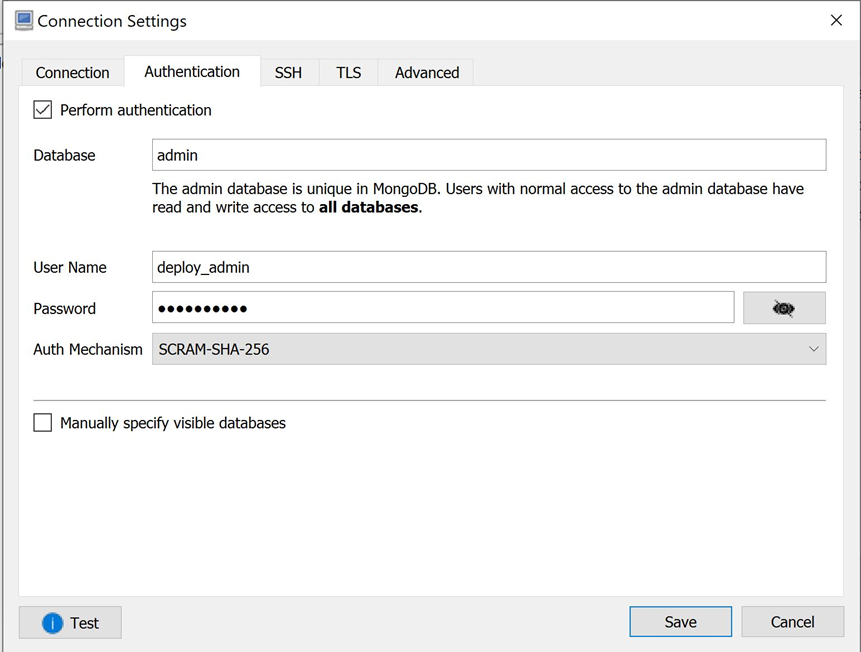
3. Select the Perform authentication checkbox and give the Database name as admin, User Name as deploy_admin, and Password for the deploy_admin and select SCRAM_SHA_256 as Auth Mechanism and then hit of test button to check for the connection getting established and save the option.
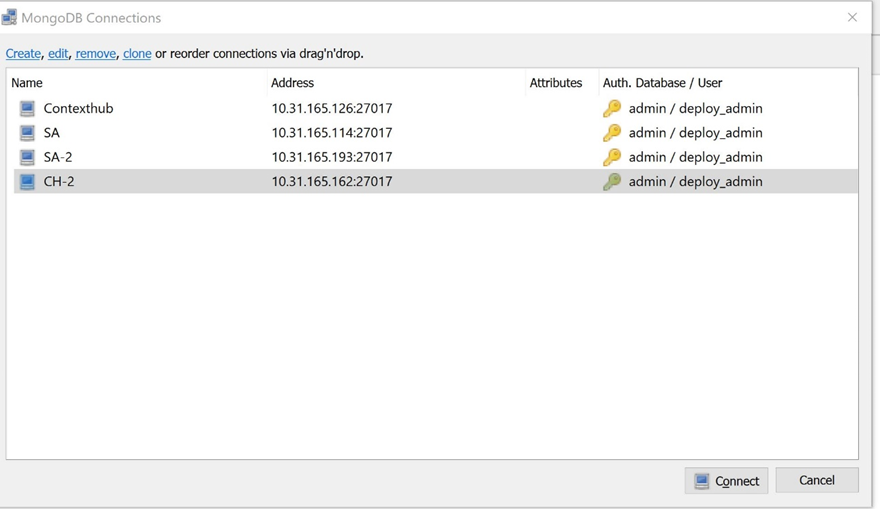
4. Once you save the option, it will appear in the previous screen something like this.
5. Click on connect button to connect to the head node. After that, navigate to the contexthub db and inside collections, check for the entry “RSA Endpoint,“ and right-click and delete the document for RSA endpoint. In this way, you can delete the entry from mongo using any GUI tools.
Note: You must restart the ContextHub service from the ESA box.
Product Details
RSA Product Set: NetWitness Platform XDRRSA Product/Service Type: RSA NetWitness Platform
RSA Version/Condition: 11.7.0.0
Platform: CentOS
O/S Version: 6/7
Summary
In 12.0 and later versions, the ECAT Integration, such as the RSA Endpoint (ECAT Data Sources) in the ContextHub Server, is not supported by NetWitness Platform XDR.
Approval Reviewer Queue
Technical approval queue