.png?width=180&height=32&name=NW%20Logo%20(2).png)
Issue
How to create a new NetWitness Logs and Packets Request for Enhancement (RFE).Resolution
1) Open JIRA and on the first screen select "Create" on the top of the page as shown below:

2) Fill in the following information as described below at the new screen:

*Note: Please include any and all information/attachments that will assist in the RSA team's understanding of the desired state for the customer.
3) Once the RFE information has been entered, on the right-hand side of the new JIRA ticket there will be a section labeled 'People'.
In order to get updates via email, ensure next to 'Watchers' you have selected the link "Start watching this issue":
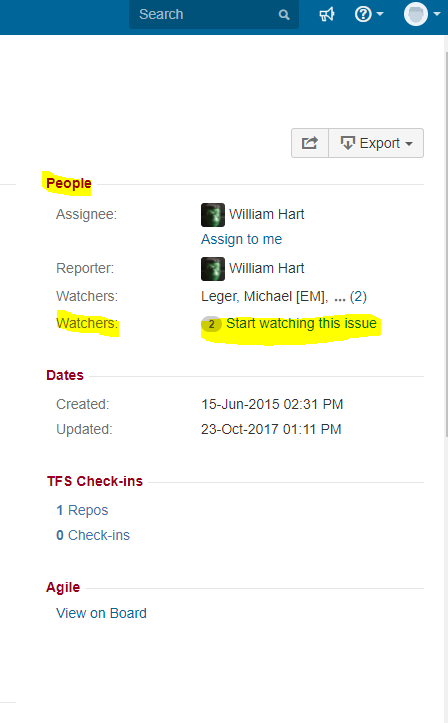
4) After Selecting the "Start watching this issue" it should now say "Stop watching this issue":
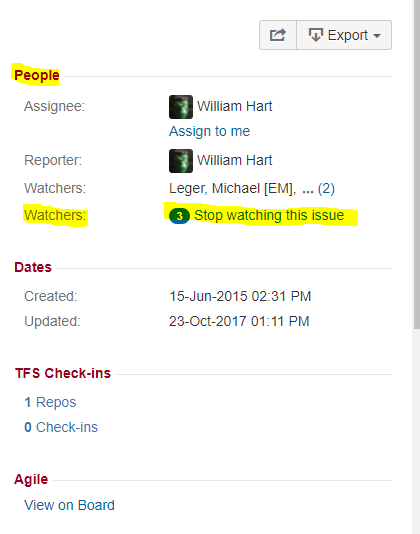
4) After Selecting the "Start watching this issue" it should now say "Stop watching this issue":
Product Details
RSA Product Set: RSA NetWitness Logs and NetworkRSA Product/Service Type: NetWitness Logs and Network
Approval Reviewer Queue
RSA NetWitness Suite Approval Queue