Skip to content
  • There are no suggestions because the search field is empty.

Create or Modify Template View

Create or Modify Template ViewCreate or Modify Template View

In the Create/Modify Template view, you can customize alert templates to use when creating alerts.

Workflow
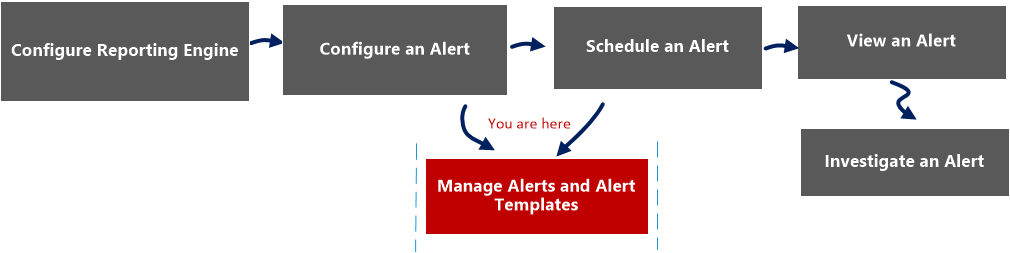
netwitness_alertlist_view_workflow.png

What do you want to do?


  • Role:

    Administrator/ Analyst

  • I want to...:

    Configure an alert

  • Documentation:

    Configure an Alert


  • Role:

    Administrator/ Analyst

  • I want to...: Schedule an alert
  • Documentation: Schedule an Alert

  • Role:

    Administrator/ Analyst

  • I want to...:

    View an alert

  • Documentation:

    View an Alert


  • Role: Administrator/ Analyst
  • I want to...: Investigate an alert
  • Documentation: Investigate an Alert


*You can complete these tasks here.

Related Topics

Alerting Overview

Quick View

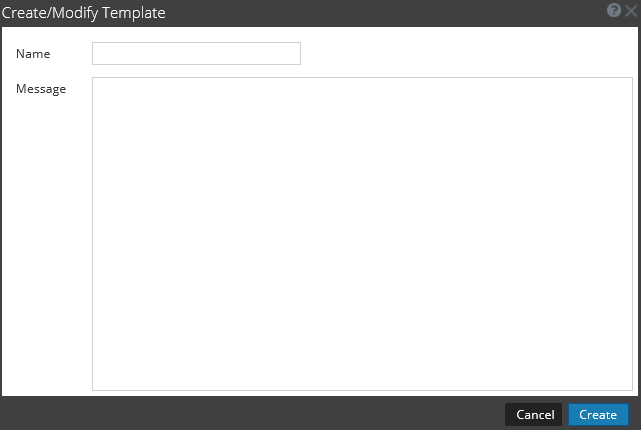
You can create or modify an alert template name and message on this view.

The following figure is an example of the Create or Modify alert template.
netwitness_create_modify_temp.png

The following table describes the fields in the Create/Modify template.

  • Feature: Name
  • Description: Indicates the name of the template for Reporting alerts. For example, source IP.

  • Feature: Message
  • Description: Specifies the message that will be sent when an alert is triggered.

  • Feature: Create
  • Description: Creates the template with a confirmation message and becomes available for use in Reporting immediately.

  • Feature: Save
  • Description: Saves the template with the edited details or when a new template is created. This button is visible only in the edit mode.

  • Feature: Cancel
  • Description: Closes the dialog without saving the template or any changes made to the template.