.png?width=180&height=32&name=NW%20Logo%20(2).png)
Issue
After creating a custom feed, for example to tag meta against a set of Fully Qualified Domain Names (FQDN), only some of the entries are tagged by the feed whereas some are not.In this example, the CSV file being used is shown in the screenshot below.
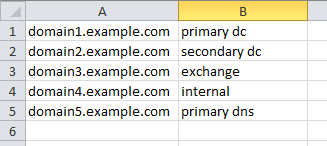
The XML file for the feed in this example is shown below.
<?xml version="1.0" encoding="UTF-8"?>
<FDF>
<FlatFileFeed separator="," comment="#" path="CompanyServers.csv" name="CompanyServers">
<MetaCallback name="device" valuetype="Text">
<Meta name="device.host">
</Meta>
</MetaCallback>
<LanguageKeys>
<LanguageKey name="companyserversfqdn" valuetype="Text"/>
</LanguageKeys>
<Fields>
<Field type="index" index="1"/>
<Field type="value" index="2" key="companyserversfqdn"/>
</Fields>
</FlatFileFeed>
</FDF>
<FDF>
<FlatFileFeed separator="," comment="#" path="CompanyServers.csv" name="CompanyServers">
<MetaCallback name="device" valuetype="Text">
<Meta name="device.host">
</Meta>
</MetaCallback>
<LanguageKeys>
<LanguageKey name="companyserversfqdn" valuetype="Text"/>
</LanguageKeys>
<Fields>
<Field type="index" index="1"/>
<Field type="value" index="2" key="companyserversfqdn"/>
</Fields>
</FlatFileFeed>
</FDF>
Cause
By default, custom feeds are case-sensitive. Therefore, if meta is generated with different casing from that which is in the CSV file, the custom feed will not tag the meta properly.In the example above, the CSV file has an entry for the domain1.example.com FQDN. If meta is generated for Domain1.EXAMPLE.COM then it will not be tagged by the custom feed.
Resolution
The basic feed setup in the UI is great for putting together a quick feed that does not have any special requirements with respect to the data it includes.However, If you want to do anything special, like multi-indexed feeds, SRC/DST meta key feeds, or in this case making it case insensitive, you have to manually write the .xml file for the feed.
Prior to Security Analytics, in Netwitness feeds were written by hand as there was no UI mechanism to create them.
The *.feed files on the Log Decoder in /etc/netwitness/ng/feeds are compiled from the .csv and the .xml file (either automatically created from using the UI, or manually created and uploaded with the CSV in the advanced section of the custom feed wizard in the UI).
Additionally, once created, custom feed files are also located on the SA Server in /var/lib/netwitness/uax/temp in .zip format (containing the .csv file and an expanded xml file).
If you want to build a custom XML, begin by grabbing a copy of the .xml from that zip file to modify.
If you open the .xml file in an editor like vi, the lines will just appear jumbled together.
It is recommended to use a separate editor, something that supports XML formatting, to manage the XML file.
A copy of it will need to be pulled off the system anyways as, once modified, it will be linked back into the custom feed definition.
Optional: Notepad++ with the XML tools plugin may be an editor to use.
Optional: In Notepad++, paste the contents into a new file and then from the plugins menu, in the XML tools submenu, select "Pretty Print (XML Only - with line breaks)" (this will put it in a more readable format).
To make the custom feed case-insensitive, the ignorecase boolean value must be set to true within the MetaCallback tag in the XML file. This is shown in the example below:
<?xml version="1.0" encoding="UTF-8"?>
<FDF>
<FlatFileFeed separator="," comment="#" path="CompanyServers.csv" name="CompanyServers">
<MetaCallback name="device" valuetype="Text" ignorecase="true">
<Meta name="device.host"></Meta>
</MetaCallback>
<LanguageKeys>
<LanguageKey name="companyserversfqdn" valuetype="Text"/>
</LanguageKeys>
<Fields>
<Field type="index" index="1"/>
<Field type="value" index="2" key="companyserversfqdn"/>
</Fields>
</FlatFileFeed>
</FDF>
<FDF>
<FlatFileFeed separator="," comment="#" path="CompanyServers.csv" name="CompanyServers">
<MetaCallback name="device" valuetype="Text" ignorecase="true">
<Meta name="device.host"></Meta>
</MetaCallback>
<LanguageKeys>
<LanguageKey name="companyserversfqdn" valuetype="Text"/>
</LanguageKeys>
<Fields>
<Field type="index" index="1"/>
<Field type="value" index="2" key="companyserversfqdn"/>
</Fields>
</FlatFileFeed>
</FDF>
Once the changes have been made, go to Live -> Feeds, edit the custom feed and add the modified .xml file to the Advanced section on the first wizard window.
Continue stepping through (it will look a bit different since a customized .xml was uploaded) and save.
The feed should now work with incoming data no matter what the case.
Product Details
RSA Product Set: NetWitness Logs & NetworkRSA Product/Service Type: Core Appliance, NetWitness UI
RSA Version/Condition: All Versions
Approval Reviewer Queue
RSA NetWitness Suite Approval Queue