.png?width=180&height=32&name=NW%20Logo%20(2).png)
Issue
Prior to 11.5 upgrade, content authors were unable to fine parse structured data fields and capture the results to meta. Parsers for structured logs like JSON were also limited to name value pairs without the context of the parent object and were difficult to write.
Workaround
Resolution
Data Types, added in 11.5 introduces a way to further parse the complex textual data and capture the results to meta. For example, consider the below following JSON data: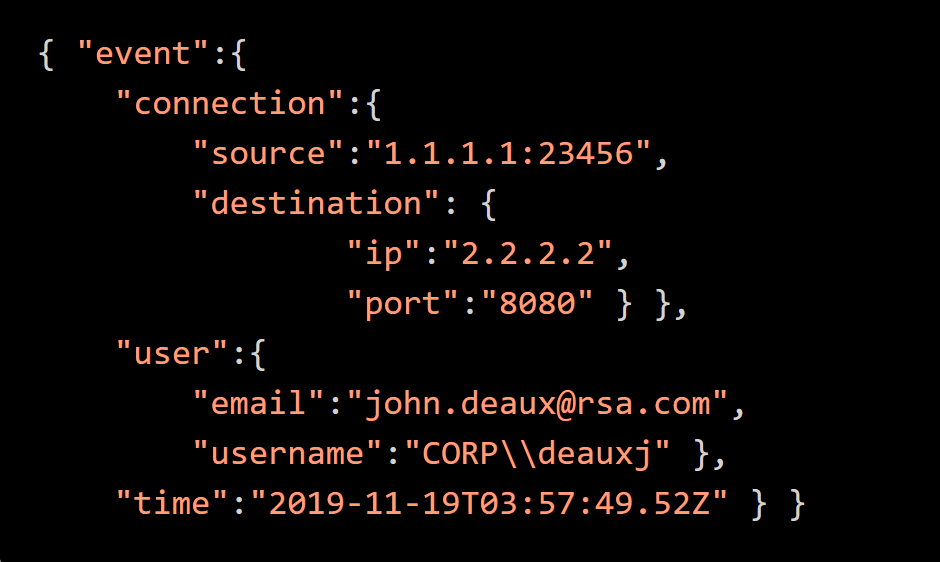
The source, username, and time values require further parsing to map the data to the appropriate meta. The source address value is an IP:Port pair. The time value needs converted to an epoch timestamp and the username value should have both the username and domain extracted.
We can parse out this data with the following Data Type definitions: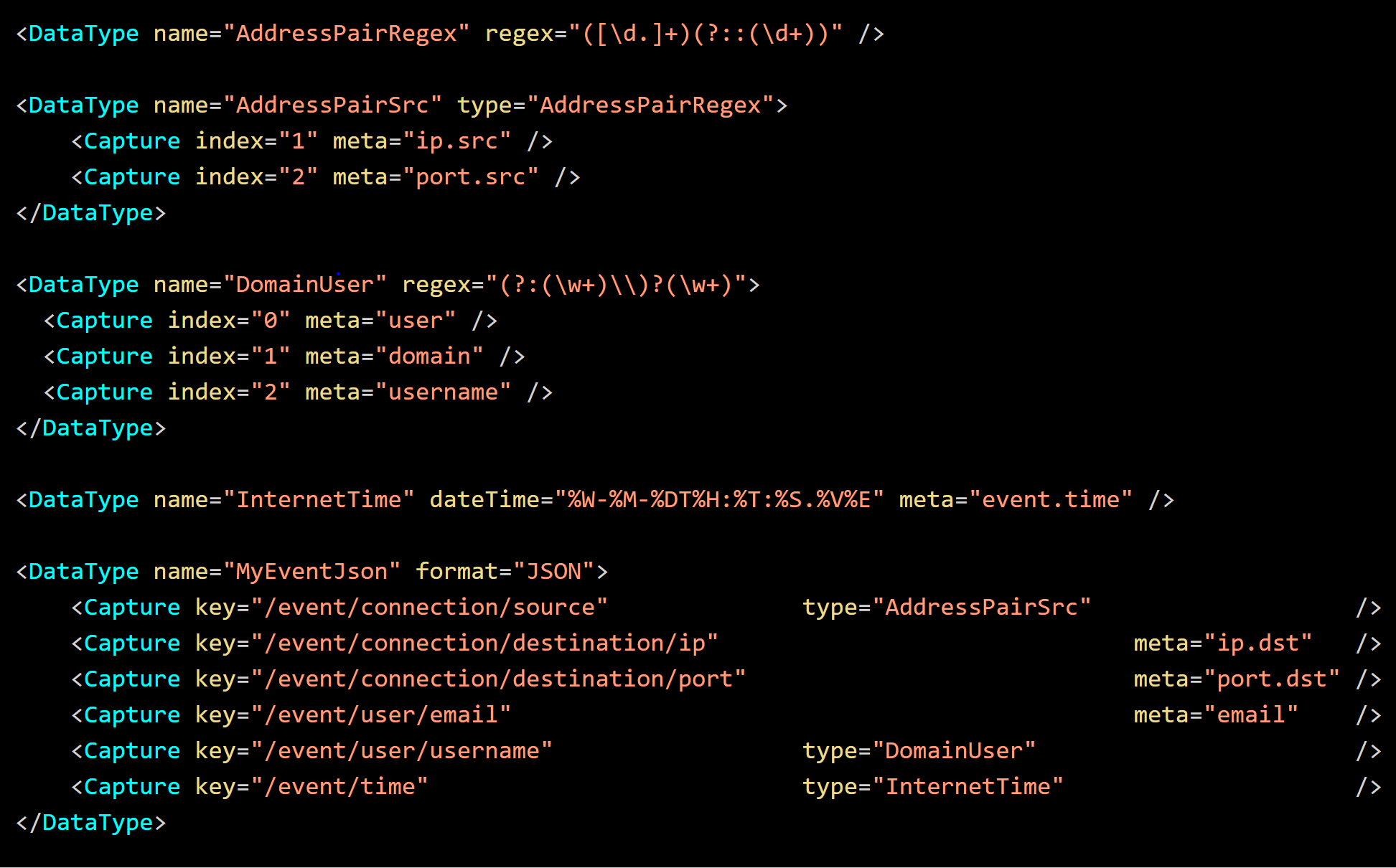
With Data Types, you can pass parsed values to other Data Types for further nested parsing. In the above definitions, the JSON is first parsed and the ip, port and email fields are record to meta. Then additional "nested" parsing if applied to source, time and username to transform or extract their components.
Many data constructs are common or standardized. Data Types provide a mechanism to define the base types, which in turn can be reused and built upon. This reduces the complexity and effort to add parsing for new devices and messages. For example, consider the following RFC – 3164 Syslog message
You can declare re-usable common types for different devices and messages. In the below example, SyslogRFC3164Header and RFC3164TimeStamp are defined with the source address (mymachine) going to the meta ip.src. For more complex messages, further parsing of event.desc can be performed by a nested Data Type.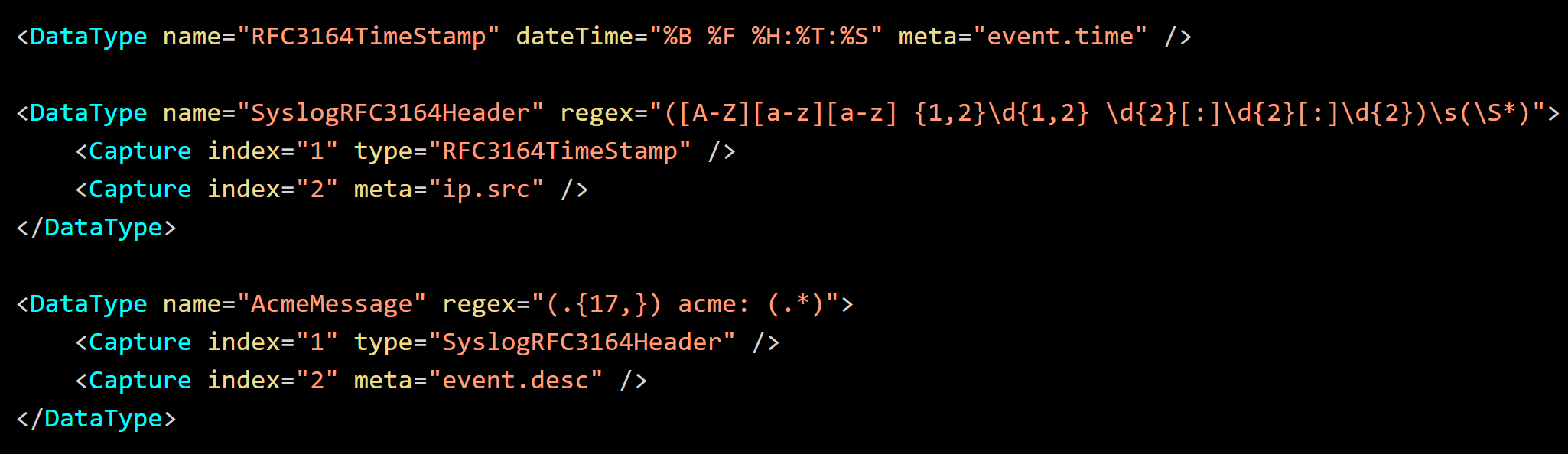
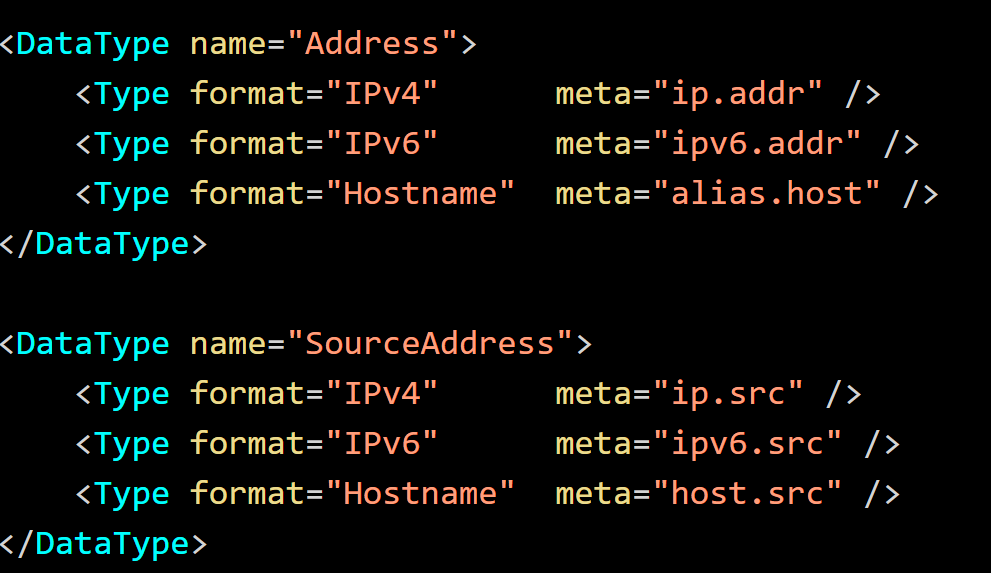
The meta key ip.src is currently converted to IPv4, IPv6, or Hostname (nwText) by the failure mappings defined in the Table Map XML. However, a Data Type can instead be defined to assign the value to the appropriate meta key. The definition of SourceAddress in the following example iterates through the possible formats to assign the address value to the appropriate meta key.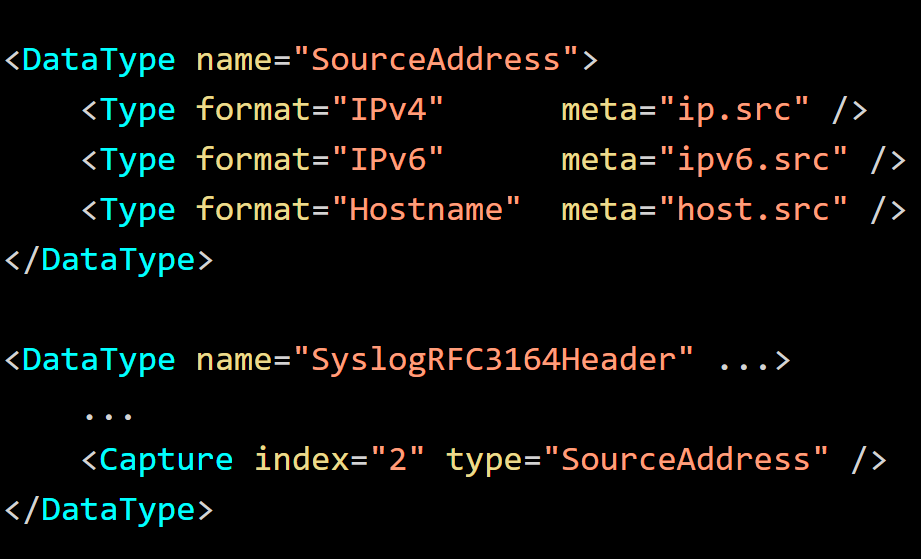
Later, the SourceAddress definition can be reused for future parsing.
Complex Fine Parse
Data Types allow you to fine parse entire logs or captures. Consider the following JSON
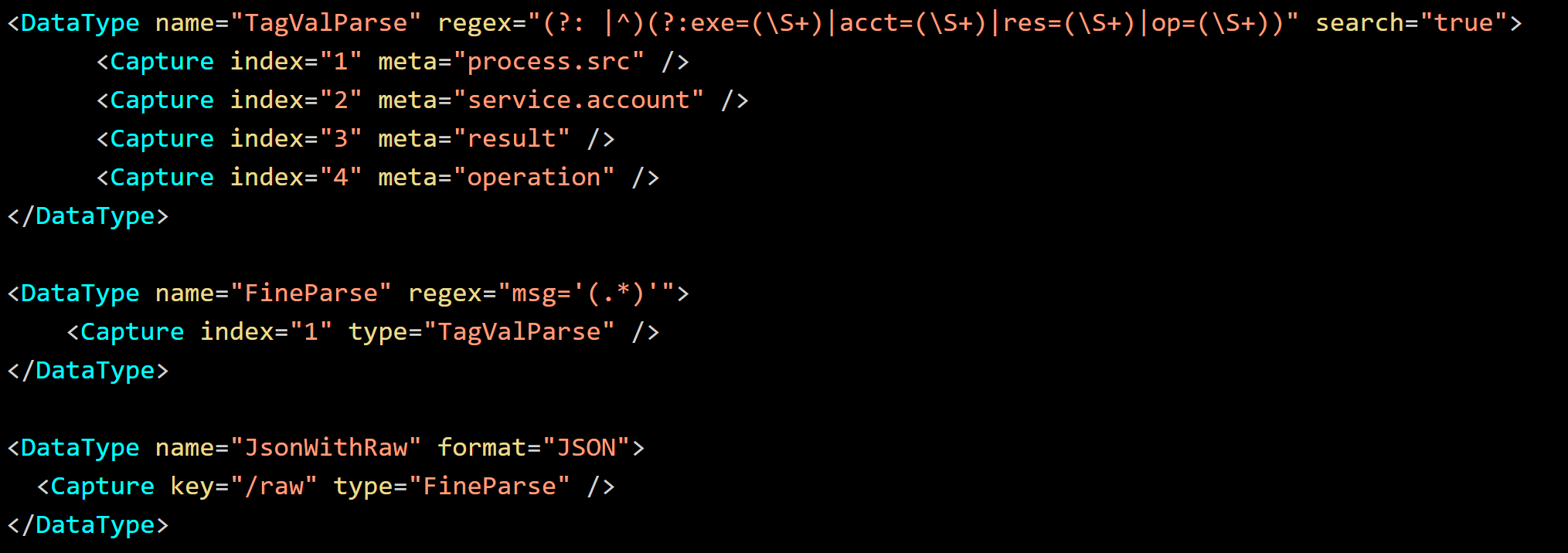
The raw message is embedded as a value with TagVal like named value pairs.
In the following example definition, the Data Type TagValParse parses the named value pairs to the appropriate meta even if presented in an arbitrary order. It utilizes the search attribute to look for a match, rather than match the entire input, then repeats until the end of the input has been reached. The Data Type FineParse enables the simplification of TagValParse, while JsonWithRaw Data Type further demonstrates the ability to perform nested parsing.
Invoking Data Types from Variables
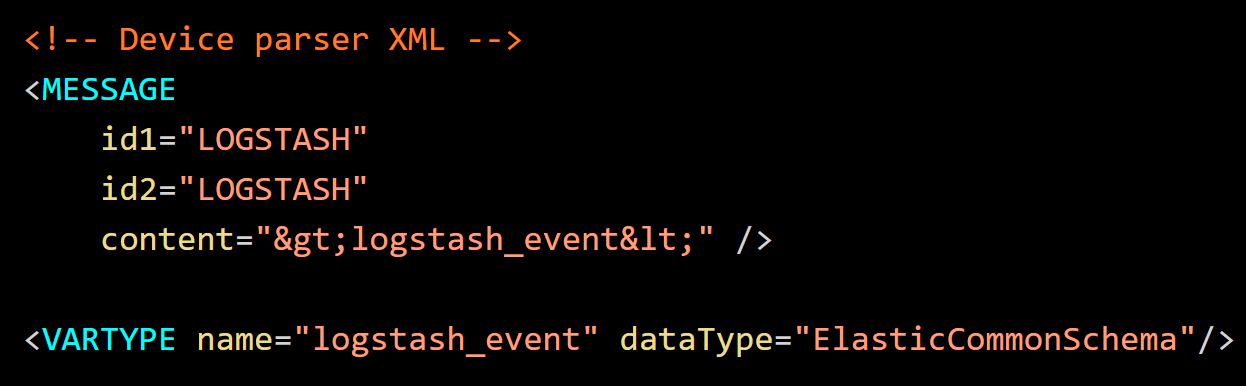
A Typed Variable (
The legacy Envision variable logstash_event is typed as a ElasticCommonSchema to invoke JSON parsing to map the Elastic event fields to the NetWitness event meta.
Data Type Formats
Log Decoder supports the Data Type formats such as regex, dateTime, and format. Please refer to the table DataType and Type XML Element Attributes below for details on all supported formats.Variant Types
You can define multiple criteria for Data Types. For example, if you want the host IP to match the IPv4 or IPv6 address but not a hostname, you can define additional types. Refer the following definition of IPAddress.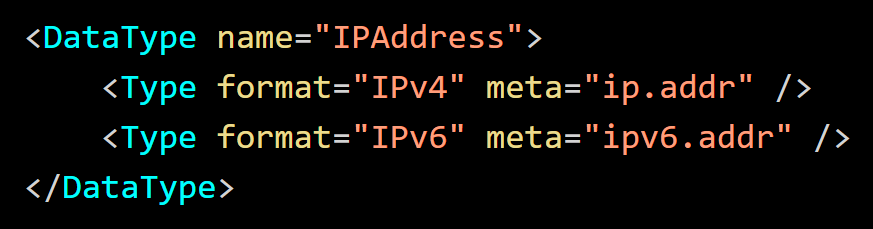
A variant type allows a value to be correctly parsed when the input varies. You can define multiple formats, multiple regular expressions or a mixture of both.
Data Types use the Data Type name to key parsing. A set of Data Types with the same name are executed in sequence until a match is found. When the match is found, processing is short circuited.
Captures
Capture Index
TheNote: Data Types capture to meta and not to variables. As they cannot register meta, they must reference already registered NetWitness meta keys defined in the Table Map XML.
In the following example, a regex with captures specifies the username and optionally the domain (if it is present). The coordinating regex capture group numbers (0, 2, and 3) define the capture indices assigned to the respective meta keys.
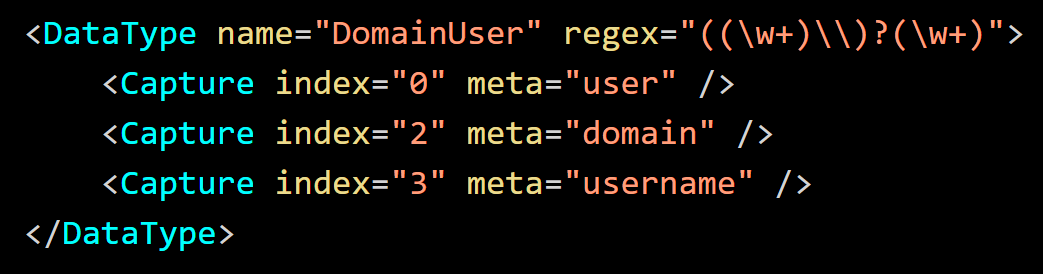
With the input DOMAIN\user, index 0
Note: Capture index 1 would have the value DOMAIN\ and therefore it is not specified for capture in the above example.
You can ignore a capture group and make it a non-capturing group by defining "(?:(\w+)\\)?(\w+)". Consequently, the referenced capture groups would become 0, 1, and 2 instead of 0, 2, and 3.
The
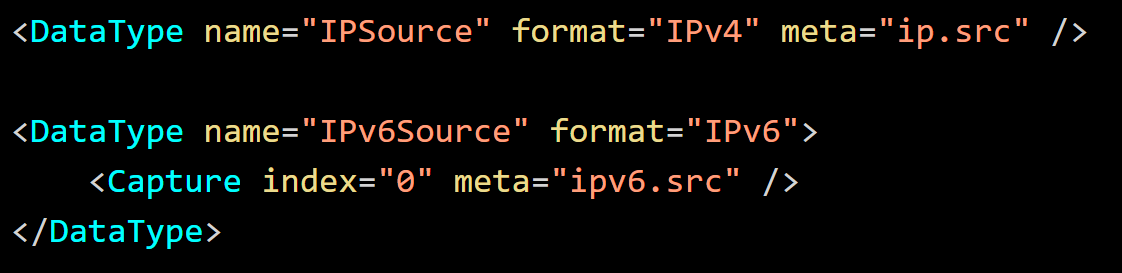
In this example, two Data Type definitions are specified. The second definition uses index 0, while the first definition declares the capture inline with the attribute meta to capture index 0.
Capture Path/Key
When capturing the structured data types like JSON, instead of a numbered capture index, a field name path is provided using the key attribute. Consider the following JSON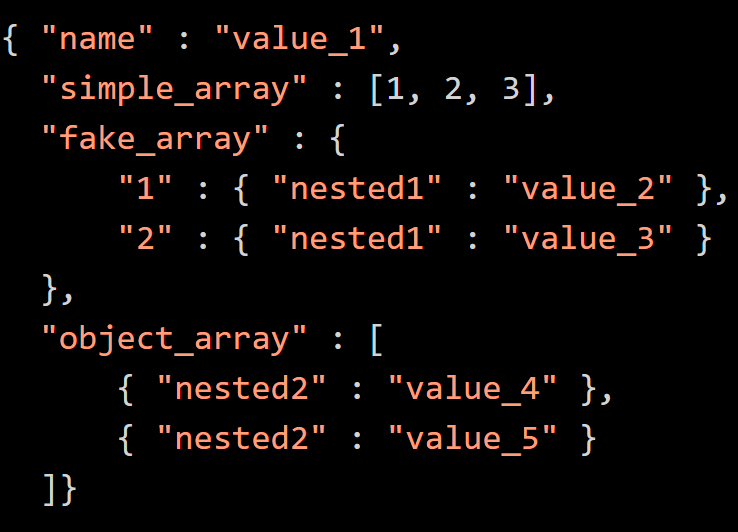
For the JSON above, each nested field name is separated with a forward slash. Wild cards for variable keys or indices of arrays are specified with an empty key name. Refer the following figure.
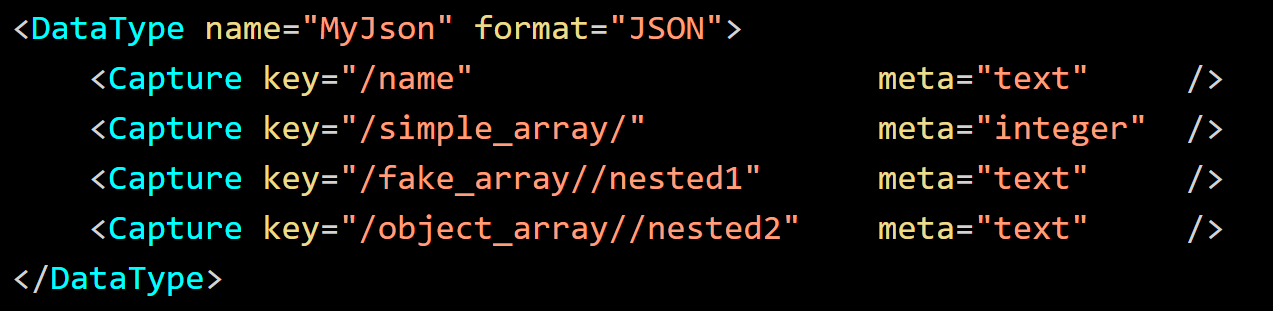
In this example, "simple_array" is indexed by placing a trailing slash in the path, "/simple_array/" and omitting the index. To access a field which has a variable parent name, leave the parent name empty in the path, "/fake_array//nested1". Paths referencing non-value fields are not captured (JSON objects or whole arrays). Use the path format "/object_array//nested2" omitting the array index to make it a wildcard to access "nested2" (a true array of objects).
Match Requirement
There are cases where a match may not be required. For example, JSON is inherently very structured, so a match may not be required for every sub-component. A match can be allowed even if the data received is unexpected, in order to consume the other fields of the message that do match expectations. Data Types allow the author to define the handling of failed matches on the captures.A capture in the Data Type can optionally specify the boolean attribute failMatch when it is assigned to a type. This attribute allows Data Types to ignore sub-components of a match containing unexpected data. This allows Data Types to be shared between parsers without effecting the results of the individual callers.
By default, the attribute failMatch is set to true for capture index. For structured Data Types such as JSON which instead use (the key attribute


Selective Capture[JV1]
Selective Capture added in 12.0, allows the dynamic assignment of captures. Sometimes, varying values are stored in a generically named event field. The type or context of a value is identified by the value of a secondary field rather than by its name.In some cases, the context of a value is can be determined by its distinct format. The value can then parsed to the appropriate meta based on its pattern. This can however take multiple matching attempts and reduce parsing performance. Often, the data format can be static or have no discernable characteristics between types. In such cases, the context can only be determined by parsing the secondary field. Selective Capture provides a mechanism to associate and map context from these two fields. Consider the following JSON event:
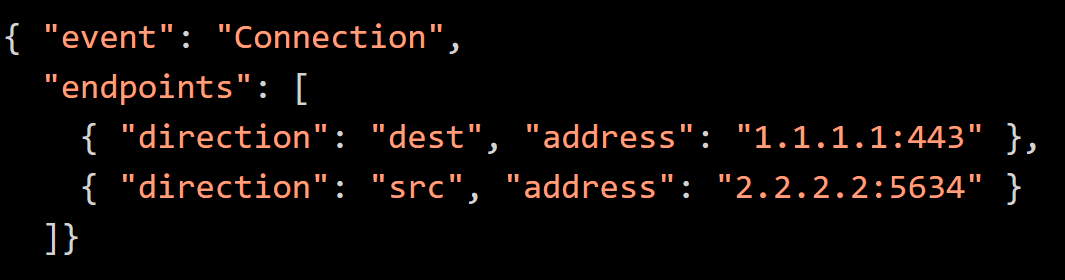
The address is stored in one field and the context is stored in another field. This occurs often happens in structured logs when an application logs its internal objects.
In the tag / value messages below, the entity types vary and appear in a generically named field. The context which defines the type of each value is defined in another generic field.

When a value cannot be iteratively parse d to determine
- Either the data format is static or,
- There is no identifying characteristics between the types.
- Define a Target (value parsed to determine the context)
- Define a Source (value assigned to meta or fine parsed)
Selector, Target, and Selection XML elements
For the tag / value messages above, the parser XML, a tagval message and aIf
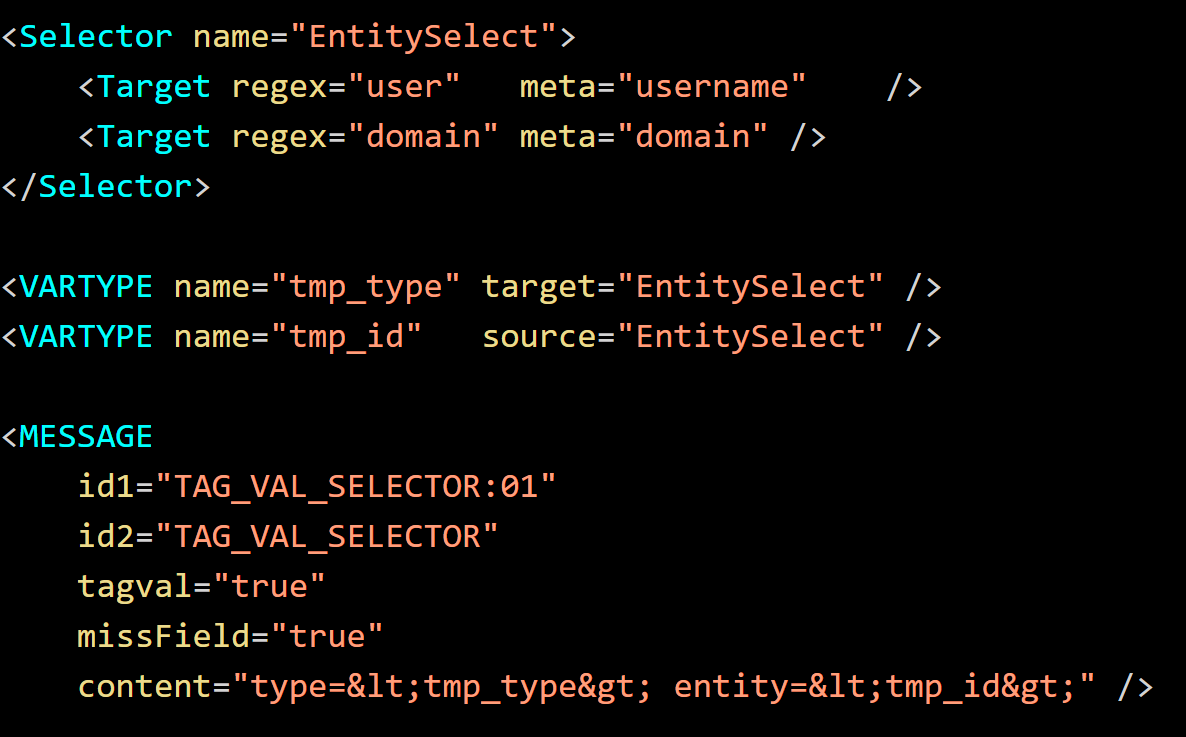
For the JSON event above, define XML content with a JSON type, fine parsing for the addresses, and a
To allow new content to load on old Log Decoders, the
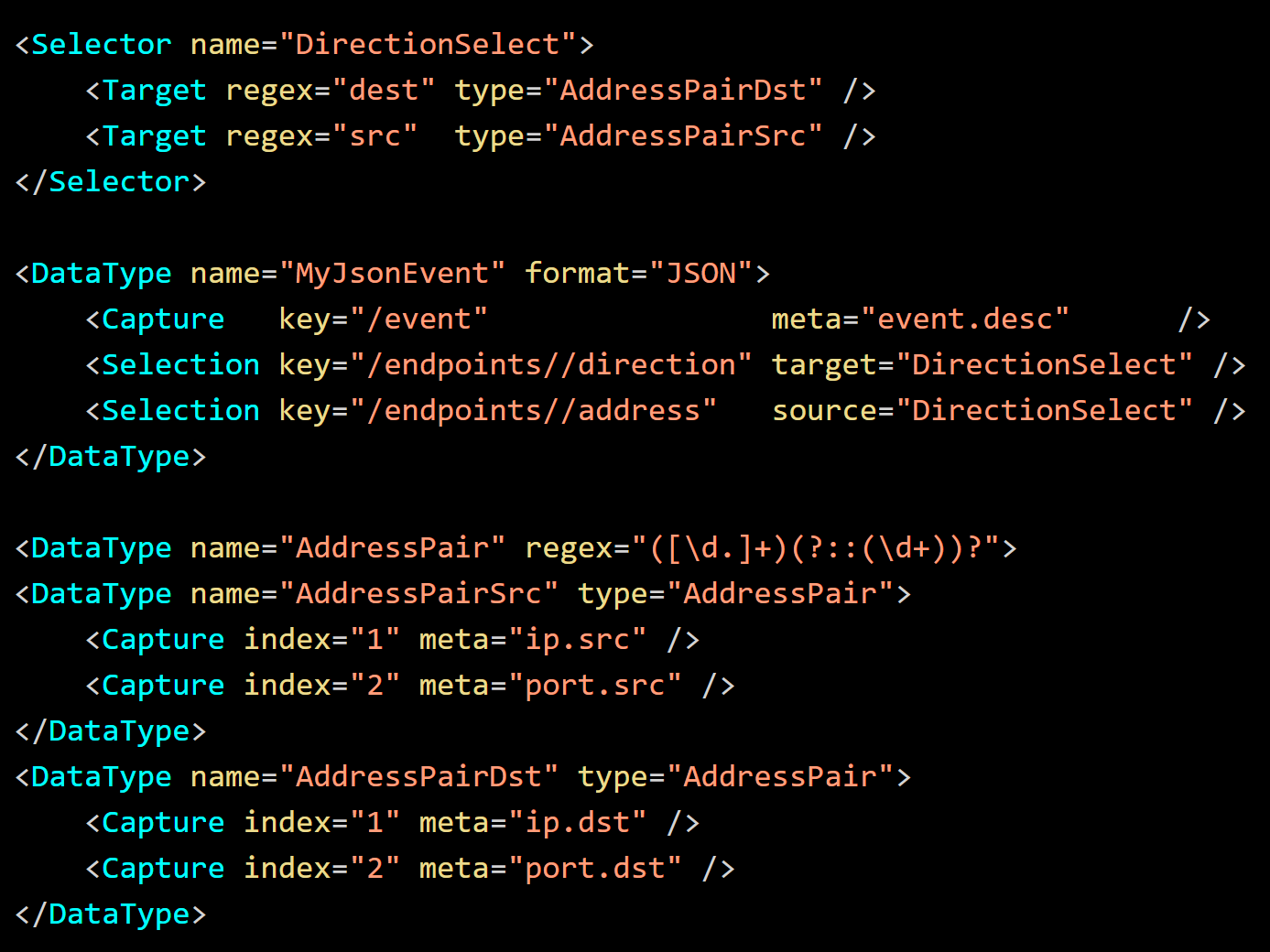
Instead of the meta key, the selected captures are assigned to Data Types for fine parsing. Either "AddressPairDst" or "AddressPairSrc" is chosen based on the value of the JSON field "direction". The order of the source and target values in the log does not affect parsing. Parsing will resolve each side of the
Selective Capture Customization
Selectors defined in the default parser at ./envision/etc/devices/default/defaultmsg.xml are not accessible in a device parser. However, iterative loading of device parser XML files is used to customize and override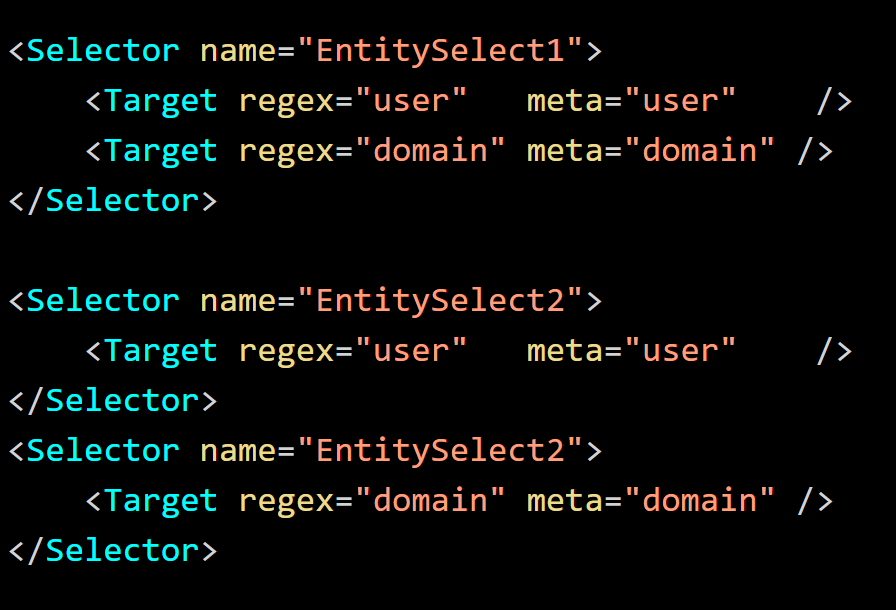
"EntitySelect1" and "EntitySelect2" are equivalent. The behavior is consistent with
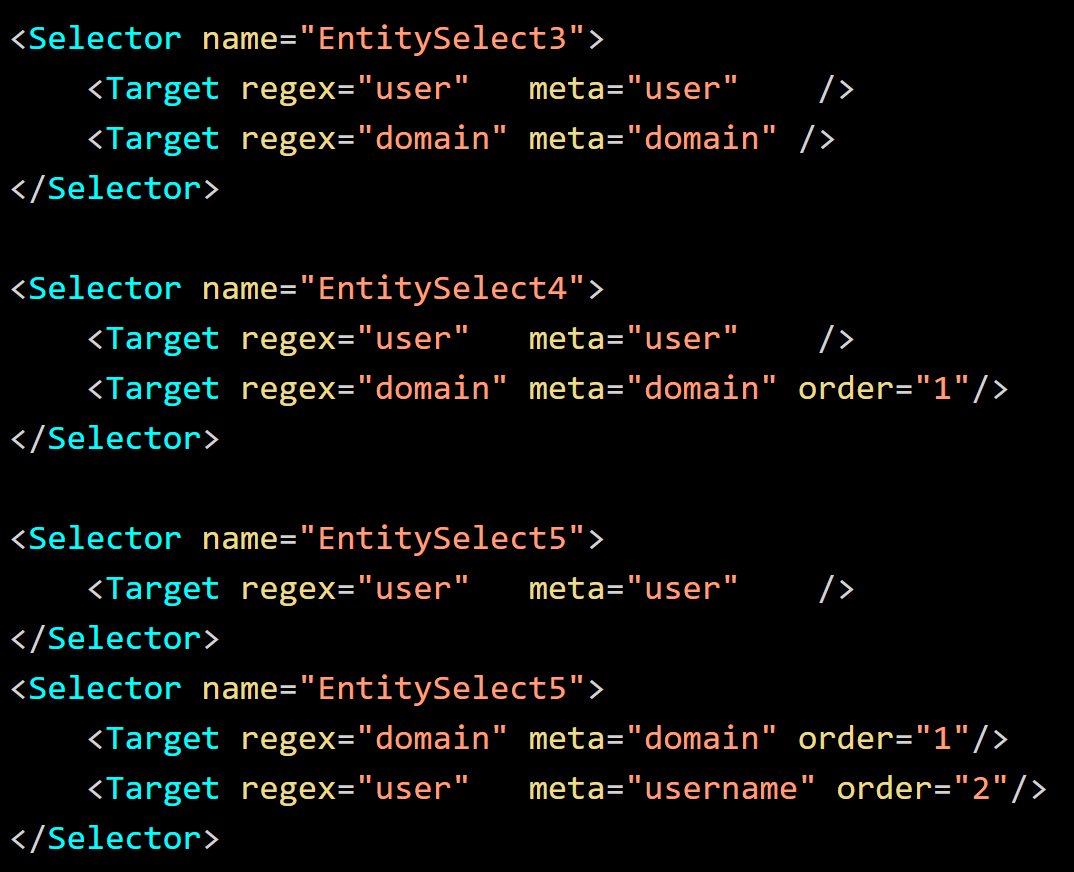
"EntitySelect3" attempts to match "user" before "domain". "EntitySelect4" and "EntitySelect5" attempt to match "domain" before "user". "EntitySelect5" adds a new
Selector Match Requirements
TheThe
Nesting and Recursion Depth
Data Type references to another Data Type or itself, could lead to performance issues or stack overflows on the Log Decoder. To avoid this, certain protections are implemented. Nesting and recursive parsing by content, or combination of, can only be defined to a depth of 10. At this point, further parsing of captures is blocked. Any attempt to perform a match on the capture will return false, possibly causing the calling Data Type to also fail to match.Shared Base Definitions
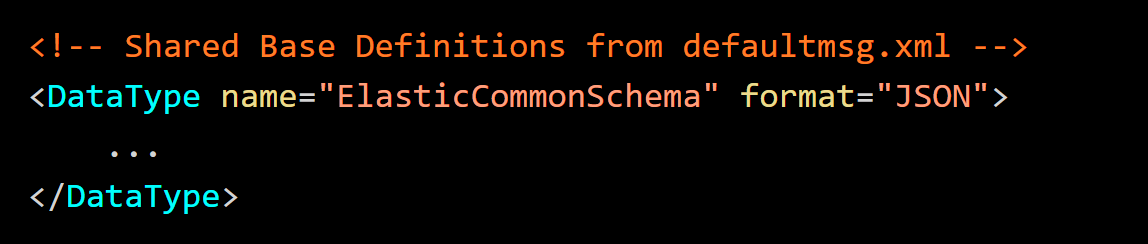
Common definitions and definitions for standardized types are defined in the default parser at ./envision/etc/devices/default/defaultmsg.xml. All the parsers can reference the Data Types defined in the default parser. When referencing a DataType, a device parser will first look locally for the definition. If the definition is not found, the parser will then look in the default parser for a shared definition.Data Type Inheritance
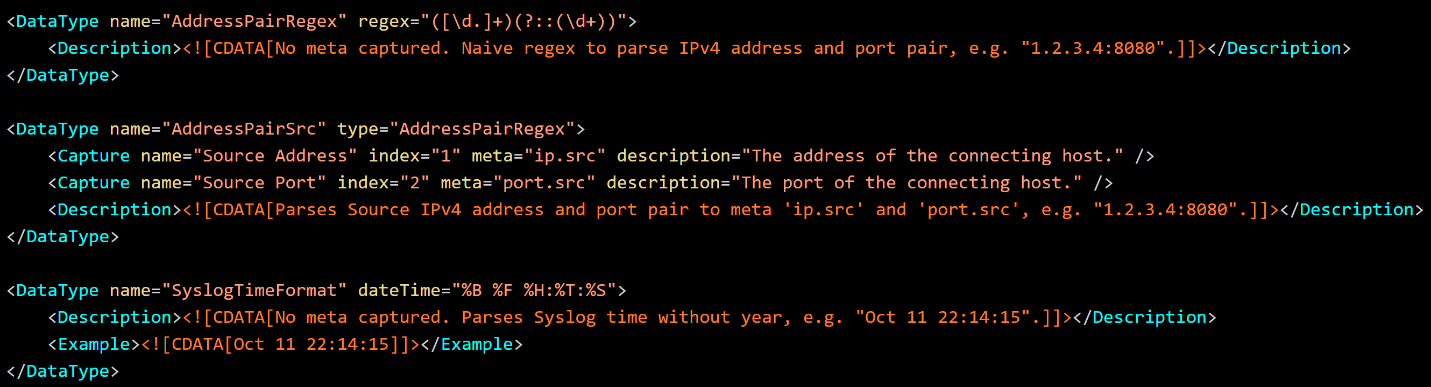
As parser files are loaded for a device, the Data Types can be cumulatively built upon and customized. Existing definitions can be referenced to create new types which inherit attributes like the format specification. The new types can then be suplemented or modified to override previous captures. The modifications are only applied to the device parser and not to the shared base definitions. Refer the following figure.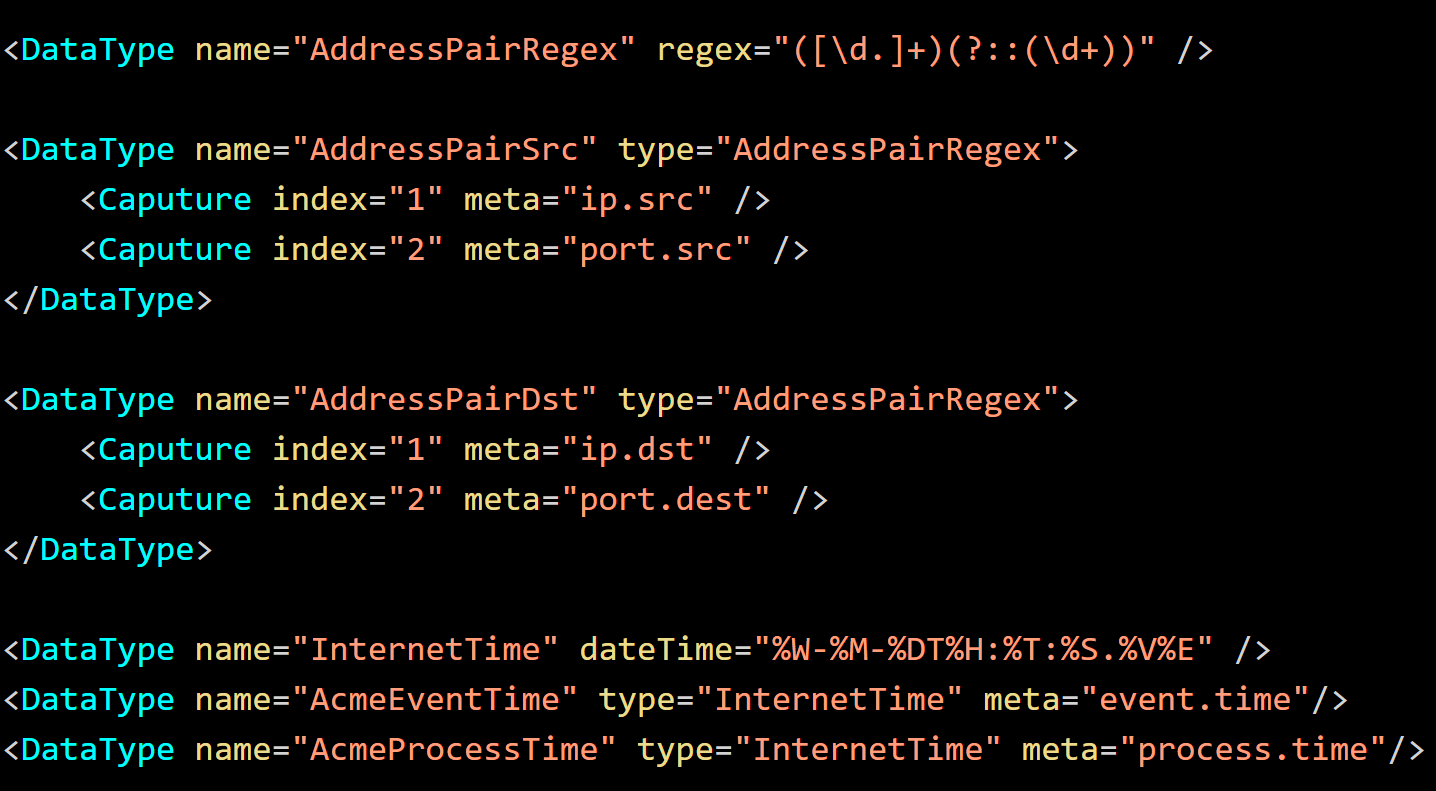
In this example, "AddressPairSrc" and "AddressPairDst" inherit from "AddressPairRegex" and supply the capture meta. "AcmeEventTime" and "AcmeProcessTime" inherit from "InternetTime" and provide the appropriate meta context.
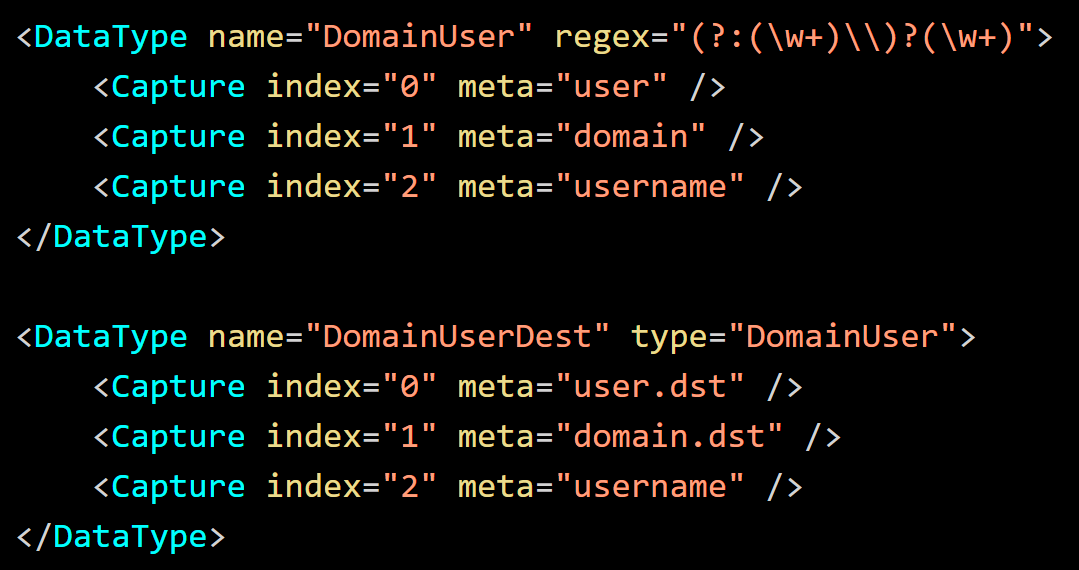
In the below example, "DomainUser" is inherited from to define "DomainUserDest" modifies capture indexes to override the meta-assignments.
If a type has multiple formats, only the first type can be modified. For the definition below, it is not beneficial to use inheritance. If the inheritance is used, only the first item can be modified. In this case, completely define an alternative type.
Note: A Data Type cannot be defined through a reference to itself either directly or through an intermediary type.
Renaming a Data Type
If the name of a type defined in the default parsers is used to name a type in the device parser, it the type will be redefined in the device parser and the type in the default parser will no longer be accessible. Refer the following figure.
"InternetTime" will inherit from "InternetTime" defined in the default parser and all references to the type will be in the device parser. However, this practice is not advised, especially while referencing a local device parser type.
Note: Renaming a Data Type in the local device parser is not supported.
Ancillary XML Data Ignored by the Log Decoder
The Data Type XML supports elements and attributes for use by Content Authors and the NetWitness UI. Optionally, the DataType element contains two child elements, Description and Example containing raw CDATA text. The Description is used by the UI to provide the user a mechanism to describe the purpose of the type in detail. The Example is line separated samples of what the Data Type is intended to parse.The Capture element can optionally contain
For below three content, please refer an attached document.
1. Content XML Elements and Attributes Summary
2. Data Type Support for CEF Parser
3. Support for Static Value Mapping in DataType
Product Details
RSA Product Set: NetWitness Logs and NetworkRSA Product/Service Type: Log Decoder
RSA Version/Condition: 11.5 or higher version
Approval Reviewer Queue
Technical approval queue