.png?width=180&height=32&name=NW%20Logo%20(2).png)
Define Notification Output DialogsDefine Notification Output Dialogs
This topic provides descriptions of the various notification output dialogs. You configure notification outputs in the  (Admin) > System > Global Notifications > Output tab. Notifications are basically the destinations used for sending notifications. For ESA, notifications enable you to define how you want to receive the ESA alerts. The following are the different notifications supported by NetWitness:
- SNMP
- Syslog
- Script
Procedures related to notifications are described in Configure Notification Outputs.
To access the Define Notification dialogs
- Go to (Admin) > System.
- In the options panel, select Global Notifications.
- On the Output tab, click
 and then select a notification output (Email, SNMP, Syslog, or Script)
The Define Notification dialog is displayed for your selection.
FeaturesFeatures
There are four notification dialogs, which allow you to configure notification outputs.
EmailEmail
Email notifications enable you to define the destination email address to which you can send the alerts. It also enables you to add a custom description in the subject of the email and also to define multiple destination email addresses.
The following figure shows the Define Email Notification dialog.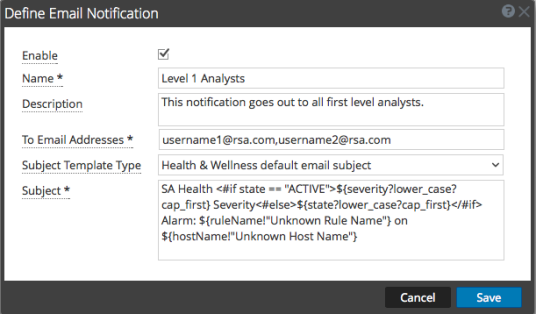
The following table lists the various parameters that you need to define for the email notifications.
SNMPSNMP
SNMP notifications enable you to define the SNMP settings to send alert notifications.
The following figure shows the Define SNMP Notification dialog.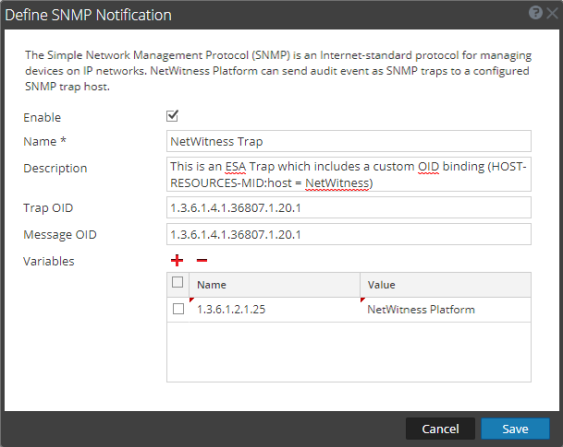
The following table lists the various parameters that you need to define for the SNMP notifications.
SyslogSyslog
Syslog notifications enable you to define the Syslog settings to send alert notifications.
The following figure shows the Define Syslog Notification dialog.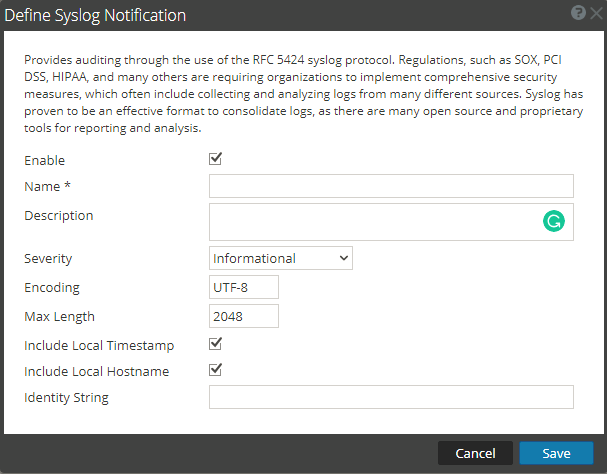
The following table lists the various parameters that you need to define for the Syslog notifications.
ScriptScript
Script notifications enable you to define the Script that executes in response to the alert. You can use any script for ESA notifications.
The following figure shows the Define Script Notification dialog.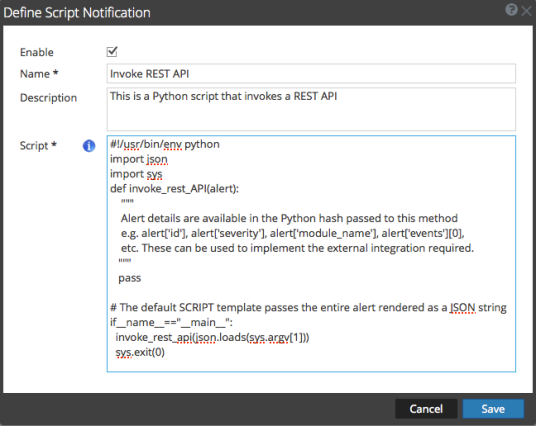
The following table lists the various parameters that you need to define for the Script notifications.