Define Notification Server Dialogs
This topic describes the Define Notification Server dialogs used to configure the settings of the various types of notification servers. You configure notification servers in the
(Admin) > System > Global Notifications > Servers tab.
Notifications are used by a variety of components in NetWitness, such as Event Stream Analysis (ESA), Respond, and Global Audit Logging. Notification settings are called Notification Servers. In the Servers tab of the Administration System view Notifications panel, you can create multiple Notification Server configurations.
You can configure the following types of notification server settings in NetWitness:
- SNMP
- Syslog
- Script
For Global Audit Logging, you can only use Syslog Notification Servers.
Procedures related to notification servers are described in Configure Notification Servers.
To access the Define Notification Server dialogs
- Go to
(Admin) > System. - In the left navigation panel, select Global Notifications.
- In the Notifications Servers panel, click
and then select a type of notification server (Email, SNMP, Syslog, or Script)
The Define Notification Server dialog is displayed for your selection.
There are four notification server dialogs, which allow you to configure notification servers.
Email notification servers enable you to configure email server settings to send alert notifications.
The following figure shows the Define Email Notification Server dialog.
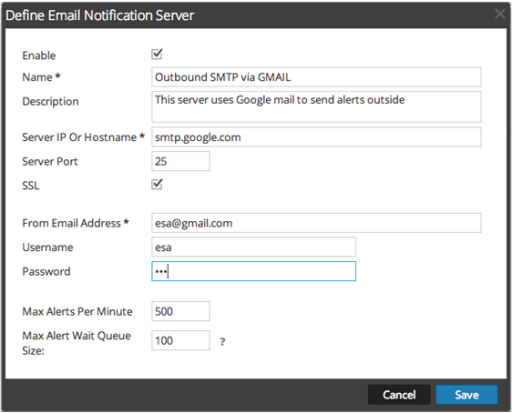
The following table lists the various parameters that you need to define for the email notification servers.
- Parameters: Enable
- Description: Select to enable the notification server.
- Parameters: Name
- Description: A name to identify or label the notification server.
- Parameters: Description
- Description: A brief description about the notification server.
- Parameters: Server IP Or Hostname
- Description: Hostname of the email server. For ESM/SMS and ESA notifications, you must specify only the hostname/FQDN.
- Parameters: Server Port
- Description: The server port.
- Parameters: SSL
- Description: Select the option if you want the communication to happen through SSL.
- Parameters: From EMail Address
- Description: Email account from which you want to send email notifications.
- Parameters: Username
- Description: Username for logging into the email account if the SMTP server requires user authentication to relay emails successfully.
- Parameters: Password
- Description: User password for logging into the email account if the SMTP server requires user authentication to relay emails successfully.
- Parameters: Max Alerts Per Minute
- Description: Describes the maximum number of alerts per minute.
- Parameters: Max Alert Wait Queue Size
- Description: Describes the maximum number of alerts to be queued before they are dropped.
SNMP
SNMP notification servers enable you to configure SNMP trap host settings as a notification server to send alert notifications.
The following figure shows the Define SNMP Notification Server dialog.
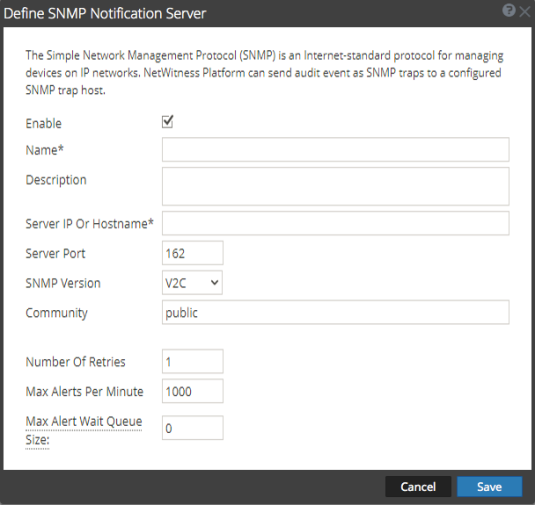
The following table lists the various parameters that you need to define for the SNMP notification servers.
- Parameters: Enable
- Description: Select to enable the notification server.
- Parameters: Name
- Description: A name to identify or label the notification server.
- Parameters: Description
- Description: A brief description about the notification server.
- Parameters: Server IP Or Hostname
- Description: SNMP trap host IP address or hostname.
- Parameters: Server Port
- Description: Listening port number on the SNMP trap host.
- Parameters: SNMP Version
- Description:
SNMP version. The following are the options:
- V1
- V2C
- V3
If you select SNMP Version 3 (v3), the following parameters are displayed:
- Column 3: Parameters
- Column 4: Description
- Column 5: Notification Type
- Column 6:
Based on the notification type a SNMP messages are sent each time an alert is generated.
The following notification types are supported:- Inform - Inform is acknowledged trap. The sender gets an acknowledgement from the receiver.
- Trap - Trap is unacknowledged notification
- Column 7: Authoritative Engine ID (This optioin is availabe only for notification type TRAP)
- Column 8: An identifier which is used to identify the agents. Authoritative engine ID along with the username is used to uniquely identify the agent.
- Column 9: Security Level
- Column 10:
Define the security level. The following are the options:
-
Unauthenticated and Unencrypted
- Authenticated and Unencrypted
- Authenticated and Encrypted
-
- Column 11: Auth Protocol ( This option is available only for security level Authenticated and Unencrypted and Authenticated and Encrypted)
- Column 12:
Authentication protocol which is used to validate a user before providing an access to the server. The options are:
- SHA
- MD5
- Column 13: Auth Key ( This option is available only for security level Authenticated and Unencrypted and Authenticated and Encrypted)
- Column 14: A password that you want to use for authentication.
- Column 15: Privacy Protocol ( This option is available only for security level Authenticated and Encrypted)
- Column 16: Privacy protocol is an encryption technique for data communication.
- Column 17: Private Key ( This option is avaliable only for security level Authenticated and Encrypted)
- Column 18: A password that you want to use for encryption.
- Parameters: Parameters
- Description: Description
- Parameters: Notification Type
- Description:
Based on the notification type a SNMP messages are sent each time an alert is generated.
The following notification types are supported:- Inform - Inform is acknowledged trap. The sender gets an acknowledgement from the receiver.
- Trap - Trap is unacknowledged notification
- Parameters: Authoritative Engine ID (This optioin is availabe only for notification type TRAP)
- Description: An identifier which is used to identify the agents. Authoritative engine ID along with the username is used to uniquely identify the agent.
- Parameters: Security Level
- Description:
Define the security level. The following are the options:
-
Unauthenticated and Unencrypted
- Authenticated and Unencrypted
- Authenticated and Encrypted
-
- Parameters: Auth Protocol ( This option is available only for security level Authenticated and Unencrypted and Authenticated and Encrypted)
- Description:
Authentication protocol which is used to validate a user before providing an access to the server. The options are:
- SHA
- MD5
- Parameters: Auth Key ( This option is available only for security level Authenticated and Unencrypted and Authenticated and Encrypted)
- Description: A password that you want to use for authentication.
- Parameters: Privacy Protocol ( This option is available only for security level Authenticated and Encrypted)
- Description: Privacy protocol is an encryption technique for data communication.
- Parameters: Private Key ( This option is avaliable only for security level Authenticated and Encrypted)
- Description: A password that you want to use for encryption.
- Parameters: Community
- Description: Community string used to authenticate on the SNMP trap host. The default value is public.
- Parameters: Number of Retries
- Description: Number of retries for the trap.
- Parameters: Max Alerts Per Minute
- Description: Maximum number of alerts per minute.
- Parameters: Max Alert Wait Queue Size
- Description: Maximum number of alerts to be queued before they are dropped.
Syslog
Syslog notification servers allow you to configure Syslog settings as a notification server to send notifications. When enabled, Syslog provides auditing through the use of the RFC 5424 Syslog protocol. Syslog has proven to be an effective format to consolidate logs, as there are many open source and proprietary tools for reporting and analysis.
You cannot disable notification servers associated with global audit logging configurations.
The following figure shows the Define Syslog Notification Server dialog.
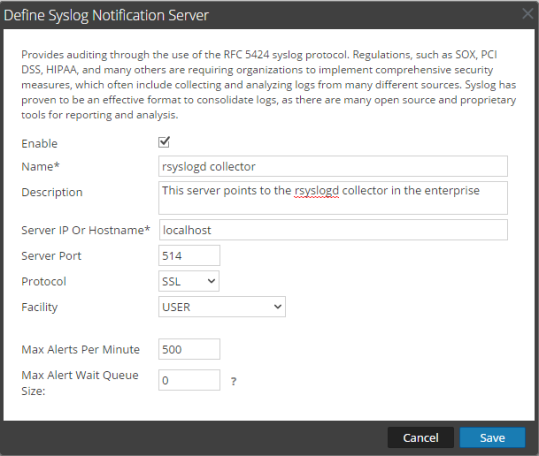
The following table lists the various parameters that you need to define for the Syslog notification servers.
- Parameters: Enable
- Description: Select to enable the notification server.
- Parameters: Name
- Description: A name to identify or label the notification server.
- Parameters: Description
- Description: A brief description about the notification server.
- Parameters: Server IP Or Hostname
- Description: The hostname of the host where the target Syslog process is running.
- Parameters: Server Port
- Description: The port number where the target Syslog process is listening.
- Parameters: Protocol
- Description: The protocol to be used to transfer the Syslog files.
- Parameters: Facility
- Description: The designated Syslog facility to use for all outgoing messages.
It is used to specify what type of program is logging the message. Some possible values are KERN, USER, MAIL, and DAEMON. This lets the configuration file specify that messages from different facilities will be handled differently.
- Parameters: Max Alerts Per Minute
- Description: Maximum number of alerts per minute.
This field is not used for Global Audit Logging.
- Parameters: Max Alert Wait Queue Size
- Description: Maximum number of alerts to be queued before they are dropped.
This field is not used for Global Audit Logging.
Script
Script notification servers enable you to configure Script as a Notification Server.
The following figure shows the Define Script Notification Server dialog.
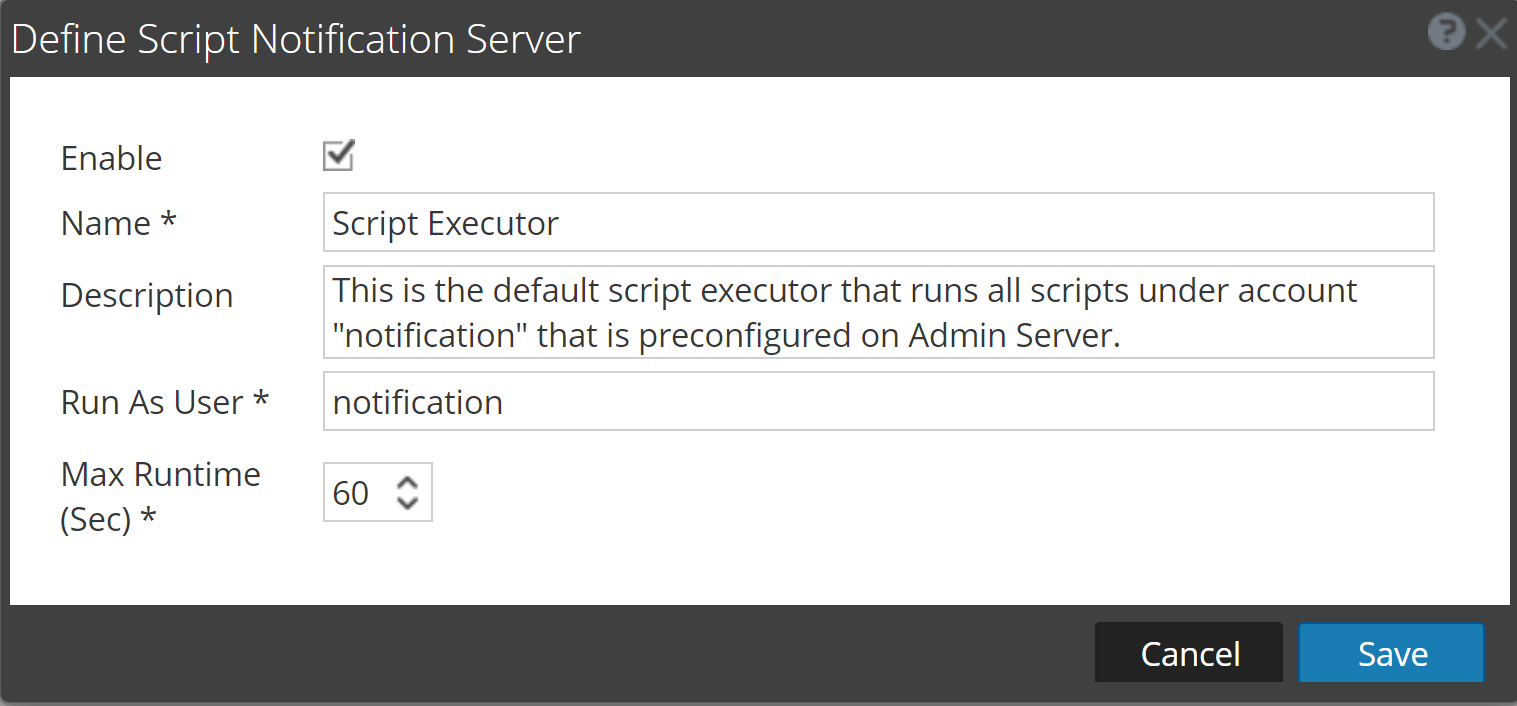
The following table lists the various parameters that you need to define for the Script notification servers.
- Parameters: Enable
- Description: Select to enable the notification server.
- Parameters: Name
- Description: A name to identify or label the notification server.
- Parameters: Description
- Description: A brief description about the notification server.
- Parameters: Run As User
- Description: Name of the user identity under which the script is executed. The default user identity is notification.
For ESA, you cannot set this to anything else unless you have created the account on the Admin Server.
- Parameters: Max Runtime (Sec)
- Description: The maximum time (in seconds) the script is allowed to run.