.png?width=180&height=32&name=NW%20Logo%20(2).png)
Define Notification Template DialogDefine Notification Template Dialog
In the Global Notifications panel, you can configure global notification settings for Notification Servers, Notification Outputs, and Notification Templates. On the Templates tab, you configure the templates for various notifications. The notification template defines the format and message fields of the notifications. You can select a default template or you can use the Define Template dialog to configure and edit templates.
You can select a default template and use it or modify a default template based on your requirement. You can also use one of the following template types and create a template:
- Audit Logging
- Event Stream Analysis
- Event Source Monitoring
- Health Alarms
- New Health & Wellness Alarms (Version 11.5 and later).
These notification templates are created in an HTML, FreeMarker (FTL) format, a combination of both HTML and FTL, or Common Event Format (CEF) format:
-
Email (SMTP) notification output type is created in both HTML and FTL formats.
-
SNMP and Script notification output types are created in FTL format.
-
Syslog notification output type is created in CEF format.
You need to have a good understanding of HTML, FTL, and CEF formats to successfully configure your own notification template. Click on the respective links to understand the specific formats.
-
HTML format, Introduction to HTML.
-
FTL format, Overall structure - Apache FreeMarker Manual.
-
CEF format, Freemarker Tips & Tricks in NetWitness.
Procedures related to notification templates are described in Configure Templates for Notifications.
To access the Define Template dialog
- Go to
 (Admin) > System.
 - In the left navigation panel, select Global Notifications > Template Tab.
- In the Notifications Configurations panel, click
 , or select a configuration and click
  to modify.
The Define Template dialog is displayed.
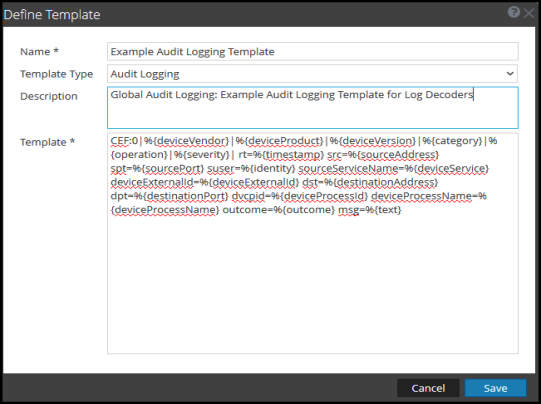
The following table describes the features in the Define Template dialog.
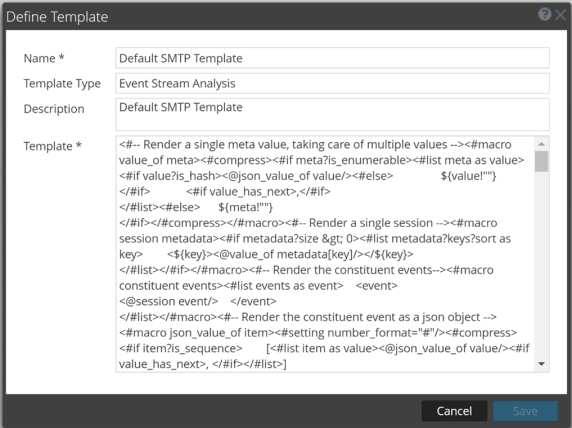
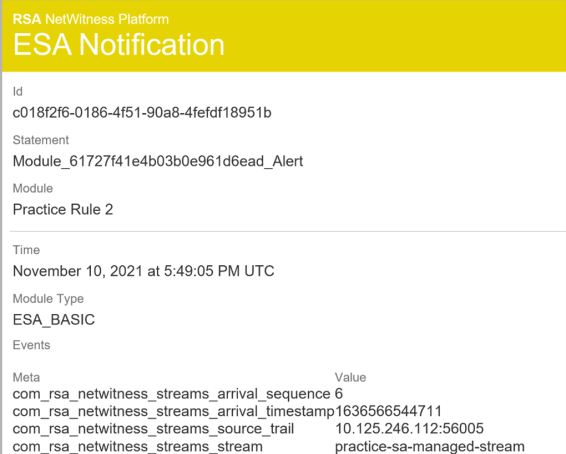
Below is an example of a defined SMTP (email) template and output.