.png?width=180&height=32&name=NW%20Logo%20(2).png)
Delete Server Certificate and Trusted CA CertificateDelete Server Certificate and Trusted CA Certificate
Note: Deleting the server certificate may cause NetWitness to apply the default server certificate on the selected appliance.
To delete a NetWitness Server Certificate with its Private Key:
- Go to
 (Admin) > Security.
The Security view is displayed with the Users tab open. - Click the PKI Settings tab.
- In the Server Certificates section, select the certificate to delete.
- Click
 .
.
The following message is displayed.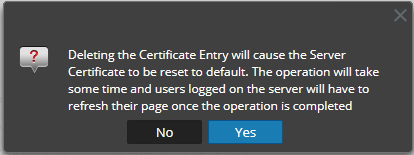
- Click Yes.
Note: When the certificate is being applied on the selected appliance, no other operation on PKI can be performed until the process is completed.
To delete a Trusted CA Certificate:
- Go to (Admin) > Security.
The Security view is displayed with the Users tab open. - Click the PKI Settings tab.
- In the Trusted CAs section, select the certificate to delete.
- Click
 .
.
The following message is displayed.
- Click Yes.
Note: Make sure you apply the PKI configuration again after deleting the Trusted CA certificate.