.png?width=180&height=32&name=NW%20Logo%20(2).png)
Disaster Recovery (Backup and Restore Instructions)
You can take a backup and restore of NetWitness Hosts using any of the following:
(Recommended) NetWitness Recovery Wrapper Tool
Note: NetWitness Recovery Wrapper tool is supported from NetWitness 11.6.1.4 and later. In case of host with large volume of data (>500GB), NetWitness recommends to use NetWitness Recovery Tool (nw-recovery-tool) for backup.
NetWitness Recovery Wrapper Tool (NRWT) provides centralized backup and restore that makes it easy for you to take a backup of all the supported installation options (Physical Host, Virtual Host, AWS, and Azure).
With NRWT you can:
-
Backup (export) an individual, a specific, or all hosts at a time.
-
Restore (import) an individual host at a time.
-
Customize files or folders during backup and restore.
-
Copy back up data to/from remote host location from/to Netwitness hosts provided:
-
Remote host is reachable via SSH from each NetWitness hosts.
-
The credentials are correct.
-
The location specified has sufficient space to take a backup in case of export.
-
The location specified should contain valid backup data in case of import.
-
(For version 11.7.1 and later) Back up Mongo databases for Endpoint and ESA instances.
-
(For version 11.7.1 and later) Include Broker index for NetWitness node in which Broker service is running.
-
(For version 11.7.1 and later) Back up custom files and folders provided by user.
-
(For version 12.3 and later) Avoid entering the password in the Command Line Interface (CLI) while exporting and importing the data.
-
(Optional) (For version 12.3 and later) Log in to the NetWitness Server or any other component host systems as a non-root user and perform backup and recovery of data. You must use the following login credentials to log in to the NetWitness Server or any other component host systems.
-
Username: nwnrt
-
Password: netwitness
Note: To log in as a non-root user to the NetWitness Server or any other component host systems, root users must use the username su nwnrt.
-
-
(For version 12.3 and later) Back up Group Hosts and Category Hosts.
For details on previous run, check NRWT logs at /var/log/netwitness/recovery-tool/nw-recovery-wrapper.log on the Admin Server.
Basic Usage of the NetWitness Recovery Wrapper Tool
You can use the NRWT to back up data by using the export option. To restore data, use the import option. The basic usage of the tool is to run the following command from the root directory level:
nw-recovery-wrapper [command] [option]
The commands and options that you can use with this tool are described in the following tables.
- Commands and Options:
-h --help
- Description:
Display help on commands and option. For example,
specify: nw-recovery-wrapper --help to get a list of supported operations and arguments.
- Commands and Options: -e, --export
- Description: Export data or configuration.
- Commands and Options: -i, --import
- Description: Import data or configuration.
- Commands and Options:
-d, --dump-dir
- Description: Path for the where data will be exported or imported from (for example, /var/netwitness/backup).
- Commands and Options: --host-key HOST_KEY [HOST_KEY ...]
- Description: Host IP, ID or display name.
- Commands and Options:
--host-all
- Description:
Specify for all hosts - supported only for export.
- Commands and Options:
--category-group CATEGORY_GROUP [CATEGORY_GROUP ...]
- Description:
Specify for host and service groups - supported only for export.
- Commands and Options:
--host-group HOST_GROUP [HOST_GROUP ...]
- Description:
Specify host group created on the UI hosts page - supported only for export.
- Commands and Options: --include CUSTOM_PATH [CUSTOM_PATH ...]
- Description: Custom path or file.
- Commands and Options:
--remote-location REMOTE_LOCATION
- Description:
Remote host path for remote host configuration.
- Commands and Options: --remote-ip REMOTE_IP
- Description: Remote host IP for remote host configuration.
- Commands and Options:
--remote-password REMOTE_PASSWORD
- Description:
Remote host password for remote host configuration.
- Commands and Options: --remote-user REMOTE_USER
- Description:
User for remote host configuration.
(Optional) user for remote host configuration. If not specified, defaults to root user.
Required Conditions
-
Make sure that there is adequate disk space on dump directory to take the backup on each NetWitness Hosts.
-
Valid Host key is entered. Host key can be Host ID, IP address or display name.
Back Up using NRT Wrapper:
-
Backup NetWitness Hosts and store on local dump directory of each hosts:
nw-recovery-wrapper export --dump-dir--host-key ...... nw-recovery-wrapper export --dump-dir
--host-all Note: If you have logged in with the username nwnrt or su nwnrt, you must enter sudo before the commands you run while performing the backup and recovery actions on the NetWitness Server Host or any other Component Hosts using the NetWitness Recovery Wrapper Tool.
For Example: To backup NetWitness hosts using the NetWitness Recovery Wrapper Tool, the first step is to run the following command after logging in.
sudo nw-recovery-wrapper export --dump-dir--host-key ......
-
(Optional) Add custom files or folders during backup and restore other than what is predefined in recovery tool:
Note: Make sure the custom files or directories are available on NetWitness Hosts, if not, the files or directories will be ignored.
nw-recovery-wrapper export --dump-dir
--include-file /--include-dir --host-key ......
nw-recovery-wrapper export --dump-dir--include-file /--include-dir --host-all
-
(Optional) Copy backup data to remote Location:
Note: Make sure that:
- You specify valid values for --remote-ip, --remote-location arguments for remote copy operation.
- Remote Host IP is valid and reachable via SSH from all NetWitness Hosts.
- Remote Host location (--remote-location) has adequate space to take backup.nw-recovery-wrapper export --dump-dir
--host-key ...... --remote-ip --remote-location
nw-recovery-wrapper export --dump-dir--host-all --remote-ip --remote-location Note:
- Optional argument --remote-user defaults to root if you do not specify any value.
- Optional argument --remote-passworduses ssh keys if argument is not specified. Note: To perform password-less export, follow these steps on all the NetWitness nodes:
1. ssh-keygen (Without passphrase)
2. ssh-copy-id@
Confirm the ssh connection by performing step 3 and exit from the remote machine.
3. ssh@ Example:
For adminserver, the backup folder name will be adminserver-backup-2021-09-08-12:48:13
-
Backup (export) including custom files or folders and copy to remote location:
Note: Make sure that:
- the custom files or directories are available on NetWitness Hosts, if not, the files or directories will be ignored.
- You specify valid values for --remote-ip, --remote-location arguments for remote copy operation.
- Remote Host IP is valid and reachable via SSH from all NetWitness Hosts.
- Remote Host location (--remote-location) has adequate space to take backup.nw-recovery-wrapper export --dump-dir
--include --host-key ...... --remote-ip --remote-location nw-recovery-wrapper export --dump-dir
--include --host-all --remote-ip --remote-location Note:
- Optional argument: --remote-user defaults to root if argument is not specified.
- Optional argument --remote-passworduses ssh keys if argument is not specified. Note: To perform password-less export, follow these steps on all the NetWitness nodes:
1. ssh-keygen (Without passphrase)
2. ssh-copy-id@
Confirm the ssh connection by performing step 3 and exit from the remote machine.
3. ssh@
Example:
For Admin server, the backup folder name will be adminserver-backup-2021-09-08-12:48:13
-
(For version 11.7.1 and later) (Optional) Include Mongo service.
Note: Make sure that:
- Mongo service is running on the NetWitness host.
- --host-all and --host-key with multiple values are not supported for include Mongo operation.nw-recovery-wrapper export --dump-dir
--host-key --include-mongo
-
(For version 11.7.1 and later) (Optional) Include Broker index.
Note: Make sure that:
- Broker service is running on the NetWitness host.nw-recovery-wrapper export --dump-dir
--host-key ...... --include-broker-index nw-recovery-wrapper export --dump-dir
--host-all --include-broker-index
-
(For version 11.7.1 and Later) (Optional) Backup (export) including Mongo and Broker index.
Note: Make sure that:
- Mongo service is running on the NetWitness host.
- Broker service is running on the NetWitness host.
- --host-all and --host-key with multiple values are not supported for include Mongo operation.nw-recovery-wrapper export --dump-dir
--host-key --include-mongo --include-broker-index
-
(For version 11.7.1 and later) (Optional) Backup (export) including custom files or folders, copying to remote location, Broker index and Mongo.
nw-recovery-wrapper export --dump-dir
--include-broker-index --include-mongo ---include-file /--include-dir --host-key --remote-ip --remote-location Note: To perform password-less export, follow these steps on all the NetWitness nodes:
1. ssh-keygen (Without passphrase)
2. ssh-copy-id@
Confirm the ssh connection by performing step 3 and exit from the remote machine.
3. ssh@ -
(For version 12.3 and later) Back up all the hosts specific to a given group created on the /admin/appliances page.
nw-recovery-wrapper export --dump-dir
--host-group Example:
nw-recovery-wrapper export --dump-dir /var/netwitness/Test-backup --host-group TestGroup
-
(For version 12.3 and later) Back up all the hosts specific to a given category such as Log Hybrid, Log Collector, and Standalone Broker in the environment.
nw-recovery-wrapper export --dump-dir
--category-group Example:
nw-recovery-wrapper export --dump-dir /var/netwitness/Test-backup --category-group LogDecoder
Note: Make sure that:
- Custom files or directories are present on NetWitness hosts to be backedup, if it is not present it skips the files or directory.
- Fields such as --remote-ip, --remote-location are mandatory for remote copy operation.
- Remote host IP credentials should be valid and reachable via SSH from all NetWitness hosts.
- Remote host location (--remote-location) should have sufficient space to contain backups.
- Mongo service is running on the NetWitness host.
- Broker service is running on the NetWitness host.
- --host-all,--host-key, --category-group, and --host-group with multiple values are not supported for include Mongo operation.
- Optional argument --remote-passworduses ssh keys if argument is not specified.
Restore (import) options supported in NRT Wrapper
Caution: Use import commands carefully as it performs system level changes.
-
Restore (import) single host at a time (using IP address, Host name, or Host ID).
nw-recovery-wrapper import --dump-dir--host-key
-
Restore custom files or folders (if any).
Note: Make sure the custom files or directories are available on NetWitness Hosts, if not, the files or directories will be ignored.
nw-recovery-wrapper import --dump-dir
--include-file /--include-dir --host-key
-
Restore from a remote location.
Note: Make sure that:
- --remote-location contains remote host location in which data is backedup.
- Remote Host IP is valid and reachable via SSH from all NetWitness Hosts.
- Remote Host location (--remote-location) has adequate space to take backup.nw-recovery-wrapper import --remote-ip
--remote-location --dump-dir --host-key Note:
- Optional argument: --remote-user defaults to root if argument is not specified.
- Optional argument --remote-passworduses ssh keys if argument is not specified. Note: To perform password-less import, follow these steps on all the NetWitness nodes:
1. ssh-keygen (Without passphrase)
2. ssh-copy-id@
Confirm the ssh connection by performing step 3 and exit from the remote machine.
3. ssh@ Example, for adminserver, the backup folder name should be adminserver-backup-2021-09-08-12:48:13
nw-recovery-wrapper import --dump-directory--host-key --remote-ip --remote-location /home/adminserver-backup-2021-09-08-12:48:13 Note:
- Optional argument: --remote-user defaults to root if argument is not specified.
- Optional argument --remote-passworduses ssh keys if argument is not specified. -
Note: To perform password-less import, follow these steps on all the NetWitness nodes:
1. ssh-keygen (Without passphrase)
2. ssh-copy-id@
Confirm the ssh connection by performing step 3 and exit from the remote machine.
3. ssh@
-
Restore data from remote location including custom files or folders.
Note: Make sure that:
- The custom files or directories are available on NetWitness Hosts, if not, the files or directories will be ignored.
- --remote-location contains remote host location in which data is backedup.
- Remote Host IP is valid and reachable via SSH from all NetWitness Hosts.
- Remote Host location (--remote-location) has adequate space to take backup.nw-recovery-wrapper import --dump-dir
--include --host-key --remote-ip --remote-location Example, for Admin Server, the backup folder name will be adminserver-backup-2021-09-08-12:48:13
Note:
- Optional argument: --remote-user defaults to root if argument is not specified.
- Optional argument --remote-passworduses ssh keys if argument is not specified. -
Note: To perform password-less import, follow these steps on all the NetWitness nodes:
1. ssh-keygen (Without passphrase)
2. ssh-copy-id@
Confirm the ssh connection by performing step 3 and exit from the remote machine.
3. ssh@
-
(For version 11.7.1 and later) (Optional) Restore Mongo service.
Note: Make sure that:
- Mongo service is running on the NetWitness host.
- --host-all and --host-key with multiple values are not supported for include Mongo operation.nw-recovery-wrapper import --dump-dir
--host-key --include-mongo -
(For version 11.7.1 and later) (Optional) Restore Broker index.
Note: Make sure that:
- Broker service is running on the NetWitness host.
- --host-all option is not support for include broker index operation.nw-recovery-wrapper import --dump-dir
--host-key --include-broker-index -
(For version 11.7.1 and later) (Optional) Restore Mongo and Broker index.
Note: Make sure that:
- Mongo service is running on the NetWitness host.
- Broker service is running on the NetWitness host.
- --host-all and --host-key with multiple values are not supported for include Mongo operation.nw-recovery-wrapper import --dump-dir
--host-key --include-mongo --include-broker-index -
(For version 11.7.1 and later) (Optional) Restore custom files or folders, copying to remote location, Broker index, and Mongo.
Note: Make sure that:
- Custom files or directories are present on NetWitness hosts to be backedup, if it is not present the files or directory is skipped for backup.
- Fields such as --remote-ip, --remote-location are mandatory for remote copy operation.
- Remote host IP credentials should be valid and reachable via SSH from all NetWitness hosts.
- Remote host location (--remote-location) should have sufficient space to contain backups.
- Mongo service is running on the NetWitness host.
- Broker service is running on the NetWitness host.
- --host-all and --host-key with multiple values are not supported for include Mongo operation.nw-recovery-wrapper import --dump-dir
--include-file /--include-dir --include-mongo --include-broker-index --host-key --remote-ip --remote-location Note:
- Optional argument: --remote-user defaults to root if argument is not specified.
- Optional argument --remote-passworduses ssh keys if argument is not specified. Note: To perform password-less import, follow these steps on all the NetWitness nodes:
1. ssh-keygen (Without passphrase)
2. ssh-copy-id@
Confirm the ssh connection by performing step 3 and exit from the remote machine.
3. ssh@
Status Check
You can check the Backup or Restore status using the below command.
/var/log/netwitness/recovery-tool/recovery.log
Troubleshooting
- Column 1: Error Message
- Column 2:
NRT Wrapper fails during backup or restore.
- Column 1: Solution
- Column 2:
Do any one of the following:
-
Log in to host where backup is failing and check /var/log/netwitness/recovery-tool/recovery.log.
-
Run in debug mode (nw-recovery-wrapper -l debug) on Node 0 to get recovery logs of each host.
-
- Column 1: Error Message
- Column 2:
NRT Wrapper fails due to incorrect password for remote copy operation (--remote-password).
- Column 1: Cause
- Column 2: NRWT fails if you enter wrong password multiple times during remote copy. Since SFTP uses SSH, it locks the system SSH for a while.
- Column 1: Solution
- Column 2:
You must retry after sometime.
- Column 1: Error Message
- Column 2:
NRT Wrapper fails after running for long hours for a particular host but the backup is still in progress. For example, Endpoint or ESA node.
- Column 1: < ,,,,,,, ,,,,,,, ,,,,,,, ,,,,,,, this issue is caused when salt communication times out.
- Column 1: Solution
- Column 2: ,,,,,,, ,,,,,,, recommend using "nw-recovery-tool" by logging into particular host.,,,,,,, ,,,,,,, ,,,,,,, hardware refreshes, and general backup and restore requirements. Refer to Disaster Recovery in Azure Deployment for specific steps on how to perform disaster recovery for hosts deployed in Azure VMs.,,,,,, ,,,,,,, ,,,,,,, the following terms in bold are referred to as categories.,,,,,,, Investigate, Respond, Health and Wellness, and Reporting Engine)
- AnalystUI (may include Broker, Investigate, Respond, Reporting Engine) , ,,,,,,, Log Decoder, Endpoint Server, and Concentrator,,,,, ESA Correlation, and Incident Management database
- ESA Secondary ESA Correlation
- Gateway Cloud Gateway
- Log Hybrid Retention Log Hybrid-Retention Optimized (for RSA Series 6 Hybrid hardware with Log Hybrid-Retention Optimization)
- Log Collector Log Collector including Virtual Log Collector if installed
- Log Decoder Log Decoder including Local Log Collector and Warehouse Connector, if installed
- Log Hybrid Log Collector, Log Decoder, and Concentrator
- Malware Malware Analysis and Broker
- Network Hybrid Concentrator and Decoder
- Search (for Health & Wellness Beta Host)
- UEBA User Entity and Behavior Analytics
- Warehouse Warehouse Connector ,,, ,,,,,,, use the import option. The basic usage of the tool is to run the following command from the root directory level:,,,,,,, ,,,,,,, ,,,,,,, ,,,,,,, --help,,,,,,, ,,,,,,, ,,,,,,, ,,,,,,, --export
- Column 3: Export data or configuration.
- Column 1: -i, --import
- Column 2: Import data or configuration.
- Column 1: ,,,,,, --dump-dir
,,,,,,, /var/netwitness/backup).
- Column 1: ,,,,,,, --category
,,,,,,, ,,,,,,, ,,,,,,, AnalystUI, Archiver, Broker, Concentrator, Decoder, Endpoint, EndPointBroker, EndpointLogHybrid ,,,,,,, ,,,,,,, ,,,,,,, ,,,,,,, ,,,,,,, ,,,,,,, (optional) user for remote host configuration. If not specified, defaults to root user.
- Column 1: ,,,,,, ,,,,,,, ,,,,,,, ,,,,,,, ,,,,,,, ,,,,,,, ,,,,,,, so you want to make sure you have all the information required to back up and restore your implementation of NetWitness Platform before going through this process.
- Run the NRT for both backup and recovery locally, on each system being backed up or restored. You cannot run the NRT on an external host, or back up or restore several hosts simultaneously. However, you can back up several components on the same host system simultaneously.
- Export and import data on the same host. If a host fails and you need to build a new system, the new system must have the same identity parameters (i.e., the same IP address), and must be on the same version of NetWitness Suite.
- , ,,,,,,, ,,,,,,, ,,,,,,, ,,,,,,, ,,,,,,, include all the services in a single command string for the import and export commands in the nw-recovery tool. ,,,,,,, the Malware , Reporting Engine, and Postgresql services are stopped and restarted during both the backup (export) and restore (import) processes,,,,, ,,,,,,, ,,,,,,, or any combination of hosts depending on which host or hosts failed.,,,,,,, ,,,,,,, ,,,,,,, ,,,,,,, ,,,,,,, ,,,,,,, ,,,,,,, ,,,,,,, a shared mount or drive), use host-specific subfolders for the path to the location of the exported files for each host, to avoid overwriting one host’s exported data with another. For example, you could use a path similar to --dump-dir /mnt/storage/< host-specific-name> for the path to the location of the exported files.,,,, ,,,,,,, functional NetWitness Server host system.,,,,,,, ,,,,,,, type the following command:,,,,,,, ,,,,,,, you must enter sudo before the commands you run while performing the backup and recovery actions on the NetWitness Server Host or any other Component Hosts using NetWitness Recovery Tool.
For Example: To backup the data on a NetWitness Server host using the NetWitness Recovery Tool, the first step is to run the following command after logging in.
sudo nw-recovery-tool --export --dump-dir /var/netwitness/backup --category AdminServer,,,,,, dedicated host, you must include it in the command string. The Gateway and EndpointBroker can be co-located as show in the following examples:
nw-recovery-tool--export --dump-dir /var/netwitness/backup --category AdminServer --category Gateway
nw-recovery-tool--export --dump-dir /var/netwitness/backup --category Broker --category EndpointBroker,,,,,, ,,,,,,, ,,,,,,, the backup files could be located on a network mount or an external device.,,,,,,, ,,,,,,, ,,,,,,, ,,,,,,, ,,,,,,, --remote-location a rguments for remote copy operation.
- Remote Host IP is valid and reachable via SSH from all NetWitness Hosts.
- Remote Host location (--remote-location) has adequate space to take backup.,,,,,,, ,,,,,,, ,,,,,,, follow these steps on all the NetWitness nodes:
1. ssh-keygen (Without passphrase)
2. ssh-copy-id
Confirm the ssh connection by performing step 3 and exit from the remote machine.
3. ssh
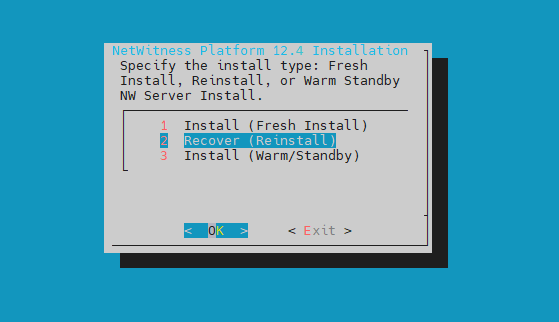
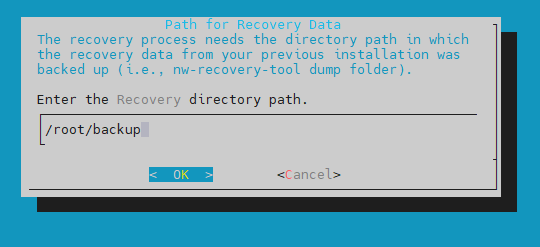
The file path provided in the recovery path location should be in folder structure. If it is tar.gz file or any compressed file, it needs to be extracted. The tar.gz file can be extracted using the command “tar -zxvf /root/backup.tar.gz” if required.
The path can be /root/ or /var/netwitness/backup or any similar path.
The backup file for admin-server wil