.png?width=180&height=32&name=NW%20Logo%20(2).png)
Issue
The Endpoint Server shows the status as yellow in health and wellness for the endpoint service only, and in the UI when navigating to the Investigate>Hosts page it shows the Endpoint Server as offline.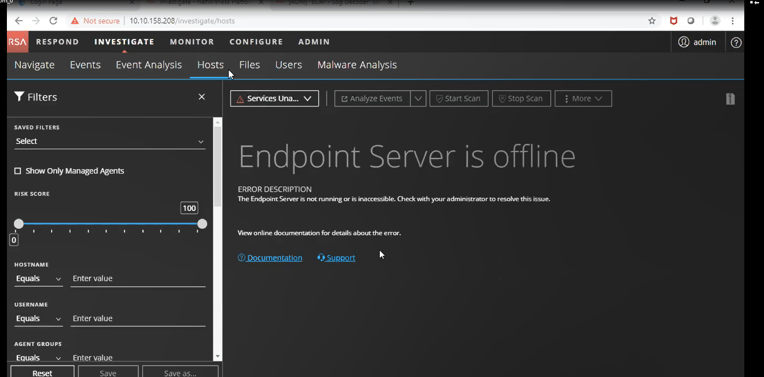
Cause
The cause of this issue is the config server. The address of the Endpoint server that is saved in the mongodb gets cleared (possibly during a reboot of the endpoint). During orchestration, the Admin server's mongodb gets updated with the Event Stream Analysis's IP address instead of the Endpoint servers. This causes the system to try and connection to the ESA mongodb, and it is rejected. Thus the UI shows the Endpoint server offline in some investigate pages.Resolution
The resolution is to perform the following steps:1. On the Endpoint Server run the following command and replace
The output should be the Event Stream Analysis's (ESA) NODE ID:
2. On the Admin Server run the following command:
The output should be the ESA's NODE ID
3. On the Admin server run the following command to get the prop-identity needed for the next command:
4. On the Admin server run the following command with the prop-identity retrieved from the previous command:
The output of the Endpoint's Node ID will be as follows. If this output does show the correct Endpoint Node ID, stop and contact NetWitness Support as the the fix is beyond the scope of this article. However, if the NODE ID provided by this output is not the correct one for the Endpoint server, proceed to the next step.:
5. On the Admin server run the following command:
6. On the Endpoint server run the following to restart the service.
7. In the UI go to the Hosts page and reload the page a few times.
Product Details
RSA Product Set: NetWitness PlatformRSA Product/Service Type: Endpoint
RSA Version/Condition: 11.3.x, 11.4, 11.5, 11.6, 11.7, 12.0, 12.1
Platform: Linux
Approval Reviewer Queue
Technical approval queue