.png?width=180&height=32&name=NW%20Logo%20(2).png)
Issue
During Virtual Log Collector (VLC) push configuration, Log Collector (LC) needs to be added as a destination in VLC->Config->Local collector tab as below.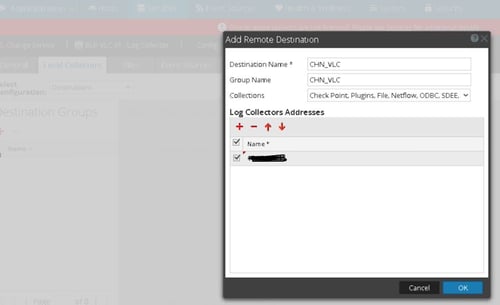
However, Pressing "OK" in above page would result in throwing a warning as below with the following message:
Failed to add destination for "CHN_VLC": "HttpOps:127.0.0.1:15671/api/nw/shovel/destinations/CHN_VLC:GET:
Response returned with status code: 500 Response: {"error":"Internal Server Error","reason":
"{error,{exit,{noproc,{gen_server,call,\n [nw_shovel_file_server,\n {get_destination,\
"CHN_VLC\"}]}},\n [{gen_server,call,2,[{file,\"gen_server.erl\"},{line,180}]},
\n {nw_wm_shovel,get_shovel_json,2,[]},\n {nw_wm_shovel,get_json,2,[]},\n {webmachine_resource,resource_call,
3,[]},\n {webmachine_resource,do,3,[]},\n {webmachine_decision_core,resource_call,1,[]},
\n {webmachine_decision_core,decision,1,[]},\n {webmachine_decision_core,handle_request,2,[]}]}}\n"}"
Response returned with status code: 500 Response: {"error":"Internal Server Error","reason":
"{error,{exit,{noproc,{gen_server,call,\n [nw_shovel_file_server,\n {get_destination,\
"CHN_VLC\"}]}},\n [{gen_server,call,2,[{file,\"gen_server.erl\"},{line,180}]},
\n {nw_wm_shovel,get_shovel_json,2,[]},\n {nw_wm_shovel,get_json,2,[]},\n {webmachine_resource,resource_call,
3,[]},\n {webmachine_resource,do,3,[]},\n {webmachine_decision_core,resource_call,1,[]},
\n {webmachine_decision_core,decision,1,[]},\n {webmachine_decision_core,handle_request,2,[]}]}}\n"}"

Cause
This 500 Response Error indicates VLC is not getting an appropriate response from Local collector within the expected time.
Resolution
Please follow below steps to stop the warning comes up during Push configuration and to add a Log Collector as destination successfully.1. SSH into the VLC and LC with the root account.
2. Restart the rabbitmq-server service by running the following command.
service rabbitmq-server restart
3. Test if the LC can be added.
4. If the issue continues, run reboot command from the VLC to reboot the system or also restart the collector services on both log decoder and VLC.
restart nwlogcollector
5 Wait till the VLC comes up and try configuring VLC Push configuration by navigating to VLC->Config->Local collector tab in SA GUI.
Product Details
RSA Product Set: Security AnalyticsRSA Product/Service Type: SA Virtual Log Collector
RSA Version/Condition: 10.5.0.1
Platform: CentOS
O/S Version: 6
Summary
During VLC Push model configuration, GUI pops-up with warning Failed to add destination error. This can be fixed by restarting rabbitmq service or rebooting VLC.
Approval Reviewer Queue
RSA NetWitness Suite Approval Queue