.png?width=180&height=32&name=NW%20Logo%20(2).png)
Issue
Customer who intend to re-image one of the SA Core Appliances with RSA Security Analytics build stick and gets the following error:
The installer has tried to mount image #1, but cannot find it on the hard drive
Resolution
The error appears when the RSA Security Analytics buildstick is not properly created on first place, concretely when the SA ISO file is not copied into the USB.Example of SA ISO file that needs to be copied to the buildstick: sainstall-10.3.2.6567-73-usb.iso
Below are the steps to perform a proper buildstick creation:
Buildstick creation
Resources required to creating the buildstick:
- Universal Netboot Installer at: http://sourceforge.net/projects/unetbootin/?source=directory
- 7-zip or other utility to open and extract ISO files: http://www.7-zip.org/download.html
- Latest SA USB ISO files - SA Software All Versions: https://libhq-ro.rsa.lab.emc.com/SA/10.3.2/iso/
- USB thumb drive (4G, or 8G for Informer)(preferred 8g)
Hint: when using a USB stick make sure it is read by the computer as a removable disk not a hard disk.
1- Creating USB Build Stick
1. Format the USB drive (do not quick format)
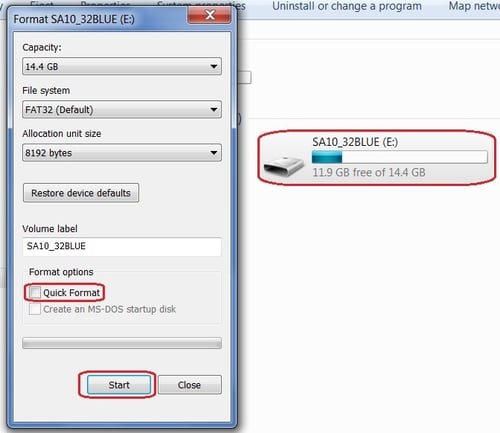
2. Launch the Unetbootin tool
3. Select the Diskimage radio button
4. Select the following ISO file: sainstall-10.3.2.6567-73-usbboot.iso that you should have already downloaded from: https://libhq-ro.rsa.lab.emc.com/SA/10.3.2/iso/ (For internal use only)
5. Confirm Type is set to USB Drive and Drive is set to the correct USB drive
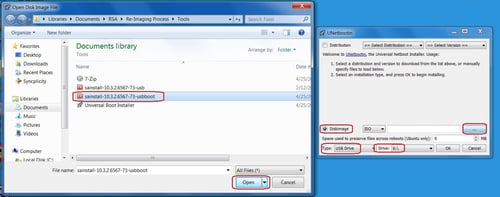
6. Click OK to start build process
7. Click Yes to All when asked to overwrite files (popup may be hidden behind)
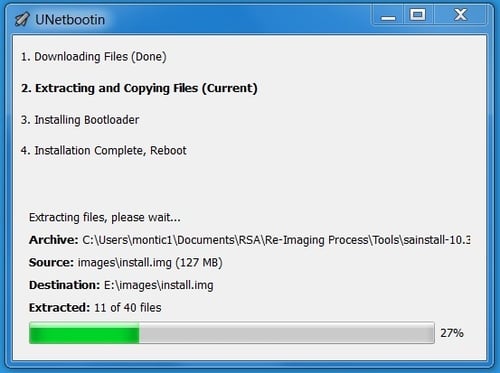
8. After installation is complete, do not reboot and Exit

9. Copy sainstall-10.3.2.6567-73-usb.iso to the root of the USB build stick

10. Extract the sainstall-10.3.2.6567-73-usbboot.iso file using 7-zip or similar utility on your local machine.
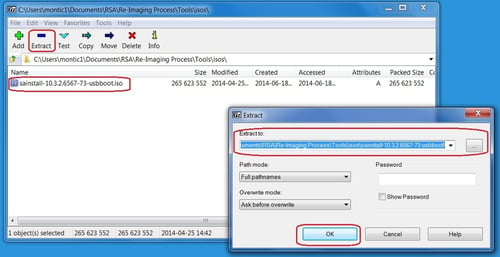
11. Once the extraction is completed go into the destination folder and copy the [BOOT] folder from the extracted files to the root of the USB build stick.
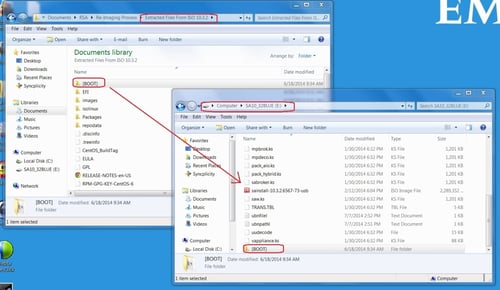
Notes
Even if the captures are based on SA 10.3.2 installation it applies to all 10.3.X and 10.4.x versions.Internal Comments
Use this guide instead for later versions: https://50269063.hs-sites.com/knowledge-base/564839>
Product Details
NetWitness Product Set: NetWitness PlatformNetWitness Product/Service Type: All Nodes
NetWitness Version/Condition: 11.x, 12.x or later
Platform: CentOS/Alma Linux
Summary
Explanation on what the installer has tried to mount image #1, but cannot find it on the hard drive error stands for.
Approval Reviewer Queue
Technical approval queue