.png?width=180&height=32&name=NW%20Logo%20(2).png)
Issue
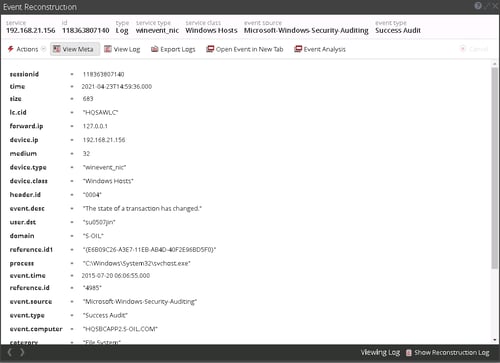
When querying data from WinRM our WLC sources via Investigate, event.time meta displays and old or inconsistent time as you can see below.
And you can also see "View Meta" below, event.time meta shows 2015-07-20 date while time meta displays 2021-04-23 date.
Cause
- From the event viewer properties for the security event log, it was observed that the file has a max size of 16 MB, but the actual log file size observed was more than 2 GB.
- This implies that the customer had set a much larger max size on the Event Log Properties and changed it to a smaller value at some point.
- Windows do not auto shrink this file, and it will only do that if the event log is cleared.
- Since the windows API field for the record id of WLC is 4 bytes in size then the max the API can handle is 4 billion so it is most likely overflowing to a smaller number (maybe 0 which is invalid) so WCL actually reads older events.
Resolution
The solution is that you need to shrink the actual log file size on the Windows Host by clearing the event log and then ensure record id numbering can be restarted in windows machine.
Product Details
NetWitness Product Set: NetWitness Platform
NetWitness Product/Service Type: Log Collector (WinRM), Windows Legacy Collector
NetWitness Version/Condition: 11.x, 12.x
Platform: CentOS 7, AlmaLinux
Approval Reviewer Queue
Technical approval queue