.png?width=180&height=32&name=NW%20Logo%20(2).png)
Issue
When you look at "# EVENTS" column in RESPOND > Alerts, it shows up to 100 counts as shown below.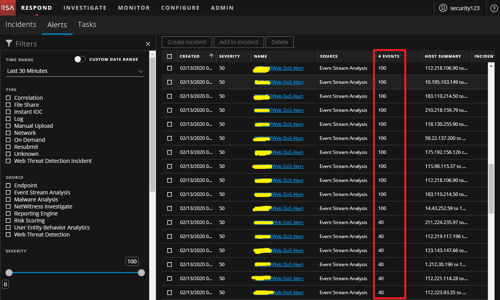
Here is an example via the "Web Dos Alerts" ESA rule.
Refer to the following screenshot of ESA syntax.

Case 1) If HAVING COUNT(ip_dst) >= 150 inside ESA rule syntax, "# Event" column shows 100 based on first screenshot.
Case 2) If HAVING COUNT(ip_dst) <= 100 inside ESA rule syntax, "# Event" column changed to 40 based on first screenshot.
Resolution
Events counts in the Respond > Alerts always show 100 because the default value of 'max-constituent-events' for the ESA rule is set to 100 for better performance.Due to this reason, only 100 events are shown in UI.
You can increase this value with the following steps.
- Go to Admin->Services->ESA->Explore->correlation->rule
- Under the field, 'max-constituent-events' changes the value from 100 to 200 as per your requirement.
Product Details
RSA Product Set: RSA NetWitness PlatformRSA Product/Service Type: Core Appliance
RSA Version/Condition: 11.3.2.0
Platform: CentOS
O/S Version: 6
Approval Reviewer Queue
RSA NetWitness Suite Approval Queue