Events View - Text Tab
The Text tab is in the Event Details panel. Here you can safely view and analyze the raw text payload of an event. The Text reconstruction includes features that can show decompressed or compressed text, expand truncated entries, perform URL and Base64 encoding and decoding, and download network events, logs, and endpoint events. The text reconstruction is available for all types of events: network, log, and endpoint.
WorkflowWorkflow
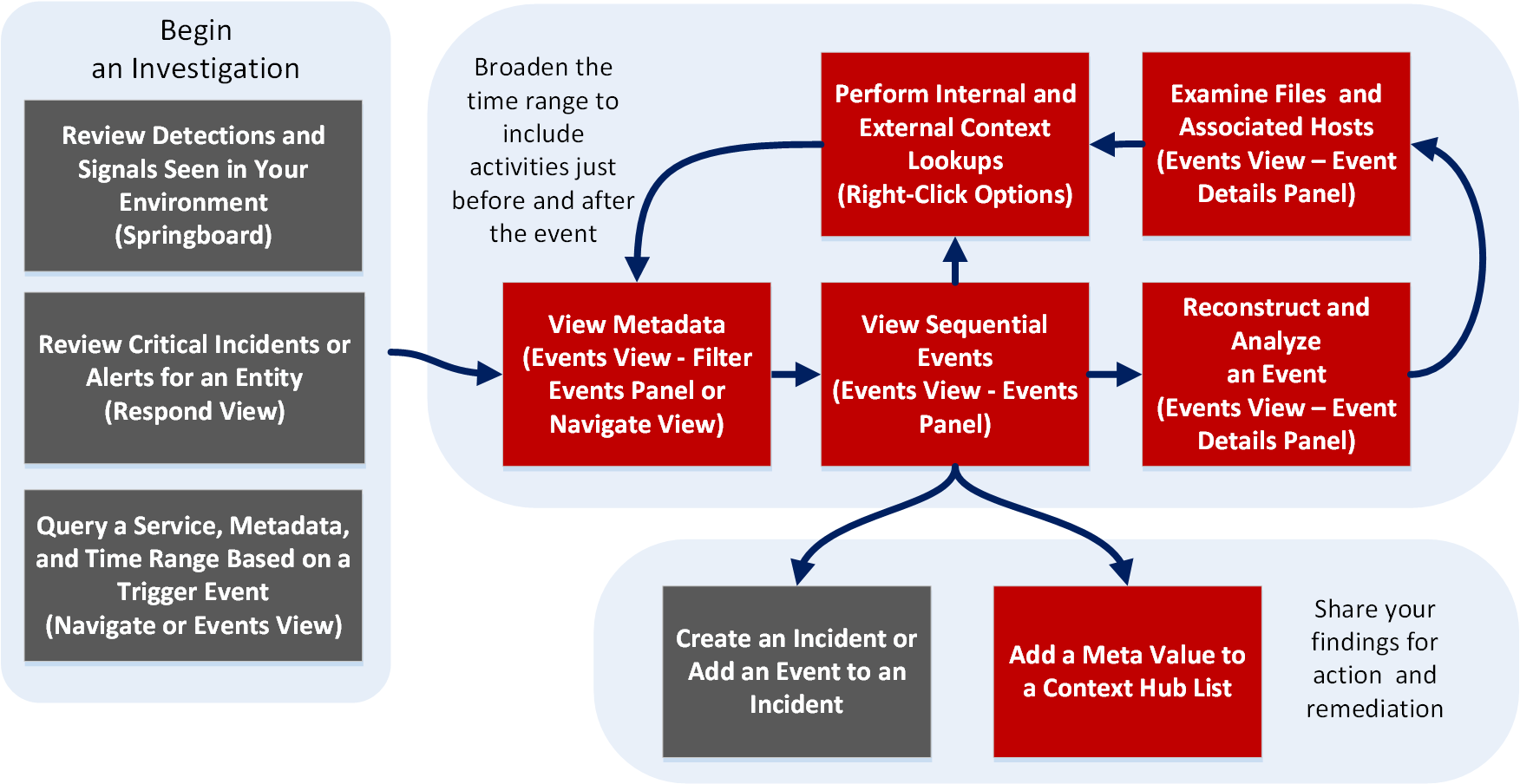
What do you want to do?
- User Role:
Incident Responder or Threat Hunter
- I want to ...:
review detections and signals seen in my environment
- Show me how:
NetWitness Platform Getting Started Guide
- User Role: Incident Responder
- I want to ...:
review critical incidents or alerts
- Show me how:
NetWitness Respond User Guide
- User Role: Threat Hunter
- I want to ...: query a service, metadata, and time range
- Show me how:
Begin an Investigation in the Events View
Begin an Investigation in the Navigate or Legacy Events View
- User Role: Threat Hunter
- I want to ...:
view metadata*
- Show me how:
- User Role: Threat Hunter
- I want to ...:
view sequential events*
- Show me how:
- User Role:
Threat Hunter
- I want to ...:
reconstruct and analyze an event*
- Show me how:
- User Role: Threat Hunter
- I want to ...: examine files and associated hosts*
- Show me how:
Download Data in the Events View
- User Role: Threat Hunter
- I want to ...: perform lookups*
- Show me how:
- User Role: Threat Hunter
- I want to ...: create an incident or add to an incident
- Show me how:
- User Role:
Threat Hunter
- I want to ...:
add a meta value to a Context Hub list*
- Show me how:
*You can perform this task in the current view.
Related Topics
- How NetWitness Investigate Works
- Events View - Packet Tab
- Events View - Text Tab
- Events View - File Tab
- Events View - Email Tab
- Events View - Host Tab
Quick Look
The Events view displays the text of a single event in the Text panel (formerly known as Text Analysis). When you click an event in the Event list panel, the adjacent panel shows the text reconstruction. Only the raw log for log events and endpoint events is shown in the Text panel. For network events, the direction of the packet (Request or Response) and contents of each packet are provided in text format. For more examples of the Text, see Reconstructing and Analyzing Events. For detailed procedures, see Analyze Events in the Events View.
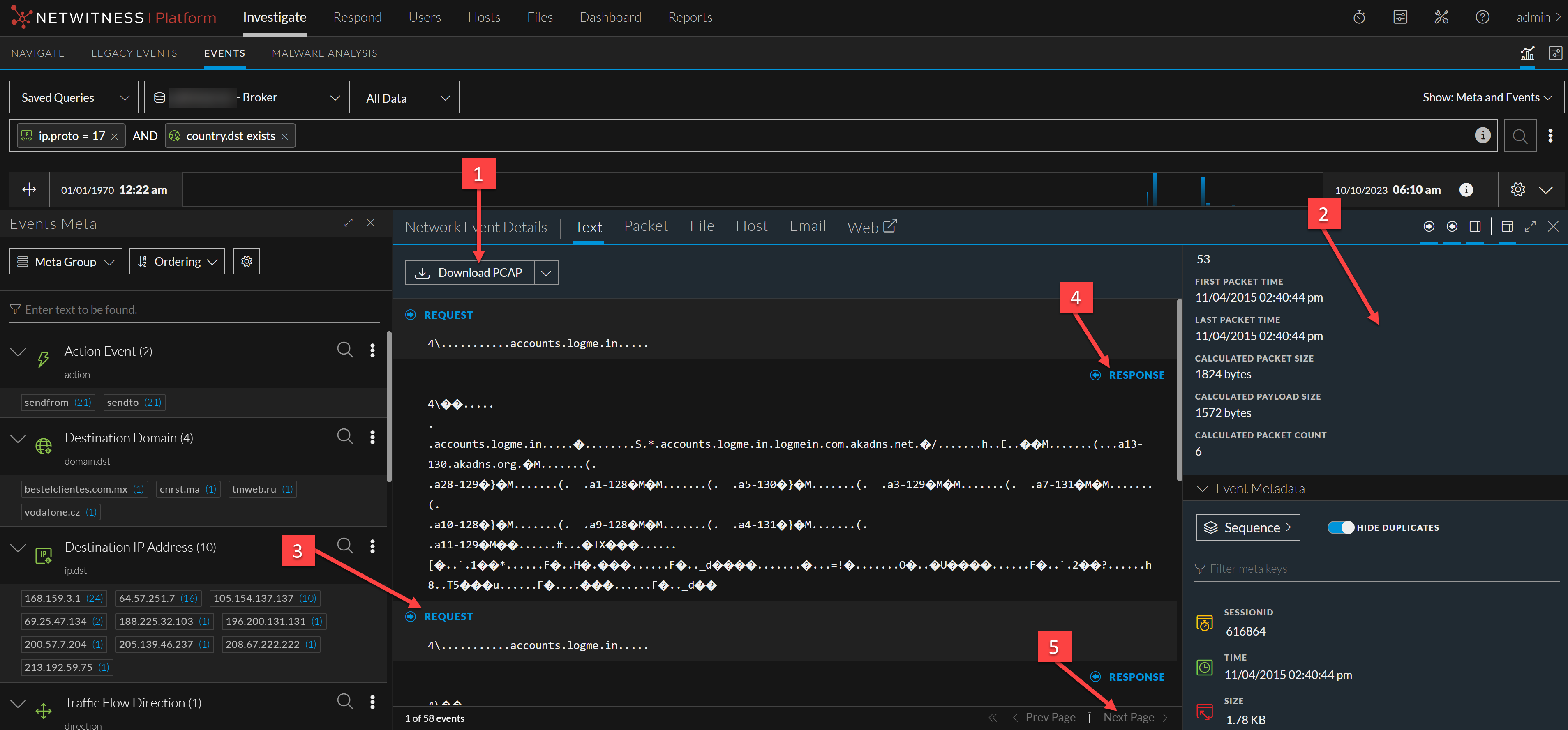
- Column 1: 1
- Column 2: Options for exporting a log, a PCAP, or files for deeper analysis and to share with others. This download menu is for network data.
- Column 1: 2
- Column 2: The Overview panel information.
- Column 1: 3
- Column 2: The payload for a network event includes requests and responses. This is the request side of the packet.
- Column 1: 4
- Column 2: This is the response side of the packet.
- Column 1: 5
- Column 2:
(Version 11.2 and later) Event pagination controls allow more flexibility in paging through a list of events. When a control is unavailable, the image is dimmed; for example, when you are viewing page 1, the
and
controls are dimmed.
- Go to the first page
- Go to the previous page
- Go to the next page
- Go to last page (Only available after last page has already been navigated to)