.png?width=180&height=32&name=NW%20Logo%20(2).png)
Issue
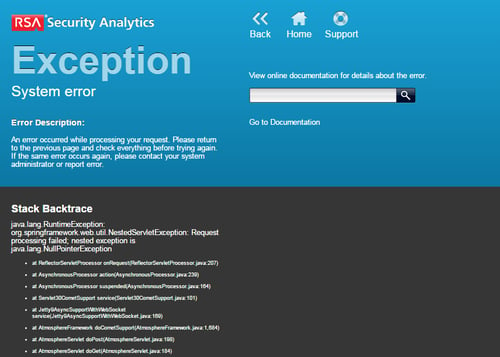
An Exception System Error page is displayed when navigating to the Investigation -> Malware Analysis page in the Security Analytics UI, which also displays the error message below.
java.lang.RunTimeException:
org.springframework.web.util.NestedServletException: Request processing failed; nested exception is java.lang.NullPointerException
org.springframework.web.util.NestedServletException: Request processing failed; nested exception is java.lang.NullPointerException
Cause
This issue occurs when a default Malware Analysis service has not been configured in the Security Analytics UI.
Workaround
To resolve the issue, define a default Malware Analysis service by performing the steps below.- In the Security Analytics UI, navigate to the Administration -> Services page.
- Click on the red Actions button for the Malware Analysis service that you wish to be the default, and select View -> Config.
- Take note of the device number listed in the URL for the Config page, as shown in the screenshot below.

- Navigate directly to the following URL, replacing
with the number from Step 3: https:// /investigation/ /malware - On the Summary page that loads, click on the device name underneath the Summary of Events heading, as shown in the example below.

- Under the Malware Services section of the dialog box that appears, click on the service you wish to be the default and click on the Default Service button.
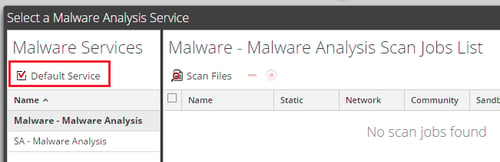
After making this change, you will be able to navigate to the Investigation -> Malware Analysis page without seeing the Exception System Error message.
If you are unsure of any of the steps above or experience any issues, contact RSA Support and quote this article number for further assistance.
Product Details
RSA Product Set: Security AnalyticsRSA Product/Service Type: Malware Analysis, Security Analytics UI
RSA Version/Condition: 10.4.x, 10.5.x
Platform: CentOS
O/S Version: 6
Summary
When a default service has not been configured for Malware Analysis, an exception page will be displayed when attempting to perform Malware Analysis investigations in the Security Analytics UI.
Approval Reviewer Queue
ASOC Approval Group